
Vandaag of morgen in huis

Kwaliteit gegarandeerd

Welkomstaanbiedingen ontgrendelen: GRATIS bezorging | Tot 80% korting | Gratis 30 dagen JoyPlus-proefperiode
Download de app
Buying a new Corsair PC case and case fans may seem straightforward, until you discover that not every fan fits every connection and that a large case does not automatically provide better airflow. RGB lighting may also require extra cabling or a specific controller.
For UK PC builders, these three pitfalls are particularly relevant:
A 120 mm PC fan is a common size and fits many mid-tower cases, radiators and older cases. According to the product specifications, a 140 mm PC fan may provide greater airflow at a lower speed, but the case must have suitable mounting points.
So do not just look at the diameter. Also check:
A good basic layout is usually to draw air in at the front or bottom and exhaust it at the rear or top. Check the arrows on the fan frame before securing it in place.
A PWM case fan generally uses a 4-pin connection for automatic speed control via the motherboard. The lighting often has a separate connection. With a Corsair ARGB fan, check that the motherboard has a suitable 5V ARGB header. Do not connect it to a 12V RGB header without checking first.
Fans in the iCUE LINK case fan range use the Corsair LINK system and may require a hub or compatible cabling. This can reduce the number of cables, but it also means you should check controller and power-supply compatibility in advance.
Airflow is usually shown in CFM or m³/h. Static pressure is important when the fan has to push air through a radiator, dust filter or enclosed front panel. For an open mesh front, airflow is often a useful initial indicator.
Also pay attention to the full noise range. A fan rated at 10 dB at low speed and 36 or 37 dB at high speed may be quiet in everyday use when the fan curve is configured correctly. However, the maximum noise level remains relevant under heavy loads. Manufacturer specifications do not guarantee the same noise level in every PC: case panels, resonance and fan settings all play a part.
A Corsair mid-tower is suitable for many ATX, micro-ATX and Mini-ITX systems and generally takes up less space on or under a desk. Check the exact compatibility for each model. According to the stated product specifications, the Corsair 3500X ARGB supports EATX motherboards, graphics cards up to 410 mm and CPU coolers up to 170 mm.
A Corsair full tower offers more room for storage, additional fans and advanced water cooling. This is particularly useful for powerful workstation PCs or systems with multiple radiators. According to the product information, the 9000D RGB AIRFLOW has six 2.5-inch positions, five 3.5-inch positions and ten expansion slots. This size does require sufficient space, a sturdy desk and help when moving it.
A PC case with RGB and tempered glass is particularly appealing if you want your components to be visible. When choosing one, check whether the lighting is controlled directly via the motherboard, through a controller or via iCUE. A case with glass panels is not a substitute for a well-ventilated front and regular dust-filter maintenance.
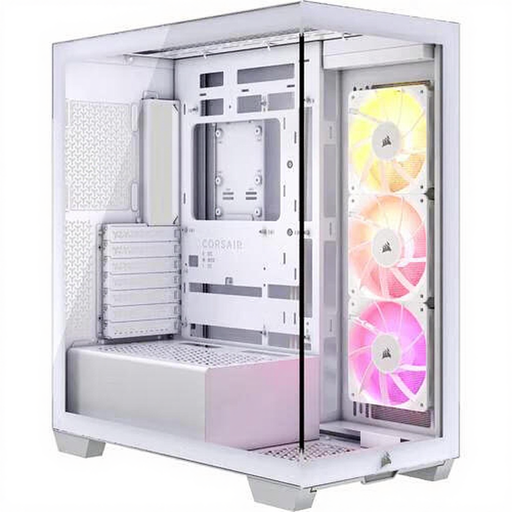
Why it suits this profile: This mid-tower combines a manageable size with three pre-installed 120 mm ARGB fans, USB-C and support for large components.
You do not need to buy additional fans straight away. However, check that the EATX support and maximum GPU length are suitable for your components.
Three 120 mm ARGB fans, water-cooling support and room for a graphics card up to 410 mm.
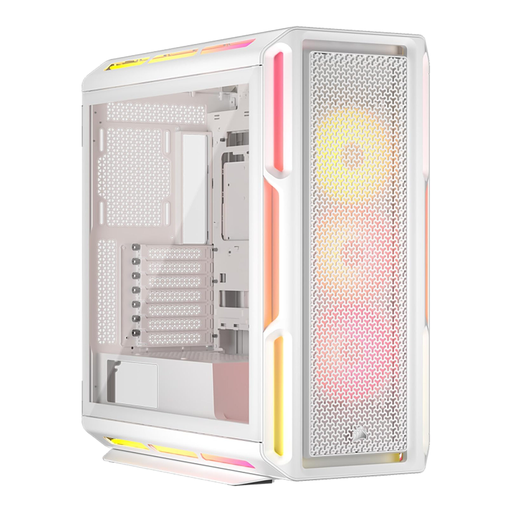
Why it suits this profile: For a high-end gaming PC build, this case offers multiple cooling positions, a tempered-glass panel and support for motherboards from Mini-ITX to EATX.
The iCUE LINK hub and three pre-installed fans make cable management more straightforward, but check the USB 2.0 and power connections in advance.
Graphics cards up to 450 mm, three 120 mm RGB fans and support for a radiator up to 360 mm.
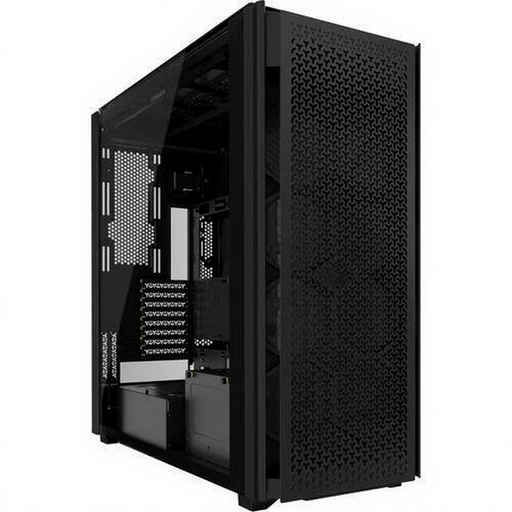
Why it suits this profile: This full tower is designed for large gaming and workstation systems with multiple storage drives, fans or custom water cooling.
The spacious layout means you do not have to combine cooling components by guesswork. However, measure the available floor or desk space beforehand.
Support for 120, 140 and 200 mm fans, ten expansion slots and multiple drive bays.
We have put together a complete, up-to-date list of products that fully meet these strict selection criteria and the applicable European safety regulations.
That depends on the processor, graphics card, case and intended use. A simple setup could consist of one fan at the front and one at the rear. A more powerful gaming PC may benefit from additional top or front fans. First check the available positions, then set an appropriate fan curve.
Not necessarily. According to the product specifications, a 140 mm fan may deliver similar or greater airflow at a lower speed, but the final noise level also depends on the rpm, bearing, resonance and case. So compare the stated noise range and airflow, rather than looking only at the size.
No. Check that your motherboard has the correct ARGB header and whether the fan requires a separate controller. For iCUE LINK models, you should also check that a suitable hub and power connection are available. Always shut down the PC completely and unplug it from the mains before installing fans or RGB cables.
