
Vandaag of morgen in huis

Kwaliteit gegarandeerd

Welkomstaanbiedingen ontgrendelen: GRATIS bezorging | Tot 80% korting | Gratis 30 dagen JoyPlus-proefperiode
Download de app
A Corsair PC case fan can improve airflow in your desktop while also adding RGB lighting. However, it is not advisable to focus solely on the brand, the number of LEDs or a high maximum speed. As a Joybuy Product Recommendation Officer, I filter the most important product specifications so that you can choose a fan that suits your case, radiator and intended use.
The most commonly used sizes are 120 mm and 140 mm. A 120 mm PC fan will not automatically fit a 140 mm mounting point. Always check your case or radiator manual before placing your order.
Pay attention to the thickness as well. A standard fan is often around 25 mm thick, whereas a model such as the Corsair iCUE LINK RX120 MAX is 30 mm thick. This extra space can affect the clearance between the fan and your graphics card, radiator, memory modules or side panel.
A high airflow rating in CFM sounds appealing, but static pressure is also important for a radiator. A PC fan designed for a radiator uses pressure to push air through a densely packed cooling surface. For an open front or rear panel, good air movement is generally more important.
Also consider the direction of the airflow. The arrows on the frame usually indicate which way the air moves. A practical layout is:
A Corsair RGB fan may require its own controller, an iCUE LINK System Hub or a suitable connection. So do not just check whether a PWM connection is available; also check how the lighting is connected.
PWM stands for Pulse Width Modulation. With a 4-pin connection, the motherboard or a controller can regulate the fan speed more precisely than with a simple voltage-based control system. iCUE LINK fans can also connect multiple compatible components using a linked cable structure. Always check the included accessories and the controller’s limits.
A 120 mm PC fan is often easier to install and is supported by many cases and radiators. A 140 mm PC fan can move a lot of air at a similar speed, but requires more space. Measure the available mounting points and check that side-by-side fans will not come into contact with cables or components.
A high maximum speed is mainly useful when you temporarily need extra cooling capacity. For everyday use, an adjustable fan curve is often more comfortable. The product details for the selected models, for example, specify a minimum noise level of 10 dB and a maximum of between 29.5 and 36 dB. These figures depend on the measurement method and the selected speed, so use them primarily to compare models within the same product range.
According to the product specifications, several Corsair iCUE LINK models use magnetic bearings. This type of bearing is designed to keep the rotor spinning smoothly. That may appeal to users who consider quiet PC cooling important. However, a bearing cannot prevent dust, poor installation or cables touching the blades from causing noise.
Also check whether the product contains a single fan or a multipack. A three-pack may be more convenient for a complete airflow setup, while a single pack is suitable for replacing one faulty or missing fan.
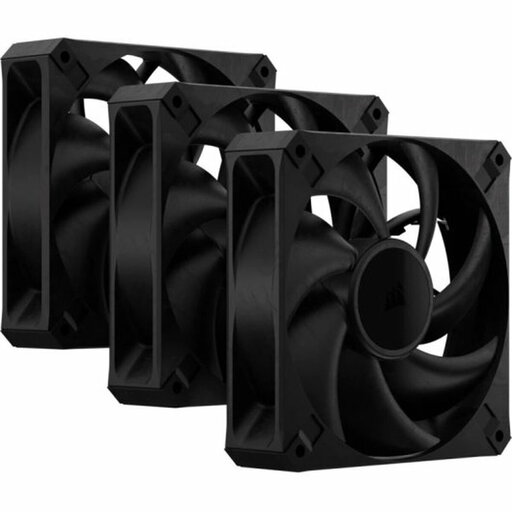
Why it suits this profile: A three-pack provides a practical starting point for a basic setup with intake and exhaust fans. The black design suits many standard builds.
The product specifications state 120 mm, PWM control and a thickness of 30 mm. Check the available space in your case beforehand.
Three fans, up to 2,000 RPM, a maximum of 72 CFM according to the product information, and suitable for case and radiator cooling.

Why it suits this profile: Suitable for users who value tidy cable management, RGB lighting and central control via iCUE.
This starter pack includes an iCUE LINK System Hub according to the product details. This makes the required controller clearer than with a standalone expansion without a hub.
Three 120 mm PWM fans, RGB LEDs, 400–2,100 RPM and maximum airflow of 74.2 m³/u according to the product listing.
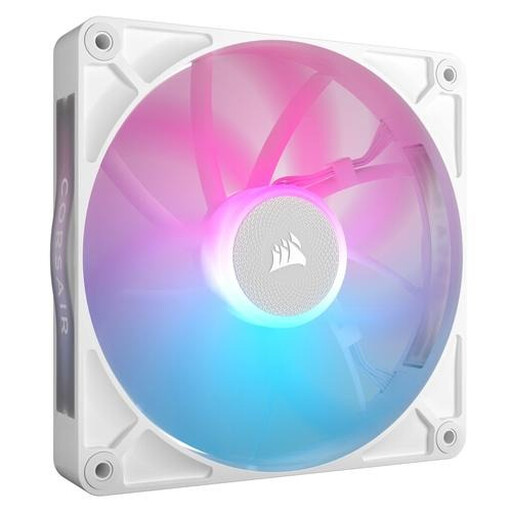
Why it suits this profile: A 140 mm model is suitable for larger cases and users who want to move a lot of air with a lower specified maximum speed.
The size and pack contents are clearly stated: one 140 mm fan. This helps you avoid accidentally ordering a multipack or a size that does not fit your mounting point.
Magnetic bearings according to the product description, PWM support, RGB lighting and maximum airflow of 94.7 CFM.
We have put together a complete, up-to-date list of products that fully meet these strict selection criteria and the applicable European safety regulations.
Switch off the PC completely, turn off the power supply and unplug it before installing a fan. Secure the fan firmly, but do not overtighten the screws unnecessarily. Afterwards, check that no cable is running near the blades.
Connect PWM to a suitable 4-pin header or compatible controller. For RGB, use the specified Corsair controller, iCUE LINK connection or motherboard header. Regularly remove dust from the fan using compressed air or a soft brush. Water or cleaning fluid should never be used inside the case.
That depends on your case, components and existing airflow. A basic desktop can start with one intake fan and one exhaust fan. For a gaming PC with a powerful processor or graphics card, an additional intake, exhaust or radiator fan may be useful. Pay particular attention to the available mounting points and temperatures under load.
Not automatically. A 140 mm fan can move a lot of air at a lower speed, but noise levels also depend on the bearings, fan curve, case and installation. Compare the specified dB values in a similar usage scenario and configure PWM control correctly.
Not without checking first. The fan may offer PWM functionality, but iCUE LINK communication and RGB control may require a compatible controller or System Hub. Check the product packaging, your motherboard headers and the required cables before purchasing a standalone fan or expansion. The statutory guarantee for these products is at least two years according to the specified EU consumer information; additional rights may apply under Dutch law.
