
Vandaag of morgen in huis

Kwaliteit gegarandeerd

Welkomstaanbiedingen ontgrendelen: GRATIS bezorging | Tot 80% korting | Gratis 30 dagen JoyPlus-proefperiode
Download de app
A Corsair PC case fan can help remove warm air from your case more quickly and bring fresh air to your processor and graphics card. However, an attractive RGB ring does not guarantee that a fan is the right choice. The connector, size and intended use ultimately determine whether it is a good match for your PC.
A speed of 2400 RPM sounds impressive, but it does not tell the whole story. Noise levels can increase at higher speeds. That is why you should also consider airflow in CFM or m³/h, static pressure and the stated noise level. For everyday use, a fan that runs quietly at low speed is often more practical than a model that only performs well at maximum speed.
A 120 mm PC fan fits in many cases, but mounting points vary between models. A 140 mm PC fan can move more air at a lower speed, but requires more space around the motherboard, RAM and radiator. Always check the manual or the available mounting positions in your PC case.
PWM and RGB are two different functions. PWM controls the speed via a 4-pin connection. RGB lighting may require its own controller, a compatible hub or a specific motherboard header. With a Corsair iCUE LINK fan in particular, you should check whether a suitable iCUE LINK hub is included or needs to be purchased separately.
The most common sizes are 120 mm and 140 mm. As well as the diameter, check:
Fans are generally placed at the front or bottom for air intake, and at the rear or top for exhaust. Look for the arrows on the frame: they show the direction of airflow and rotor rotation.
Airflow indicates how much air the fan can move. For example, the product descriptions for the Corsair models mentioned list a maximum of 63.1 to 70 CFM for various 120mm fans. A 140mm model such as the CO-9051031-WW lists a maximum of 84.7 CFM.
Static pressure, expressed in mmH₂O, is particularly relevant when air has to pass through a radiator, dust filter or restrictive front panel. For a radiator fan, higher static pressure is often more important than the highest possible airflow rating. These figures are stated product specifications; the actual result also depends on your case, filters and fan curve.
A quiet PC fan does not always run at the same speed. Models with PWM can automatically adjust their speed according to the temperature. The specifications for various Corsair fans list figures from 10 dB at low speed to approximately 36 to 37 dB at high speed.
A 4-pin PWM connection offers more control options than a simple fixed-voltage connection. Also check how many fan headers your motherboard has. A three-fan set may require a hub or splitter.

Why it suits this profile: This individual 120mm fan is a good choice when you want to expand a single position without immediately buying a multi-fan kit.
The specifications list PWM, a range of 480 to 2400 RPM, and suitability for case and radiator cooling. This means you can adjust the speed rather than always running the fan at maximum speed.
Maximum airflow of 63.1 CFM, static pressure of 3.8 mmH₂O and 34 individually addressable LEDs according to the product description.

Why it suits this profile: This set is ideal for a gaming PC where multiple fans need to be controlled centrally and connected with fewer cables.
The iCUE LINK connection supports a daisy-chain configuration. Please note that, according to the product information, an iCUE LINK hub is required separately.
Three 120mm fans, up to 70 CFM, 3.8 mmH₂O static pressure, PWM control and 18 RGB LEDs per fan.
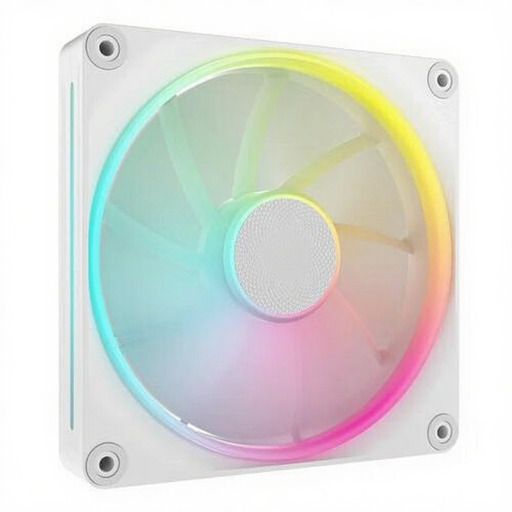
Why it suits this profile: A 140mm fan is a good option for a spacious PC case or a system that needs to move plenty of air at a moderate speed.
According to the product information, the fan has a speed range of 350 to 2000 RPM. Check beforehand that your case actually has 140mm mounting points.
Up to 84.7 CFM, PWM support, RGB lighting and, according to the description, suitability for case and radiator cooling.
Switch off the computer completely and unplug it from the mains before installing a PC cooling fan. Connect the PWM cable to a suitable 4-pin header. For RGB, check whether the connector requires 5V ARGB, Corsair RGB or iCUE LINK; these systems are not automatically interchangeable.
Then set a fan curve in the BIOS or the accompanying software. Let the fan run quietly at low temperatures and increase the speed when the processor or graphics card becomes warmer. Regularly remove dust from the blades and filters using a soft brush or compressed air. Do not touch rotating blades and keep cables away from them.
We have compiled a complete, up-to-date list of products that fully meet these strict selection criteria and the applicable European safety regulations.
Not every connection is the same. A 4-pin PWM header is preferable for speed control. RGB may require a separate connection or controller. So check both the fan header and the RGB system before placing your order.
It can be, but this is not guaranteed. A 140mm fan can run at a lower speed while moving a similar amount of air. The final noise level depends on the fan curve, bearings, case, filters and mounting.
Power consumption varies according to the model and speed. PWM generally reduces average consumption when the fan is not running continuously at maximum speed. For exact figures, check the technical data sheet for your chosen model and the capacity of the fan header or hub.
