
Vandaag of morgen in huis

Kwaliteit gegarandeerd

Welkomstaanbiedingen ontgrendelen: GRATIS bezorging | Tot 80% korting | Gratis 30 dagen JoyPlus-proefperiode
Download de app
A Corsair PC case fan can improve airflow in your computer while adding RGB lighting. However, it’s not wise to focus only on the number of LEDs or the maximum speed. A fan that doesn’t fit your case, doesn’t provide enough pressure for a radiator or needs an extra controller can lead to unnecessary costs.
In this buying guide, you’ll find out what to look for in a Corsair case fan, which specifications make a practical difference and which model suits different types of PC builder.
A 120 mm PC fan and a 140 mm PC fan aren’t automatically interchangeable. First, check the available mounting points at the front, top, rear or bottom of your case. Also check the thickness: some MAX models are about 30 mm thick, while a standard fan is often around 25 mm.
When mounting a fan on a radiator, you should also check that there’s enough room for the radiator, fan and any motherboard components together.
High airflow, measured in CFM or m³/h, is useful in the open space inside a PC case. For a radiator or dense dust filter, static pressure, measured in mmH2O, is also important. A radiator fan with a higher pressure rating may be more suitable than a model designed primarily to maximise airflow.
So, check both figures when looking for a PC cooling fan for a water cooler or CPU radiator.
An RGB PC fan doesn’t always have the same connection as your motherboard. With a Corsair iCUE LINK fan, check that you have a suitable iCUE LINK hub and the necessary cables. For some versions, it may not be clear whether a hub is included in the box.
Also check whether your motherboard or controller has a spare 4-pin PWM connection. PWM enables automatic speed control through the BIOS, software or a fan controller. RGB functionality and fan speed are two separate things.
The stated noise level usually applies at a particular speed. According to the product descriptions in this range, figures vary from 10 dB at low speed to around 29.5–37 dB at maximum speed. In practice, the overall noise also depends on resonance, dust, installation and the fan curve you set.
A high maximum RPM rating doesn’t mean the fan has to run loudly all the time. With PWM, you can increase the speed as your PC gets hotter.
Look for this combination:
According to the stated product specifications, some 120 mm models offer airflow of around 63–74 CFM, while certain 140 mm models exceed 90 CFM. Only compare these figures for similar uses, and also consider pressure, noise and dimensions.

Why it suits this profile: This standalone 120 mm fan is a good choice if you want to add a fan in one place without immediately buying a multi-pack.
The product information lists a 120 mm size, PWM, a speed range of 480–2400 RPM and suitability for case or radiator installation. Make sure you check which RGB connection you need.
34 individually addressable LEDs, PWM control and a stated maximum airflow of 63.1 CFM.
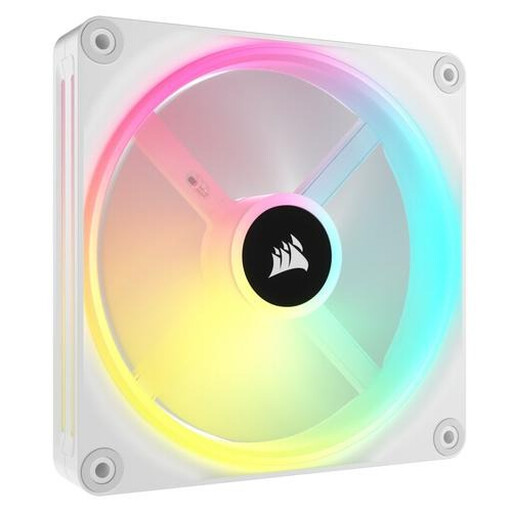
Why it suits this profile: This 140 mm Corsair iCUE LINK fan is a good fit for a spacious build where integrated RGB control and a larger fan size are priorities.
The stated speed ranges from 480 to 2000 RPM, and PWM allows you to adjust it. Measure the 140 mm mounting point beforehand and check that an iCUE LINK hub is available.
34 individually addressable RGB LEDs, stated airflow of 63.1 CFM and suitability for case or radiator use.
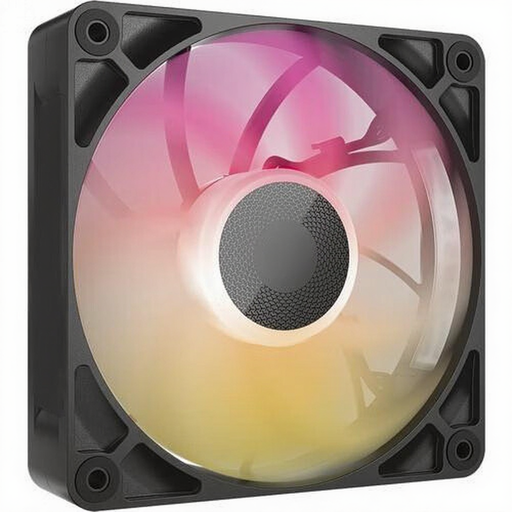
Why it suits this profile: This model is aimed at users looking for a 120 mm fan for a radiator or a demanding airflow setup.
As well as a maximum airflow of 71.3 CFM, the product information lists a static pressure of 4.16 mmH2O. Before buying, make sure the 30 mm thickness will fit in the available space.
PWM control, 8 RGB LEDs, a stated noise level of up to 29.5 dB and a design for case and radiator cooling.
We’ve put together a complete, up-to-date list of products that meet these strict selection criteria and comply with current European safety regulations.
The product information states that these models come with a statutory warranty of at least two years under EU consumer rules. Keep your proof of purchase and check the seller’s warranty terms if you run into any problems.
Not necessarily. A 140 mm model can move a lot of air at a lower speed, but actual noise levels depend on the fan curve, installation and case. So compare the stated dB levels at similar speeds.
Check the packaging for each product. iCUE LINK models are designed for a compatible LINK system, but a hub isn’t necessarily included with every standalone fan. Also check which cables you need and how many connections are available.
It depends on the case, components and any radiator. A basic PC can start with one extra fan. For a gaming PC with a powerful graphics card or a radiator, it’s more important to create a sensible intake and exhaust layout than to fit as many fans as possible.
