
Vandaag of morgen in huis

Kwaliteit gegarandeerd

Welkomstaanbiedingen ontgrendelen: GRATIS bezorging | Tot 80% korting | Gratis 30 dagen JoyPlus-proefperiode
Download de app
Choosing a new Corsair PC case fan seems straightforward. Yet many PC builders buy a fan that doesn’t fit, makes too much noise or isn’t compatible with their RGB controller. Marketing terms such as “high performance” also tell you very little without specific figures.
The most common pitfalls are:
The two most common sizes are 120mm PC fans and 140mm PC fans. Check your case manual for:
A standard fan is often around 25 mm thick. According to the product information, the Corsair iCUE LINK RX120 MAX and RX140 MAX are 30 mm thick. This can improve static pressure, but you’ll need enough clearance. Use the correct screws when mounting the fan, and don’t force in longer ones.
For a radiator fan, static pressure, measured in mmH2O, matters as well as airflow. For moving air through an open front panel or rear grille, airflow in CFM or m³/h is a useful guide. Neither figure on its own predicts the temperature of your entire system.
A PWM fan usually has a 4-pin connector. This lets the motherboard or fan controller adjust its speed according to temperature. It’s more practical than a fan that only runs at full speed.
Check the stated speed range. For example, the range includes models with:
A low minimum speed can help keep your PC quiet during light use. Maximum speed is most relevant when your processor or graphics card is under heavy load for a long time.
An RGB case fan can use different types of connection. Always check whether the fan:
An iCUE LINK fan is designed for the iCUE LINK system. This can help keep cabling tidy, but you’ll need a suitable hub and compatible cables. A 5V ARGB PC fan isn’t automatically compatible with every Corsair system.
According to the product information, several models have individually addressable LEDs, but the number varies. For example, the RX120 MAX RGB lists 8 RGB LEDs, while the QX120 product information states that it has individually addressable RGB lighting. Before you buy, check which controller and software you already use.
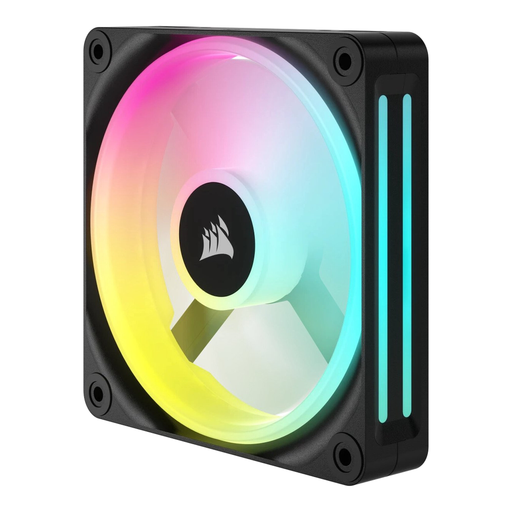
Why it suits this type of user: A single 120mm fan is a good choice if you want to replace one worn-out fan or improve airflow gradually. The product specifications list PWM, LED lighting and a speed range of 480 to 2400 RPM.
You won’t have to buy a three-pack if you only need one mounting position. Just check in advance that your case has a 120mm fan position and a suitable 4-pin header.
120mm size, PWM control, LED lighting and a wide stated speed range.
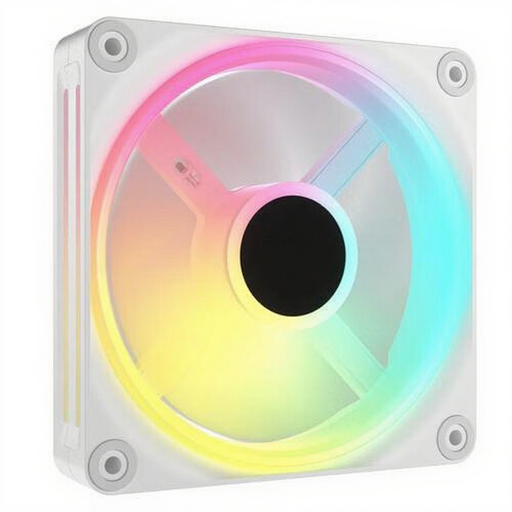
Why it suits this type of user: This three-pack of Corsair fans is designed for a complete 120mm setup, for example at the front, top and rear of your case. The specifications list PWM, 400–2400 RPM and suitability for case and radiator cooling.
The pack includes three fans, so you know exactly how many mounting points you can fill. Just check that you have the required iCUE LINK hub and enough room in your case.
Three 120mm fans, RGB lighting, PWM control and a stated maximum speed of 2400 RPM.
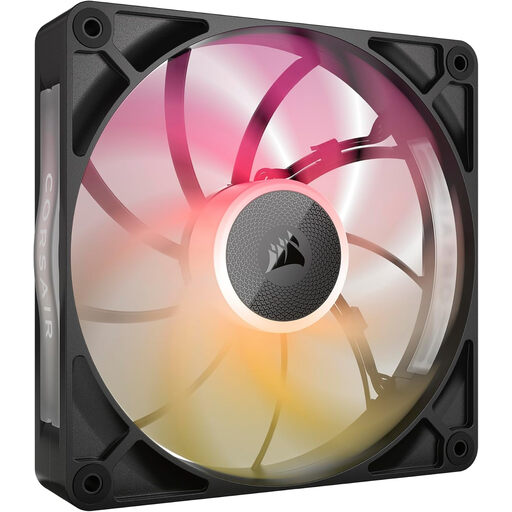
Why it suits this type of user: This 140mm radiator fan is designed for users who have room for a 30mm-thick fan and want to move a lot of air. The product details list PWM, 300–1600 RPM, 102,9 CFM and RGB lighting.
The stated thickness is clearly listed, so you can check the radiator clearance and distance from the motherboard or side panel in advance.
140mm size, 30mm thickness, PWM control, RGB LEDs and a stated airflow of 102,9 CFM.
We’ve put together a complete, up-to-date list of products that meet these strict selection criteria and comply with the applicable European safety regulations.
Switch off your PC completely and unplug it from the mains before connecting a Corsair case fan. Check the arrows on the frame: they show the direction of airflow. A common setup is:
Connect the motor to the correct PWM header or a compatible controller. For iCUE LINK models, use the recommended hub, cables and power connection. Keep cables clear of the fan blades, and clean away dust regularly with a soft brush or compressed air. Don’t use water.
The stated noise level, for example 10 dB at low speed, is a product specification measured under certain conditions. In a real PC, resonance, radiator resistance and other fans can increase the overall noise.
No. Your case needs to have 140mm mounting points. Also check the clearance around the radiator, memory modules and graphics card. A 30mm-thick MAX model needs particular attention.
Check the details for each model. iCUE LINK products are designed for the LINK system and may need a compatible System Hub. A standard PWM or ARGB connection is not the same as iCUE LINK.
Lifespan depends on usage, dust, temperature and bearing design. According to the product information, EU consumer rules provide a legal guarantee of at least two years. This isn’t a fixed prediction of the fan’s technical lifespan. Regular cleaning and an appropriate fan curve can help prevent unnecessarily high speeds.
