
Vandaag of morgen in huis

Kwaliteit gegarandeerd

Welkomstaanbiedingen ontgrendelen: GRATIS bezorging | Tot 80% korting | Gratis 30 dagen JoyPlus-proefperiode
Download de app
A Corsair PC case fan can improve airflow in your desktop PC, but not every fan will fit your case. The wrong size, a missing controller or an overly thick fan can lead to extra costs and a tricky installation. It’s best to check the technical specifications first, then consider lighting or maximum speed.
A high speed doesn’t automatically mean a fan will work better in your PC. Noise levels can increase, and airflow also depends on the blade design, static pressure and position in the case. A fan that spins quickly on paper may still be less effective in a dusty or cramped case.
A standard 120mm case fan is usually about 25 mm thick. Some MAX models are 30 mm thick. Those extra 5 mm can cause problems with a radiator, long graphics card, memory modules or the cable space behind the motherboard. So check not just the diameter, but also the available clearance.
An RGB case fan doesn’t always use the same connection as a standard PWM computer fan. With Corsair iCUE LINK models, you’ll also need to check whether a compatible hub or starter kit is included. An expansion fan on its own may seem attractively priced, but you won’t have a complete setup without a compatible controller.
A 120mm case fan fits many compact and mid-sized PC cases. It’s a handy size if you want to replace existing fans or install several fans at the front, top and rear.
A 140mm case fan can move more air at a lower speed, provided your case supports it. This can be useful if you want a quiet PC fan, but only if your case has 140mm mounting holes. Check your case manual for the mounting positions and maximum fan thickness.
Airflow is often shown in CFM or m³/hour. This indicates how much air the fan can move under the specified conditions. Static pressure, usually measured in mmH2O, is especially important when the fan needs to push air through a radiator, dust filter or solid front panel.
So, for a radiator fan or CPU cooler, static pressure is at least as important as maximum airflow. For an open position at the rear or top of the case, airflow may matter more. Always compare measurements taken using the same method; figures from different product listings aren’t always directly comparable.
A PWM computer fan usually has a 4-pin connector. This lets the motherboard or a compatible controller adjust the speed automatically according to the temperature. The fan can run more quietly under light loads and move more air when you’re gaming.
Check the stated noise level. Product information for several Corsair models, for example, gives figures of around 10 dB at low speed and approximately 29.5 to 37 dB at high speed. These are the figures stated in the product listings, not a guarantee that every PC will produce the same noise level. Case resonance, turbulence and dust can all affect your experience.
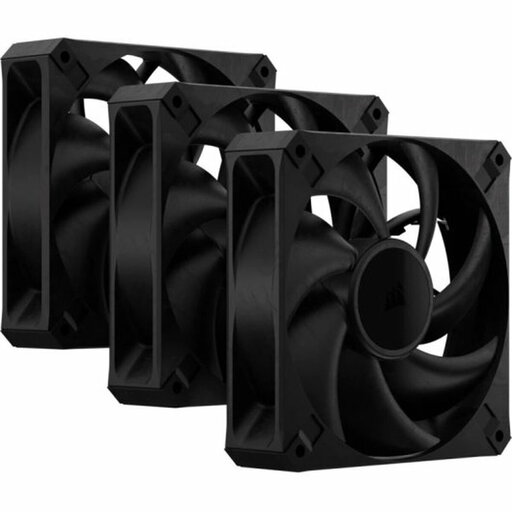
Why it suits this type of user: This computer case fan comes as a three-pack, making it a good choice if you want to fill several 120mm mounting positions without needing RGB lighting.
The product information states that it is 30 mm thick, so check the available clearance before buying. The PWM connection allows speed control via a 4-pin header.
According to the product listing: three 120mm fans, up to 72 CFM, a maximum speed of 2000 rpm and noise levels of up to 29.5 dB.
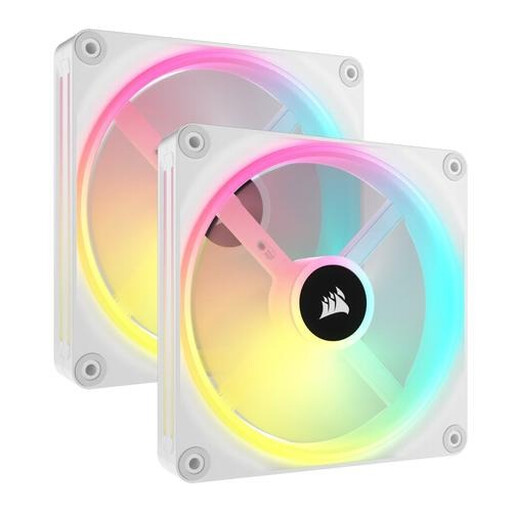
Why it suits this type of user: This 140mm fan is designed for cases with compatible mounting points, and for builders who want RGB lighting and an interconnected iCUE LINK system.
Check that your case supports 140mm fans and that you have a compatible hub connection before buying. This helps you avoid ending up with a fan that’s too large or an incomplete system.
According to the product information: two 140mm fans, PWM support and 34 individually controllable LEDs per fan. The stated maximum speed is 2000 rpm.
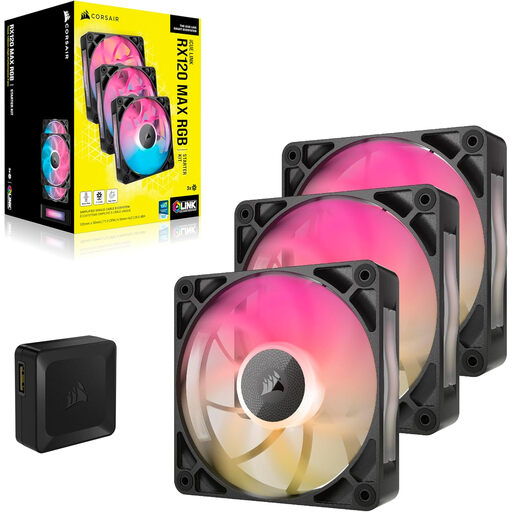
Why it suits this type of user: This set is a good fit for gamers and PC builders who want RGB lighting across three 120mm mounting positions and need higher static pressure for a radiator or dense dust filter.
The stated 30mm thickness is clearly shown in the product specifications. Check the clearance around your radiator and inside your case before ordering. The set includes three fans, so you won’t need to combine several separate packs.
According to the product listing: up to 71.3 CFM, 4.16 mmH2O static pressure, 400–2000 rpm, PWM and eight RGB LEDs per fan.
Check the following before buying:
Corsair product listings generally state that these models come with a minimum two-year statutory warranty under EU consumer rules. Keep your proof of purchase and check the seller’s terms if you have a problem.
We’ve put together a complete, up-to-date list of products that meet these strict selection criteria and the applicable European safety requirements.
No. Many cases support 120 mm fans, but always check the manual and the available mounting points. Check the thickness too, especially with MAX models.
PWM is useful because it lets you adjust the speed automatically. The fan can run more slowly under light loads and speed up when you’re gaming or rendering. The overall noise level also depends on the case, fan curve and airflow resistance.
That depends on the model and what’s included in the box. A standalone iCUE LINK expansion fan may need a compatible hub, while a starter kit may include one. Before ordering, check which parts are included and the maximum number of devices supported per channel.
