
Vandaag of morgen in huis

Kwaliteit gegarandeerd

Welkomstaanbiedingen ontgrendelen: GRATIS bezorging | Tot 80% korting | Gratis 30 dagen JoyPlus-proefperiode
Download de app
A Corsair PC case fan can improve airflow inside your computer case, but not every fan is right for every build. A larger model isn’t automatically a better choice, RGB lighting won’t always work without an extra controller, and a low noise rating means little if you run the fan at full speed all the time.
There are three key pitfalls for PC builders in the Netherlands to watch out for:
A 120 mm Corsair case fan fits in many computer cases, making it a practical choice for existing systems. 120 mm fans are also easy to install at the rear, top or front of many cases.
A 140 mm Corsair case fan can move more air at a lower speed when installed in a compatible mounting position. This can be a good option for a larger case or a system where noise matters. Always check your case manual: a 140 mm opening won’t automatically accept a 120 mm model, or vice versa.
Also check the clearance around the fan. According to the product information, the Corsair iCUE LINK RX120 MAX, RX140 MAX and RS120 MAX are 30 mm thick. Measure the available space before you order.
A PWM case fan usually uses a 4-pin connector. This allows your motherboard or a compatible controller to adjust the fan speed based on temperature. It’s useful if you want a quiet PC fan during light use and more airflow while gaming.
Check the full speed range, not just the maximum RPM. According to the specifications, the RX140 MAX runs from 300 to 1600 RPM, while the RX120 MAX operates at 400 to 2000 RPM. A lower minimum speed can help the fan run more quietly during everyday desktop use.
The quoted noise levels are product specifications, not a guarantee of how loud the fan will be in your PC. A dust filter, case resonance and your fan curve all affect noise levels.
Airflow is often an important factor for a fan mounted at the front of the case. For a radiator fan or a fan behind a restrictive dust filter, static pressure, measured in mmH2O, also matters. This figure indicates how well a model is specified to overcome resistance from a radiator or filter.
For example, the Corsair iCUE LINK RX120 MAX RGB is listed with a maximum airflow of 71,3 CFM and static pressure of 4,16 mmH2O. The RS120 MAX is listed with a maximum of 72 CFM and 4,2 mmH2O. Only compare these figures when they have been measured in the same way. Product pages may use CFM or m³/h; these are different units for measuring airflow.
A Corsair RGB case fan is a good choice if you want to synchronise lighting with other components. The exact connection varies by model. The RX120 MAX RGB and RX140 MAX RGB are listed as having RGB LEDs and PWM support. Corsair iCUE LINK systems are designed to connect via an iCUE LINK hub or compatible components.
Before you buy, check:
Shut down your PC completely and unplug it from the mains before connecting a fan. Keep cables clear of the blades, and if you’re installing a 30 mm model, only use mounting hardware that’s suitable for your case or radiator.
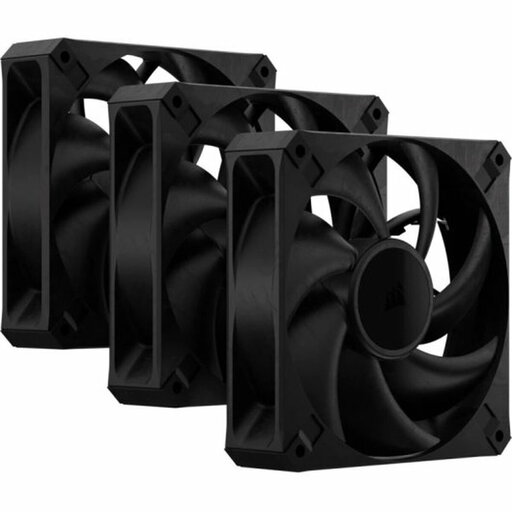
Why it suits this profile: A 3-pack is a practical choice if you want to fill several 120 mm mounting positions at once. The black finish suits many standard builds.
The product information lists PWM, a 4-pin connector and a pack of three fans. Be sure to check that the 30 mm thickness will fit in your case.
Three 120 mm fans, up to 2000 RPM, up to 72 CFM and no RGB lighting.
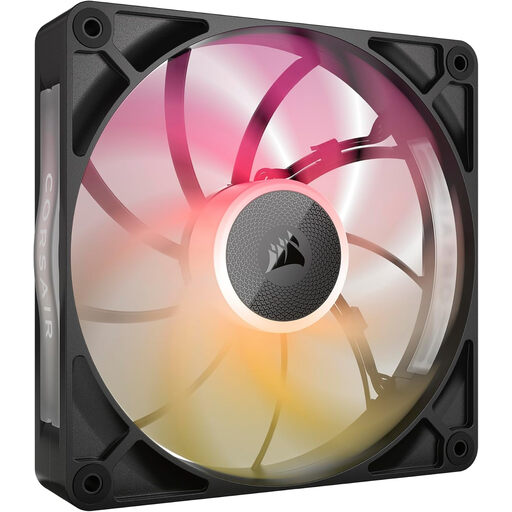
Why it suits this profile: This 140 mm model is suited to larger cases with room for a thicker fan, and to users who want to manage RGB through a compatible system.
The size, speed range and 30 mm thickness are listed, so you can check the mounting position and clearance in advance.
140 mm, PWM, 300–1600 RPM, up to 102,9 CFM and RGB lighting.
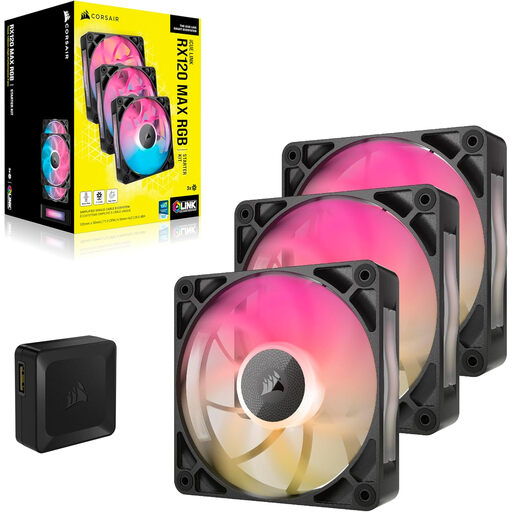
Why it suits this profile: A 3-pack is ideal for a gaming PC with several mounting positions, while iCUE LINK and RGB allow for centralised control.
The product details list PWM, RGB, a controller and a 30 mm thickness. Before buying, check that the included controller and your case are suitable for your setup.
Three 120 mm fans, up to 71,3 CFM, 8 RGB LEDs per fan and a quoted noise level of up to 29,5 dB.

Why it suits this profile: The combination of 120 mm, RGB, PWM and radiator compatibility makes it a good match for a water-cooled PC or a build with a focus on looks.
The product description lists PWM and mounting on a case or radiator. The instructions state that an iCUE LINK hub is required separately, so check this before ordering.
Three 120 mm fans, up to 2400 RPM, up to 70 CFM, 3,8 mmH2O and 18 RGB LEDs per fan.
We’ve put together a complete, up-to-date list of products that meet these strict selection criteria and current European safety regulations.
No. Check the radiator size, mounting pattern, thickness and required screws. A 30 mm model can take up more space than a standard fan of around 25 mm. Also check the quoted static pressure if the fan will be mounted against a radiator or restrictive filter.
It depends on your case and components. A common layout draws air in at the front or bottom and expels warm air at the rear or top. Don’t just look at the number of fans: consider the available mounting positions, airflow direction and fan curve too.
A PC fan usually uses little power, but total consumption depends on fan speed, lighting and the number of fans. RGB LEDs and a controller add to power use. Check the technical specifications for your chosen model, and never connect more devices than your controller or iCUE LINK channel supports.
