
Vandaag of morgen in huis

Kwaliteit gegarandeerd

Welkomstaanbiedingen ontgrendelen: GRATIS bezorging | Tot 80% korting | Gratis 30 dagen JoyPlus-proefperiode
Download de app
A gaming mouse may seem simple at first glance: plug it in, set the DPI and start playing. Yet many PC users buy a model that feels less suitable for their playing style after just a few weeks. Sensitivity that is too high can make precise aiming difficult, a flat battery can interrupt an online session and a wireless mouse does not always work in the way you expect.
The Corsair M55 gaming mouse is designed for right-handed gamers and users who want flexibility. The model supports 2.4GHz RF wireless, Bluetooth and USB Type-A. According to the product specifications, it also features an optical sensor with up to 24,000 DPI, six programmable buttons and a weight of 85 grams without the battery. Below, we explain which features you should really check and what type of user this mouse is suited to.
A gaming mouse with 24,000 DPI sounds impressive, but a high maximum DPI is not automatically necessary. DPI determines how far the cursor moves with the same hand movement. For everyday use and many games, players often choose a lower setting. What matters more is that the sensor supports multiple speeds and that you can adjust them easily.
The Corsair M55 offers multiple DPI speed settings. This makes the mouse suitable for both fast movements and more precise aiming. Treat the maximum value primarily as part of the specification, rather than a guarantee of better performance.
A wireless gaming mouse can work via a USB receiver or Bluetooth. These are different connection methods. A 2.4GHz receiver is practical for a dedicated gaming PC, while Bluetooth can be useful for a laptop or a device without a spare USB port.
The Corsair M55 wireless mouse supports both options. Using the included USB receiver, you get an RF connection with a stated range of up to 10 metres. For productivity on the go, Bluetooth may be a practical choice. However, check in advance whether your computer supports Bluetooth and whether you would prefer to use a USB receiver when gaming.
The Corsair M55 uses one replaceable AA battery. According to the product specifications, the battery is not rechargeable and is not included. This keeps the initial purchase price down, but it does mean that you will need to buy a spare battery yourself. The mouse has a battery indicator, allowing you to monitor the battery level.
If you are specifically looking for a rechargeable gaming mouse, you may be better off with another model. The M55 can also be used via the USB cable, but check what usage mode you want when ordering and whether the cable is long enough for your setup.
The Corsair M55 is an optical gaming mouse with an adjustable tracking resolution of up to 24,000 DPI. An optical sensor uses light to detect movement across a surface. For best results, use the mouse on an even, suitable desk surface or a mouse mat. The product specifications do not state that the mouse works on glass, so do not assume that it does.
For competitive gaming, stable tracking is more important than simply having the highest DPI figure. For example, set a lower DPI for shooters and a higher setting for navigation or large screens. You can further adjust the settings through Corsair iCUE, provided that your operating system and software version are supported.
The mouse has six programmable buttons. This is useful when you want to keep shortcuts, browser functions or in-game commands within easy reach. Consider your grip and the position of your index finger and thumb beforehand. More buttons are not always more convenient if you frequently press a side button by accident.
For productivity, the extra buttons could be assigned to functions such as going back, going forwards or activating a frequently used shortcut. In games, their usefulness depends on the genre and your personal layout.
According to the product information, the Corsair M55 works with Windows and macOS. You can choose from:
The cable is useful when the battery is flat or when you want to use a wired connection. Check that your computer has a USB Type-A port. If your laptop only has USB-C, you may need a suitable adapter; this is not listed as an included accessory.
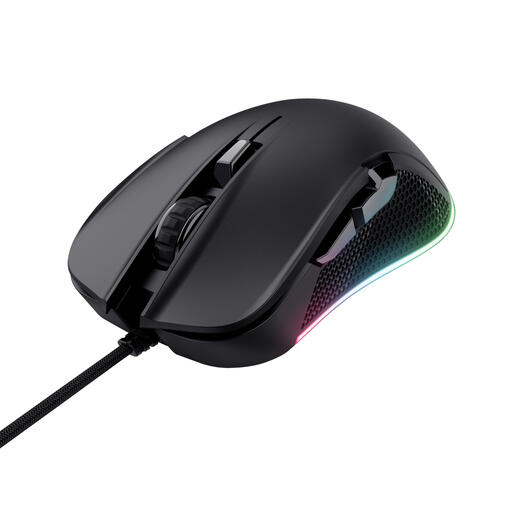
Why it suits this profile: This wired, right-handed gaming mouse is straightforward to use and does not require batteries or wireless configuration.
The fixed USB connection means you cannot forget a USB receiver or run out of battery. The lower maximum DPI makes the specification easier to assess.
Optical sensor up to 7,200 DPI, six buttons, programmable functions and a wired connection.
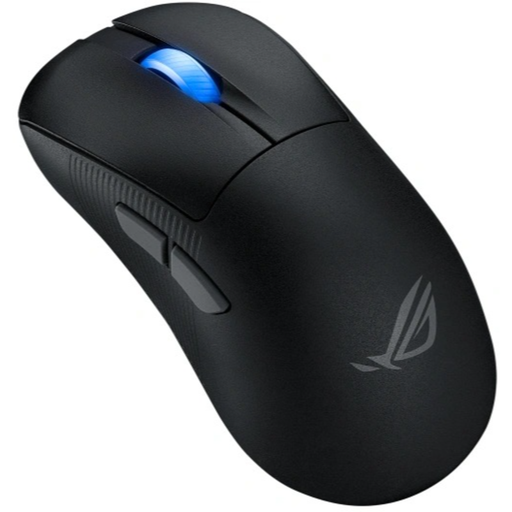
Why it suits this profile: This model is aimed at users who value very low weight and high sensor resolution for competitive gaming.
The specifications clearly list RF wireless, Bluetooth and USB, so you are not dependent on a single connection method.
54 grams, optical sensor up to 42,000 DPI, Bluetooth, RF and USB; suitable for right-handed use.

Why it suits this profile: The M55 is suitable for right-handed gamers who want to use one mouse for competitive gaming, casual gaming and everyday work.
You are not limited to Bluetooth or a cable alone. The replaceable AA battery and USB functionality provide a practical fallback option.
24,000 DPI, six programmable buttons, 85 grams without the battery, Bluetooth, RF and USB Type-A.
We have put together a complete, up-to-date list of products that fully meet these strict selection criteria and the applicable European safety regulations.
Yes. According to the stated product specifications, the mouse supports Bluetooth as well as 2.4GHz RF wireless and USB Type-A. The USB receiver is often practical for gaming, while Bluetooth can be useful with compatible laptops and other devices.
No. The mouse uses one replaceable AA battery and has no built-in charging function. The battery is not included. You can also connect the mouse via the USB cable, for example when the battery is flat.
Not necessarily. 24,000 DPI is the sensor’s maximum adjustable resolution, but many users find a lower setting more comfortable. The main strengths of the Corsair M55 are its adjustability and combination of multiple connection options, six buttons and support for Windows and macOS. Always check the latest product information and included accessories before ordering.
