
Vandaag of morgen in huis

Kwaliteit gegarandeerd

Welkomstaanbiedingen ontgrendelen: GRATIS bezorging | Tot 80% korting | Gratis 30 dagen JoyPlus-proefperiode
Download de app
At first glance, choosing a new Corsair iCUE LINK RGB case fan seems straightforward. However, there are important differences in size, connectivity, noise levels and installation. The wrong purchase could result in a fan that does not fit your PC case, lighting that does not work or an additional controller you had not budgeted for.
This guide from the Joybuy Product Recommendation Officer helps you turn marketing claims into verifiable specifications. That way, you can choose a Corsair PC fan that suits your case, usage needs and budget.
A 3-pack often appears better value than buying individual fans, but first check how many mounting positions your case has. For a compact PC, a single rear fan may already be sufficient as an upgrade. A larger ATX case, on the other hand, may benefit from several intake and exhaust fans.
Also check exactly what is included in the box. Some iCUE LINK models do not include a hub or controller. For example, the product description for the Corsair iCUE LINK LX120-R RGB states that connection to an iCUE LINK hub, sold separately, is required.
A Corsair iCUE LINK fan operates within the iCUE LINK ecosystem. This is different from a standard 5V ARGB connection on a motherboard. Therefore, check:
A standard PWM fan can operate through a 4-pin motherboard connection, but RGB control may require a separate connection or controller.
According to the product information, noise levels are usually measured at a specific speed. The Corsair iCUE LINK RX140 RGB, for example, is listed at 10 dB at low speed and up to 36 dB at high speed. This does not mean the fan produces 10 dB under all conditions.
Case panels, dust filters, cables and resonance also affect perceived noise. Therefore, alongside the dB rating, look at the RPM range and whether you can configure a custom fan curve.
A 120 mm case fan fits in many PC cases and radiators. This size is practical when replacing existing fans or when space is limited.
A 140 mm case fan can move a large volume of air at a lower speed, depending on its design. Always check your case manual: a 140 mm fan will not automatically fit a 120 mm mounting position. Also pay attention to thickness. The RX140 MAX is listed in the product information as 30 mm thick, while many standard fans are approximately 25 mm thick.
A PWM fan with a 4-pin connection allows the motherboard or a compatible controller to regulate speed more precisely. This is useful for a quiet PC fan during light workloads and higher speeds while gaming or under sustained load.
Check whether your motherboard has enough fan headers. Multiple fans may require a hub or splitter. A higher maximum RPM does not mean that you need to run the fan at full speed constantly.
Airflow, usually specified in CFM or m³/h, indicates how much air the fan can move according to its product specification. Static pressure, expressed in mmH2O, is particularly relevant when air must be pushed through a radiator, dust filter or restrictive front panel.
For a radiator fan or CPU liquid cooler, static pressure is therefore more important than a high airflow figure alone. For an open-mesh case, airflow may be the deciding factor. Performance claims should be understood as stated product specifications; actual results depend on your complete PC configuration.

Why it fits: A practical choice for a standard case with multiple 120 mm mounting positions and a need for a consistent RGB aesthetic.
The package includes three 120 mm fans, allowing you to compare the quantity with the number of mounting positions in your case beforehand. Keep in mind that the iCUE LINK hub is sold separately.
According to the product description: up to 2400 RPM, airflow of up to 70 CFM, static pressure of 3.8 mmH2O, PWM and 18 RGB LEDs per fan.

Why it fits: Suitable for a larger case with 140 mm mounting positions where lower operating speeds are preferred.
The size and maximum speed are clearly stated. However, check that your case supports the 140 mm format and provides sufficient clearance.
According to Corsair’s product information: 300–1700 RPM, PWM, up to 94.7 CFM and a stated noise range of 10 to 36 dB.
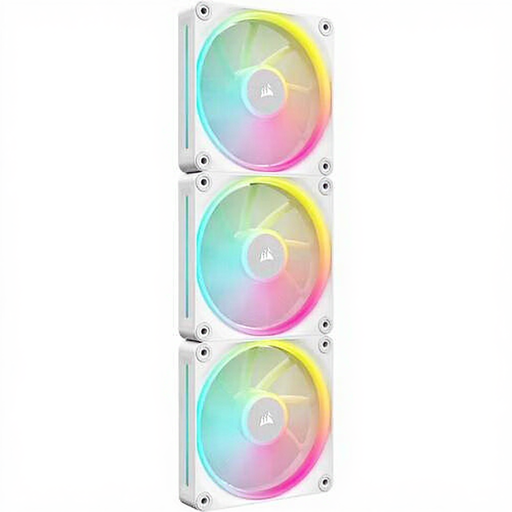
Why it fits: An appealing option for a build with 120 mm radiator or case positions and customisable white lighting.
The stated static pressure makes it possible to assess suitability for radiator use. Also check that your power supply, hub and internal cable routing can support three units.
The product listing specifies 400–2400 RPM, up to 69.9 CFM, 5.22 mmH2O and 12 individually addressable RGB LEDs per fan.
Shut down the PC completely and unplug it from the mains before installing a case fan. Check the arrows on the frame to identify the airflow direction. Fans at the front or bottom commonly draw air in, while those at the rear or top expel warm air.
Connect PWM to a suitable 4-pin header or controller. For iCUE LINK, use the correct hub and cable. Keep cables away from the blades. Clean the fan with compressed air or a soft brush; do not rinse it with water. According to the product information, the Corsair models mentioned are covered by a statutory minimum two-year warranty within the EU.
Browse a current selection of components for home PCs and compare size, connectivity and cooling performance before you order.
For the iCUE LINK models mentioned, check whether a hub is included. Several product descriptions state that the hub is sold separately. Without a compatible hub, the iCUE LINK chain cannot be fully connected and managed.
Not automatically. A 140 mm case fan can move a large volume of air at a lower speed, but noise levels also depend on the bearing, design, case and fan curve. Compare the stated dB range and RPM specifications for both models.
Power consumption depends on speed, RGB lighting, the controller and the number of fans. PWM control can run the fans more slowly during light workloads. For an accurate calculation, you need the actual power draw of your specific configuration; the number of fans alone does not provide a reliable estimate of energy consumption.
