
Vandaag of morgen in huis

Kwaliteit gegarandeerd

Welkomstaanbiedingen ontgrendelen: GRATIS bezorging | Tot 80% korting | Gratis 30 dagen JoyPlus-proefperiode
Download de app
A Corsair iCUE LINK RGB case fan can help improve airflow, reduce fan speeds and create a tidy PC build with synchronised lighting. However, it is easy to pay too much for features that are not compatible with your case or motherboard.
The main pitfalls usually do not concern the RGB effect itself, but the connection, the available space and how performance is measured. With this guide, you can compare a Corsair PC fan based on verifiable specifications rather than marketing copy alone.
A higher speed does not automatically mean a better choice. A fan that produces more noise at maximum power may be less pleasant in practice when gaming, working or sleeping. Always check the full range, such as 300–1700 RPM or 400–2400 RPM, and confirm whether PWM control is available.
With a Corsair PWM fan, you can have the speed adjusted according to the temperature via the motherboard or a suitable controller. This means the fan does not have to run at full speed continuously.
A 140mm PC fan often moves a lot of air at a lower speed, but it will not fit every mounting position. A 120mm PC fan is more versatile, as many cases, radiators and CPU coolers have mounting holes for this size.
Check the following before buying:
iCUE LINK models are designed for the Corsair LINK system. Depending on the product, a system hub or compatible controller may be required. A fan with a 4-pin PWM connection is not automatically the same as a complete iCUE LINK solution.
So check whether the packaging includes a controller and which cables are supplied. With some sets, the hub is sold separately. This difference can have a significant effect on the final cost.
Airflow, usually stated in CFM or m³/h, shows how much air the fan can move according to the stated product specifications. This is particularly relevant for intake and exhaust positions in the case.
For a PC fan for a radiator or a dense dust filter, static pressure is also important. This value is expressed in mmH₂O. A higher value can be useful when air needs to be moved through a radiator or a confined space. Compare airflow and static pressure using the same measurement method; values from different sources are not always directly comparable.
The product information for the models mentioned lists noise levels ranging from, for example, 10 dB at low speed to approximately 29.5 to 37 dB at high speed. These figures depend on the measurement conditions and the selected speed. Use them as a guide rather than a guarantee of a particular noise experience in your PC.
A quiet PC fan is not determined by the bearing alone. Correct installation, clean dust filters, a balanced fan curve and cables kept clear of the blades also make a difference.
PWM generally uses a 4-pin connection for precise speed control. RGB can be managed via a Corsair controller and iCUE software, while other products use a compatible motherboard header. Always check:
The airflow, RPM, noise and LED specifications mentioned are taken from the supplied product information. According to a brand’s own research, additional performance claims may apply, but they have not been treated as established facts here.
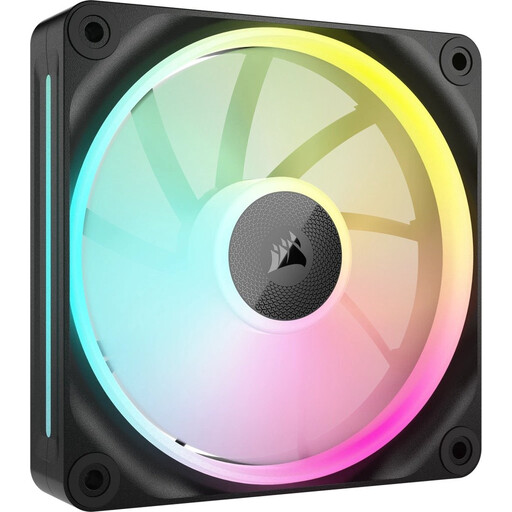
Why it suits this profile: One 120mm fan is practical when you want to upgrade an existing case step by step without buying a multipack straight away.
The 120mm size is common in many PC cases. However, check iCUE LINK compatibility beforehand and whether a hub is required.
PWM support, RGB lighting, 400–2400 RPM and stated airflow of up to 69.9 CFM.

Why it suits this profile: This set is suitable for a larger case with two 140mm positions available, where airflow matters more than maximum compactness.
The product information states a range of 300–1700 RPM and PWM control, so you do not have to rely solely on high-speed cooling.
Two fans, magnetic bearing technology according to the product description, up to 94.7 CFM and RGB lighting.
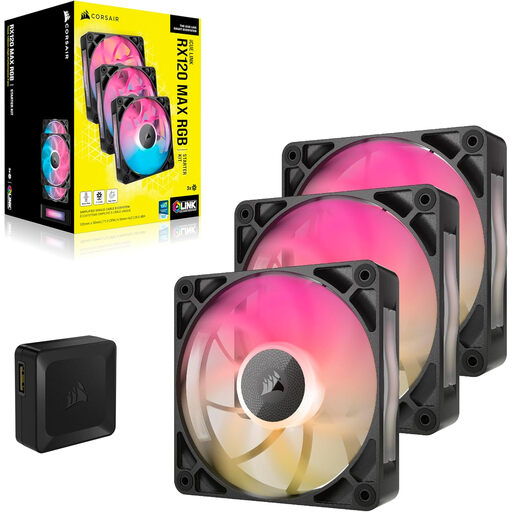
Why it suits this profile: This set is designed for an intensive build with three mounting positions and enough space for 30mm-thick fans.
The 30mm thickness is clearly stated. Measure the available space before installing these fans on a radiator or in the case.
Three fans, PWM control, up to 71.3 CFM and a stated maximum noise level of 29.5 dB.
We have put together a complete, up-to-date list of products that fully meet these strict selection criteria and the applicable European safety regulations.
Switch the computer off completely and unplug it from the mains before installing or removing a fan. Then pay attention to the following points:
A statutory guarantee of at least two years applies according to the product information under EU consumer rules. Additional rights may apply under Dutch legislation.
It can be, when the specific model is stated in the product information to be suitable for radiator and case cooling. In addition to airflow, check the static pressure, fan thickness and available mounting holes.
This depends on the model selected and the components already in your PC. Some products require a compatible iCUE LINK hub. Check the contents of the packaging and the connection before placing your order.
Power consumption varies by model, speed and lighting. PWM does not automatically reduce the rated maximum power consumption, but it can allow the fan to run at a lower speed when full cooling is not required. For an exact figure, consult the technical specifications for the model selected.
