
Vandaag of morgen in huis

Kwaliteit gegarandeerd

Welkomstaanbiedingen ontgrendelen: GRATIS bezorging | Tot 80% korting | Gratis 30 dagen JoyPlus-proefperiode
Download de app
A Corsair iCUE LINK RGB case fan can improve your desktop’s airflow and appearance, but not every fan will fit every PC. The difference is not just in RGB lighting or maximum speed. Dimensions, connections, noise levels and the contents of the package all determine whether your purchase is practical.
For gamers, PC builders and hardware enthusiasts, there are three common pitfalls:
The most common sizes are 120 mm and 140 mm. A 120 mm fan often offers more options in compact cases. A 140 mm Corsair PC fan can move a substantial amount of air at a lower speed, provided your case supports it.
Pay attention to thickness as well. According to the product information, the RX120 MAX models are 30 mm thick, while many standard fans are approximately 25 mm thick. This difference can cause problems with a radiator, memory modules, cables or a narrow case. Measure the available space before ordering.
Airflow is generally stated in CFM or m³/h. This indicates how much air the fan can move. Airflow is important for an open front or rear section of a case. For a radiator fan or a dense dust filter, static pressure is also important. This shows how effectively the fan can push air through resistance.
PWM, usually via a 4-pin connection, enables precise speed control. Your motherboard, controller or software can then adjust the speed according to the temperature. This is more practical than a fan that constantly runs at maximum speed.
The stated figures are product specifications from the relevant product listings. Noise levels and airflow may vary in practice depending on the case, installation, ambient temperature and fan curve used. Claims such as a long service life or extra-quiet operation should therefore be regarded as information from the brand or product listing, rather than a guarantee for every configuration.
An iCUE LINK fan can be connected through a linked system, reducing the need for multiple individual cables. However, check whether you need an iCUE LINK System Hub. Some starter kits include one, while individual expansion fans may require a separate purchase.
Also check the packaging:

Why it suits this profile: According to the product description, this set contains three 120 mm RGB fans and an iCUE LINK System Hub. This makes it a straightforward choice for a first PC upgrade.
The 3-pack saves you from having to combine several individual models. However, check the available 120 mm positions in your case beforehand.
PWM control, 400–2100 RPM, up to 74,2 m³/h and RGB lighting with eight LEDs per fan according to the product data.
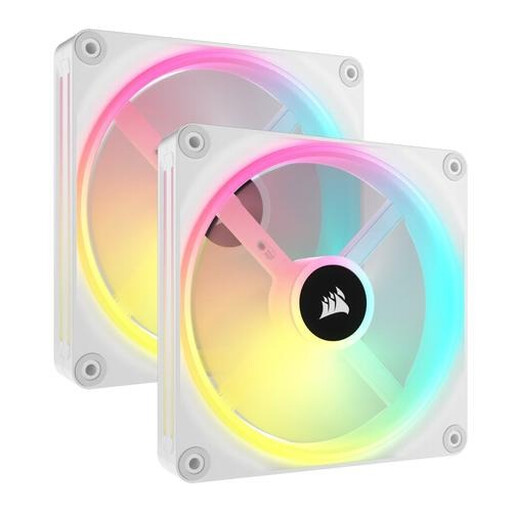
Why it suits this profile: The 140 mm version is designed for a larger case with room for two fans and a consistent look.
With the 140 mm size, you do not automatically need to use a high speed. Measure the mounting points and check iCUE LINK compatibility beforehand.
According to the product listing: 480–2000 RPM, PWM support, up to 82,5 CFM and 34 individually addressable RGB LEDs.
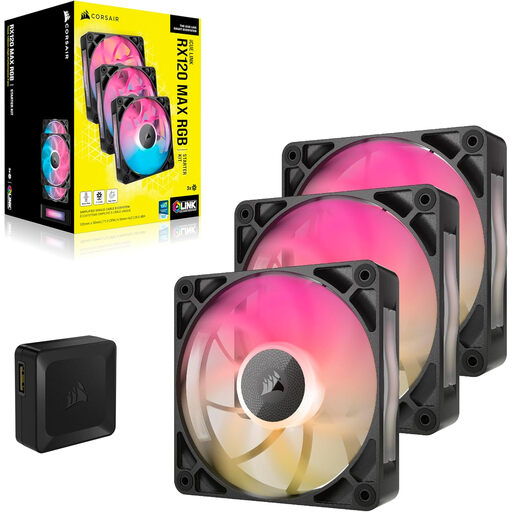
Why it suits this profile: This set is intended for users who want to fill several positions and pay extra attention to airflow and static pressure.
The product information lists PWM, an adjustable range and a maximum noise level of 29,5 dB. However, because of the 30 mm thickness, check the available space carefully.
Up to 71,3 CFM, maximum static pressure of 4,16 mmH2O, 400–2000 RPM and eight RGB LEDs per fan according to the listed specifications.
We have put together a complete, up-to-date list of products that fully meet these strict selection criteria and the applicable European safety regulations.
Switch off the computer completely and unplug it from the mains before installing a Corsair RGB fan. Pay attention to the arrows on the frame: they show the direction of airflow. In a typical configuration, fans at the front or bottom draw air in, while those at the rear or top exhaust warm air.
Connect the PWM cable to a suitable 4-pin connection or controller. Connect the iCUE LINK cable to the hub according to the instructions. Keep cables away from the blades and check after installation that the fan can rotate freely. Clean with compressed air or a soft brush; do not use water.
According to the product information, the statutory consumer guarantee in the EU is at least two years. Keep your proof of purchase and check on delivery that the correct number of fans, cables and any hub have been included.
It can be, depending on the model and radiator. Models such as the RX and LX series are mentioned in the product information for case and radiator ventilation. For a radiator, pay particular attention to static pressure, thickness and the available mounting space.
Not necessarily in every situation. A starter kit may include an iCUE LINK System Hub, while an individual expansion fan may need to be connected to an existing hub. Always check the pack contents of the specific product before ordering.
Use PWM control and set a moderate fan curve in the BIOS or Corsair software. Run the fan at a lower speed under light loads and only increase the speed when the temperature rises. Also check that the fan is securely mounted and free from dust and cables.
