
Vandaag of morgen in huis

Kwaliteit gegarandeerd

Welkomstaanbiedingen ontgrendelen: GRATIS bezorging | Tot 80% korting | Gratis 30 dagen JoyPlus-proefperiode
Download de app
A Corsair iCUE LINK RGB case fan can improve your PC cooling while also creating a tidy RGB build. However, not every fan is suitable for every computer case, radiator or connection. Choosing the wrong size, missing a controller or having unrealistic expectations about noise levels can make your purchase unnecessarily expensive.
As a Joybuy Product Recommendation Officer, I filter the most important product specifications for you. This lets you compare a Corsair RGB fan based on practical considerations, rather than just appearance or marketing claims.
A 120mm case fan and a 140mm case fan are not interchangeable. Check the mounting points on your case beforehand. A 140mm fan can move more air at a lower rotational speed, but it will not automatically fit an opening designed for 120mm.
Also measure the available space around the motherboard, RAM and radiator. A thicker model, such as a 30mm-thick fan, may come into contact with components or cables.
A Corsair iCUE LINK fan uses its own ecosystem for connection and control. Check whether you need a suitable iCUE LINK hub, cables and power connection. Some starter kits include a hub, while a standalone expansion fan may only be intended to be added to an existing chain.
A standard 5V ARGB connection on the motherboard is not automatically the same as an iCUE LINK connection. Check the product packaging and manual before ordering.
A higher maximum RPM does not automatically mean a quieter or better PC fan. The actual noise level depends on the fan curve, the airflow resistance of your case and the intended use. For a radiator fan, static pressure and the thickness of the model are also important, alongside airflow.
The stated noise levels are product specifications taken from the relevant product description. They may vary depending on the measurement method and usage conditions. So do not treat a figure such as 10 dB as a guarantee that your system will always be inaudible.
For balanced airflow, many users install fans at the front or bottom as intake fans and at the rear or top as exhaust fans. The ideal arrangement depends on your case, filters and components.
A PWM fan generally has a 4-pin connection that allows the motherboard or a controller to adjust its speed. This is useful for a quiet PC: the fan runs more slowly under light loads and can speed up as temperatures rise.
Check that the fan you choose supports PWM and that the required cables are actually included. A product listing may mention both an iCUE LINK connection and a separate PWM specification; these are different functions.
Airflow is often listed in CFM or m³/h. This indicates the volume of air the fan can move. When used with a radiator or a dense dust filter, static pressure, expressed in mmH₂O, is also relevant.
Models with magnetic bearings are associated with smooth operation in product descriptions. According to the relevant Corsair product information, some models are designed for quiet operation and a long service life. This is a brand claim, not a guarantee of a fixed lifespan. Regularly removing dust and installing the fan correctly can help reduce vibrations and additional noise.
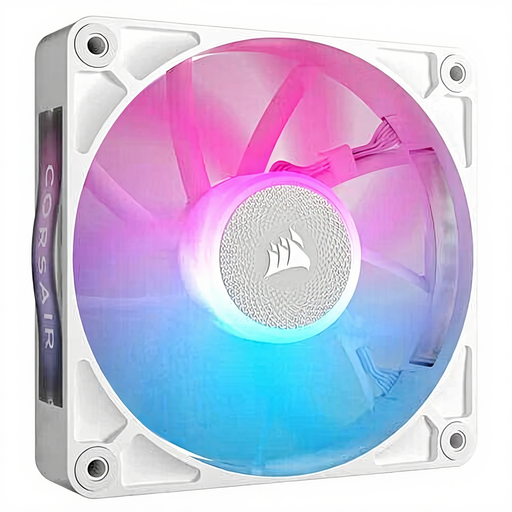
Why it suits this profile: A standalone 120mm fan is useful when you want to add one more position or start with iCUE LINK.
The 120mm size makes checking your case dimensions straightforward. However, check separately whether you need a suitable iCUE controller.
PWM control, RGB lighting and a stated range of 400 to 2100 RPM.

Why it suits this profile: This 2-pack is suitable for a spacious build with mounting points for 140mm fans and a preference for magnetic bearings.
You get two identical fans, but you should check beforehand that 140mm fans fit both your case and any radiator.
According to the product listing: 300–1700 RPM, PWM support and maximum airflow of approximately 94.7 CFM.
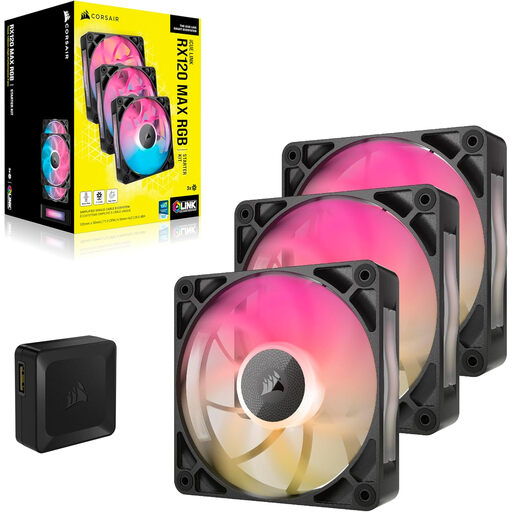
Why it suits this profile: A 3-pack is practical for a complete 120mm setup in a gaming PC, particularly when radiator or filter resistance requires extra attention.
The stated thickness of 30mm makes it clear that you need to check the available clearance before mounting this model on a radiator.
PWM control, 400–2000 RPM, maximum airflow of approximately 71.3 CFM and an RGB controller included according to the product information.

Why it suits this profile: This set is aimed at users who want to fill several 120mm positions at once and control their RGB lighting centrally.
The set is listed as a starter kit with an iCUE LINK System Hub. Nevertheless, check the contents and maximum device load in the manual.
Three PWM fans, iCUE LINK connectivity, RGB lighting and a stated range of 400 to 2100 RPM.
We have put together a complete, up-to-date list of products that fully meet these strict selection criteria and the applicable European safety regulations.
A standalone fan may be sufficient for a small upgrade. For a new build, a Corsair fan pack is often more convenient, but always check that a hub and all connection cables are included.
That depends on the model, bearings, fan curve and airflow resistance. Product listings for different Corsair models state low noise levels at low speeds and higher levels at maximum speed. Always compare the full range rather than just the minimum figure.
Not without checking first. Look at the radiator size, mounting points, available thickness and the required static pressure. For example, a 120mm fan will not fit a radiator designed for 140mm fans. With a thicker model, you need to leave extra clearance around the radiator and components.
Power consumption varies according to the fan, speed, lighting and controller. PWM control can reduce the fan speed under light loads, but RGB LEDs and the iCUE LINK hub also use power. Check the hub’s power requirements and the maximum number of devices per channel before connecting multiple fans.
