
Vandaag of morgen in huis

Kwaliteit gegarandeerd

Welkomstaanbiedingen ontgrendelen: GRATIS bezorging | Tot 80% korting | Gratis 30 dagen JoyPlus-proefperiode
Download de app
Choosing a new PC fan or Corsair CPU liquid cooler may seem straightforward at first glance. Yet many PC builders in the Netherlands pay for features that do not suit their case, motherboard or usage. When it comes to Corsair iCUE LINK PC cooling, there are three main pitfalls to avoid:
A sensible choice therefore starts not with the number of RGB LEDs, but with the available space, the connection and how you use your PC.
A 120mm PC fan is a widely used size for rear, top and radiator positions. A 140mm PC fan can move a lot of air at lower speeds, but it will only fit if the case has been designed for it.
As well as the diameter, pay attention to the thickness. According to the product information, the Corsair iCUE LINK RX120 MAX RGB and RX140 MAX RGB are 30mm thick, whereas many standard fans are around 25mm thick. Check the clearance around the motherboard, system memory, radiator and graphics card. A thicker fan may require additional space around the mounting area.
PWM, or Pulse Width Modulation, generally uses a 4-pin connection to adjust the speed via the motherboard or a controller. This is useful for a quiet PC fan: the fan can run more slowly under light loads and speed up as temperatures rise.
The ranges vary between products. For example, the RX140 RGB is listed as running from 300 to 1700 RPM, while the LX120 RGB is described as supporting 400 to 2400 RPM. A higher maximum does not mean that the fan needs to run at that speed continuously. Also look at the stated noise level, airflow and static pressure.
The stated figures are product specifications taken from the product information. Actual results also depend on the case, ambient temperature, fan curve and installation.
Corsair iCUE RGB cooling can allow you to control lighting and fan speeds through software, but the correct hardware is still required. Before buying, check the following:
The product descriptions mention a single cable and daisy-chain capability for several models. Always check the package contents when buying individual fans. Some versions may require a hub to be purchased separately.
A standalone Corsair PC fan is suitable for adding extra intake or exhaust airflow, or for replacing an existing fan. Airflow and static pressure are both important for a radiator or CPU cooler.
An all-in-one liquid cooler combines a pump, water block, tubing, radiator and fans in a single closed system. The Corsair iCUE LINK TITAN RX RGB is offered with support for, among others, Intel LGA 1851/1700 and AMD AM5/AM4. Always check your processor socket and the available radiator space in your case. A 360mm radiator requires three 120mm mounting positions, while a 280mm model generally uses two 140mm positions.
According to Corsair’s own product information, the TITAN RX RGB features a FlowDrive pump, pre-applied XTM70 thermal paste and a Zero RPM mode. These are features from the brand and product description, not a guarantee of a particular processor temperature. Correct installation, a suitable fan curve and adequate case ventilation remain essential.

Why it suits this profile: Two 140mm fans are a practical upgrade for a case with suitable front or top mounting positions. According to the product information, the speed ranges from 300 to 1700 RPM and PWM control is supported.
The pack specifies the size, speed range and PWM support. However, check beforehand that your case has 140mm mounting positions.
2-pack, PWM control, 300–1700 RPM and RGB lighting according to the product information.
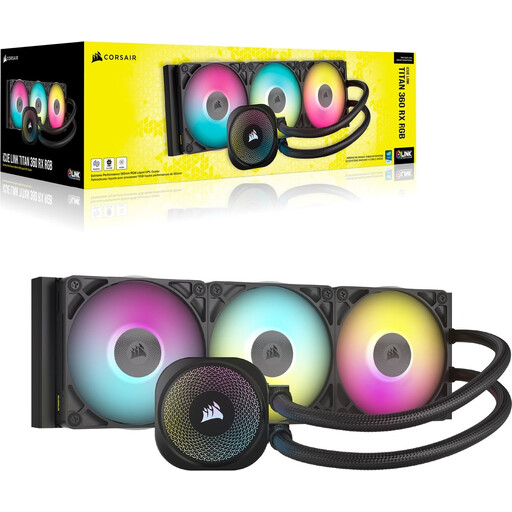
Why it suits this profile: An integrated CPU liquid cooler is aimed at builders who want to combine radiator, pump and RGB features in a single system.
The product information lists socket compatibility, a 360mm radiator and included fans. Check your case layout before ordering.
Support for LGA 1851, LGA 1700, AM5 and AM4; iCUE RGB lighting and a stated noise range of 10–36 dB.

Why it suits this profile: A set of three 120mm fans is ideal for a new gaming PC or a case where several airflow paths need to be set up at the same time.
The description specifies PWM, 120mm, airflow and static pressure. This makes it easier to assess the fan for case or radiator use.
3-pack, up to 2400 RPM, up to 70 CFM airflow, 3.8 mmH₂O static pressure and 18 RGB LEDs according to the product information.
We have put together a complete, up-to-date list of products that fully meet these strict selection criteria and the applicable European safety regulations.
Switch off the PC completely and unplug it from the mains before connecting a fan, hub or radiator. When installing a fan, look for the arrows on the frame: these indicate the direction of rotation and airflow. A common layout is intake at the front or bottom, with exhaust at the rear or top.
Keep cables away from the blades and check the available clearance around 30mm models. Clean fans with compressed air or a soft brush. Do not use water inside the case. With an all-in-one liquid cooler, do not open or dismantle the sealed loop.
Not every product includes the same components. Check the product page and packaging carefully. Some kits list a controller, while an individual fan or another version may require a hub to be purchased separately.
You cannot determine this from size alone. Look at the stated noise range, speed and fan curve. A larger fan may provide sufficient airflow at a lower speed, but only if it fits inside the case.
The lifespan depends on dust, hours of use, temperature, installation and bearing design. Check regularly for vibrations or changes in noise. According to the product information, the products mentioned are covered by at least the statutory two-year warranty under EU consumer rules; additional rights may arise under national legislation.
