
Vandaag of morgen in huis

Kwaliteit gegarandeerd

Welkomstaanbiedingen ontgrendelen: GRATIS bezorging | Tot 80% korting | Gratis 30 dagen JoyPlus-proefperiode
Download de app
A white gaming PC can quickly take on a clean, polished look with RGB fans. But a case fan is more than just a decorative component. The wrong connection, insufficient space or unsuitable airflow can lead to extra noise, messy cabling or poor cooling.
The Corsair iCUE LINK LX120 RGB White 120mm Case Fan 3-Pack is aimed at PC builders who want to fill several fan positions at once. Before you buy, there are three common pitfalls to avoid.
A 120mm RGB case fan may look appealing, but lighting says little about cooling performance. Check the maximum airflow, static pressure and fan speeds too. A fan for a radiator, for example, needs different characteristics from one that simply moves air through a spacious case.
The LX120 RGB lists 12 individually addressable RGB LEDs, a maximum airflow of 69.9 CFM and a maximum static pressure of 5.22 mmH2O. These are verifiable product specifications; real-world performance also depends on the case, filters and fan placement.
PWM and RGB are not the same thing. PWM refers to controlling fan speed via a 4-pin connection. RGB lighting may need its own controller or ecosystem.
The Corsair iCUE LINK fan uses the iCUE LINK system. Before buying, check that your motherboard and controller are compatible and that you have a suitable internal USB header available. The product information lists a system controller as included with this 3-pack. When it arrives, check the contents of the box and the latest connection instructions.
Every case fan has an intake and an exhaust side. The arrows on the frame show the direction of airflow. A common layout is:
A 3-pack doesn’t automatically mean every fan belongs in the same position. Check that there’s enough clearance around the blades, and keep cables away from moving parts.
A 120mm case fan fits many PC cases and radiators, but always check the mounting holes and available depth. Not every compact case is guaranteed to have a standard 120mm fan position. Also check whether a radiator, graphics card or cable channel will obstruct installation.
According to the product specifications, the LX120 RGB has a speed range of 400 to 2400 RPM and supports PWM control. This lets you set a fan curve in the BIOS/UEFI or compatible software. The fan can run more slowly under light loads, with higher speeds available as temperatures rise.
The stated noise levels range from 10 dB at low speed to 36 dB at high speed. Treat these as manufacturer information measured under specific conditions, not as a guarantee that every PC will be quiet. Case resonance, dust filters and your chosen fan curve all affect how much noise you hear.
Airflow, measured in CFM, indicates how much air the fan moves. Static pressure, measured in mmH2O, matters when air has to pass through a radiator, dense filter or fine mesh front panel.
An open case front often calls for a focus on airflow. Static pressure is more important for a radiator fan or a case with a restricted air intake. According to the product description, the LX120 combines both of its stated performance figures with a magnetic levitation bearing. The manufacturer says this bearing helps deliver smooth, quiet operation; always check that it’s suitable for your specific case or radiator.

Why it suits this profile: A single 120mm PWM case fan is a practical choice if you want to add one fan or check compatibility with your PC first.
There’s no need to buy a 3-pack if you only need one mounting position. The 4-pin PWM connection and 120mm size are clearly stated.
Maximum airflow of 63.1 CFM, 34 individually addressable LEDs and a stated speed range of 480 to 2400 RPM.
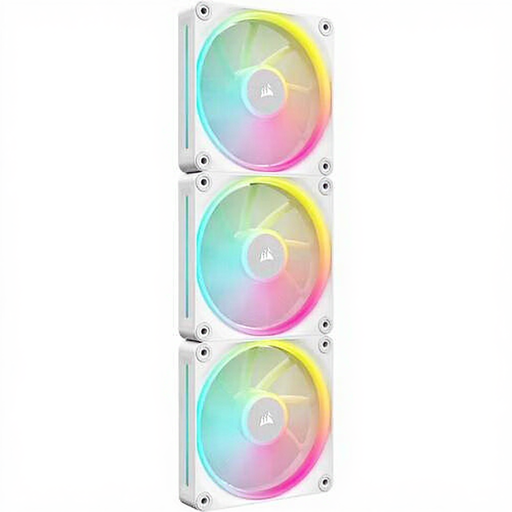
Why it suits this profile: This 3-pack of PC cooling fans is a good fit for a white build where you want to fill several 120mm positions at once using a single Corsair ecosystem.
The product information lists PWM, a controller and daisy-chain connectivity. This helps keep cabling tidy, but check iCUE LINK compatibility beforehand.
69.9 CFM, 5.22 mmH2O, 400–2400 RPM and 12 individually addressable RGB LEDs per fan.
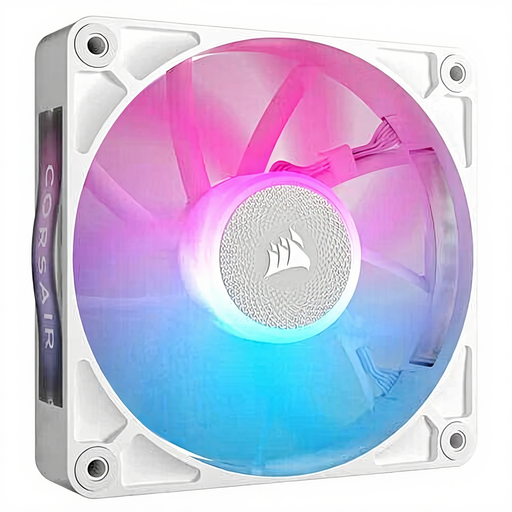
Why it suits this profile: A good choice if you want to fit one 120mm Corsair RGB fan in a radiator or case position, with the option to add more later.
You can install one fan first and test the connection. The product specifications list PWM, iCUE LINK compatibility and use for case and radiator cooling.
Maximum airflow of 73.5 CFM, 400–2100 RPM and a magnetic levitation bearing, according to the product description.
We’ve put together a full, up-to-date list of products that meet these strict selection criteria and the applicable European safety regulations.
Switch off your PC completely, turn off the power supply and unplug it before installing a fan. Secure the fan firmly, but don’t overtighten the screws. Keep cables away from the blades and check the airflow arrows after installation.
Dust affects airflow and noise, so clean the fan and filters regularly with the PC switched off. Don’t use liquids on the fan or its connections. The product specifications state a statutory minimum two-year guarantee under EU consumer law; additional rights may apply under Dutch law.
According to the product description, the LX120 is designed for both case and radiator cooling. Check that your radiator supports 120mm mounting and that the static pressure is suitable for the density of its surface.
The product information lists an included system controller and support for connecting multiple devices. Before installation, check the exact contents of the box, the available PCIe power connector and an internal USB header on your motherboard.
The exact power rating isn’t included in the product specifications provided. PWM can adjust the speed to match the temperature, so the fan doesn’t need to run at maximum speed all the time. Actual power use depends on the fan curve you set and how long the fan is in use.
