
Vandaag of morgen in huis

Kwaliteit gegarandeerd

Welkomstaanbiedingen ontgrendelen: GRATIS bezorging | Tot 80% korting | Gratis 30 dagen JoyPlus-proefperiode
Download de app
A Corsair iCUE LINK RGB PC case fan can cool your computer more efficiently while giving it a smart, polished look. However, it’s easy to focus solely on RGB lighting or maximum speed. That could leave you with a fan that doesn’t fit your case, makes too much noise or won’t work without an additional controller.
In this buying guide from the Joybuy Product Recommendation Officer, you can compare the key specifications and find out which Corsair PC fan is right for your needs.
A higher maximum speed doesn’t automatically mean that a fan will perform better in your system. For everyday use, the minimum speed, PWM control, airflow and noise output are just as important. A fan that can run at a low speed is easier to set up quietly when your PC is under light load.
Airflow is usually expressed in CFM or m³/h. This indicates how much air the fan can move. Static pressure, measured in mmH2O, is important when air has to pass through a radiator, dust filter or restrictive ventilation grille.
That means a fan with high airflow isn’t always the most suitable radiator fan. For a liquid cooler or a case with a dense dust filter, you should also consider static pressure.
The iCUE LINK system uses its own connection method. Some versions are designed as extensions to an existing chain and require an iCUE LINK hub. Certain product listings do not include the controller, or list the connection as “without connector”.
Before buying, check:
A 120 mm PC fan fits many ATX, micro-ATX and some compact cases. This size is also commonly used on radiators. A 140 mm PC fan has a larger blade surface and can move a lot of air at a lower speed, but the mounting holes must match those on your case or radiator.
So don’t just measure the opening. Also check:
The RX140 MAX, for example, is 30 mm thick, rather than the usual approximately 25 mm. This may require additional space inside your case.
For front or bottom-mounted fans, airflow is an important indicator. The Corsair iCUE LINK RX140 MAX product information, for example, specifies up to 103.5 CFM and 2.39 mmH2O of static pressure. The iCUE LINK LX120 RGB is listed with up to 69.9 CFM and 5.22 mmH2O.
These figures come from the product descriptions and do not guarantee the same performance in every PC. Actual airflow also depends on the case layout, filters, radiator, cables and the fan curve you set.
A PWM PC fan generally uses a 4-pin connection to control the speed more precisely. This allows you to set a curve in the BIOS or via software: low speed under light loads and higher speed when temperatures rise.
Bear in mind that a stated noise level often describes a range. For example, various models are listed with figures ranging from around 10 dB at low speed to approximately 31–37 dB at high speed. Always compare both the maximum figure and the speed range, rather than focusing only on a low minimum value.
RGB is primarily a visual feature. Look at the number of LEDs and how the lighting is controlled. According to the product information, the LX120-R RGB has 18 RGB LEDs, while other LX120 versions specify 12 individually addressable LEDs.
For models with magnetic bearings, the manufacturer describes their operation as smooth and quiet. Treat this as a product specification, not a guaranteed experience: resonance, installation and dust can all affect the final noise level.

Why it suits this profile: A 3-pack is practical when you want to fill several positions in a 120mm case at the same time. The stated speed ranges from 400 to 2400 RPM, and PWM control is included.
The product specifications cover more than just RGB, listing airflow of up to 70 CFM, static pressure of up to 3.8 mmH2O and a maximum of 35.1 dB. However, check whether the required hub needs to be purchased separately.
Three 120mm fans, 18 RGB LEDs per fan and PWM control for an adjustable fan curve.
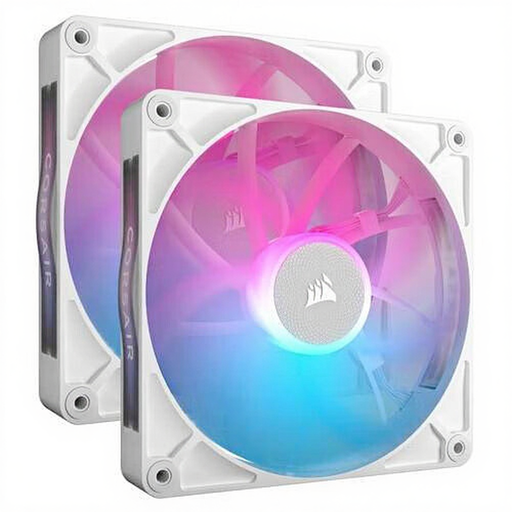
Why it suits this profile: This 140mm pack is ideal for a spacious case that can accommodate larger fans. According to the product description, the set contains two fans with RGB lighting, PWM and magnetic bearings.
The larger size is combined with stated airflow of up to 94.7 CFM and a range of 300–1700 RPM. Check the 140mm mounting points and available iCUE LINK connection before buying.
Two 140mm fans, a maximum of 36 dB according to the listed specifications, and PWM control for a customised cooling curve.
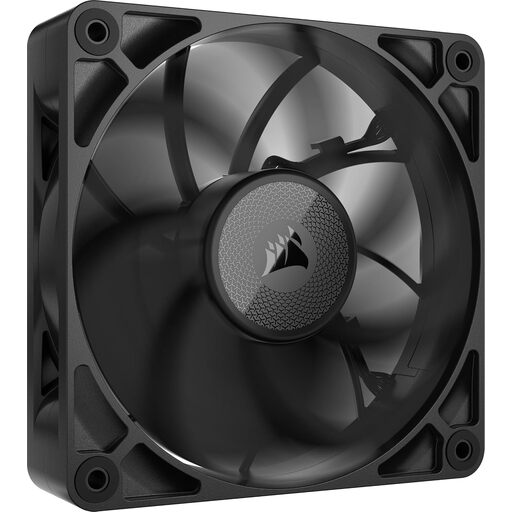
Why it suits this profile: This 120 mm fan is designed for systems where static pressure is important, such as a radiator or a case with a dense dust filter. The fan is 30 mm thick and has no RGB lighting.
The extra thickness and stated static pressure of 4.18 mmH2O make it clear that this model should not be treated like a standard 25mm fan. Measure the available clearance and use suitable mounting screws.
Airflow of up to 71.6 CFM, static pressure of up to 4.18 mmH2O and a stated noise level of up to 29.5 dB.
We’ve put together a complete, up-to-date list of products that fully meet these strict selection criteria and the applicable European safety regulations.
Switch off the computer, unplug it from the mains and wait until all fan blades have stopped moving before installing a fan. Pay attention to the arrows on the frame: they indicate the direction of rotation and airflow. Front and bottom fans usually draw air in, while rear and top fans expel warm air.
Connect a PWM cable to a suitable 4-pin connection or controller. With iCUE LINK models, check the connections between the fans, hub and power supply. Keep cables away from the blades and clean dust regularly using compressed air or a soft brush. Do not use water or dismantle the fan.
It can be, depending on the model and radiator. Pay particular attention to static pressure, the fan’s thickness and the mounting holes. Models such as the LX120, RX120 RGB and RX120 MAX are listed in the product information as suitable for both case and radiator cooling. Always check the dimensions of your specific radiator.
Not always. The required hardware varies by pack and version. Some sets are designed to connect to an existing iCUE LINK chain, while other products list a hub separately. So check the contents of the packaging and the available connections before placing your order.
Power consumption depends on the model, speed and number of hours in operation. PWM control can reduce average consumption because the fan doesn’t run at maximum speed continuously. As well as the price, compare the number of fans included in the pack and the stated current draw, where available.
