
Vandaag of morgen in huis

Kwaliteit gegarandeerd

Welkomstaanbiedingen ontgrendelen: GRATIS bezorging | Tot 80% korting | Gratis 30 dagen JoyPlus-proefperiode
Download de app
A white PC case with plenty of glass, RGB lighting and room for large components can look appealing. But a striking design doesn’t necessarily mean it’s practical for your build. With the Corsair FRAME 5000D RS ARGB White, motherboard size, component clearance and cooling are the key things to consider.
Many buyers come up against the same pitfalls:
According to the product information, the Corsair FRAME 5000D RS ARGB Midi Tower Case White is designed for powerful gaming and workstation PCs. It has a white finish, a tempered-glass side panel and a steel and plastic construction. Four 140 mm ARGB fans are included: three at the front and one at the rear.
According to the product specifications, this ATX PC case supports ATX, E-ATX, micro-ATX and Mini-ITX motherboards. This makes it suitable for a range of systems, but if you’re using an E-ATX board, always check its width and the position of the cable cut-outs.
The following maximum dimensions are listed for other components:
The maximum graphics card length should accommodate many modern gaming cards. However, allow for a radiator or front fans if you’re installing a long graphics card, as components may need to share the same space.
The four included 140 mm fans are worth noting if you’re looking for a PC case with 140 mm fans. Larger fans can move plenty of air at lower speeds, but actual noise levels and temperatures depend on fan control, hardware and installation.
According to the listing, the case has additional mounting options at the front, side, top, rear and bottom. The InfiniRail mounting system is designed to give you more flexibility when positioning fans. In most builds, set the front fans to draw air in and let warm air escape through the rear or top.
A dust filter helps with maintenance, but won’t prevent dust from building up. Clean the filters and fans regularly, and make sure you don’t block any air vents.
This PC case with RGB lighting uses addressable RGB lighting. Before buying, check that your motherboard has a suitable 5V ARGB header and that the cables are long enough for your setup. According to the product information, this model doesn’t include an integrated fan controller.
According to the description, the Corsair FRAME 5000D RS ARGB White is suitable for water cooling and supports radiators up to 420 mm. Before installation, always check the latest manual and make sure your radiator, fans, RAM and motherboard will all fit together. “Water-cooling ready” doesn’t mean that every radiator will fit without adjustments.
The tempered-glass panel gives you a view of the components, but handle its edges carefully. The safety information warns that hard knocks or scratches to the edge can cause the glass to break. Always disconnect the power supply before working on your PC.
The following options are based on verifiable features such as size, included fans, storage bays and compatibility. They aren’t ranked as absolute winners for quality.
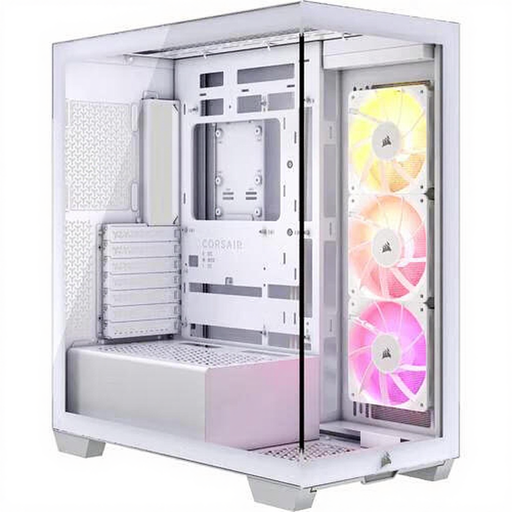
Why it suits this profile: This white PC case offers a more compact route to an ARGB-lit gaming PC, with support for E-ATX, ATX, micro-ATX and Mini-ITX motherboards.
The specifications list three included 120 mm ARGB fans and clear limits for GPU length and CPU cooler height. That means you can check compatibility before buying extra fans.
Three pre-installed fans, support for E-ATX and room for graphics cards up to 410 mm.
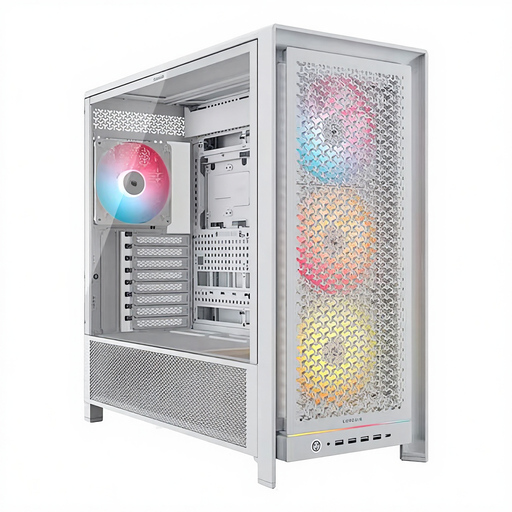
Why it suits this profile: Its generous component support, four 140 mm ARGB fans and range of cooling options make it a good fit for a powerful gaming or workstation build.
The key limits are listed: 450 mm for the graphics card and 175 mm for the CPU cooler. This makes it easier to check compatibility in advance rather than relying on the “high airflow” label alone.
Support for ATX, E-ATX, micro-ATX and Mini-ITX, four included 140 mm ARGB fans, six 2.5-inch bays and two 3.5-inch bays.
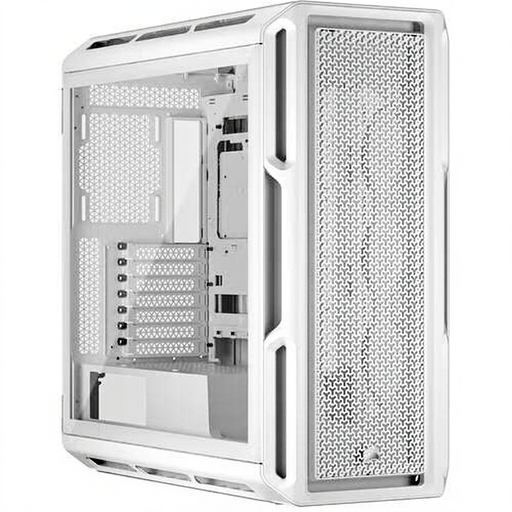
Why it suits this profile: This larger midi tower is designed for users who want plenty of room for expansion, effective cable management and an extensive cooling system.
The product specifications list a mesh front, support for up to ten fans and radiator mounts in several positions. Be sure to check the radiator and fan dimensions for each mounting position.
Support for GPUs up to 450 mm, seven expansion slots, E-ATX support and water-cooling compatibility.
We’ve put together a complete, up-to-date list of products that meet these strict selection criteria and comply with current European safety regulations.
According to the product information, this E-ATX case also supports ATX, micro-ATX and Mini-ITX motherboards. Before buying, check the exact width of your motherboard and the position of the cable cut-outs. With wider E-ATX boards, a cover plate or some of the cable-routing space may be partially obscured.
Yes. The product description lists water-cooling support and compatibility with radiators up to 420 mm. Before installation, check the latest Corsair manual, as the available space may vary by mounting position. Pay particular attention to how the radiator, fans, RAM and motherboard fit together.
The case itself doesn’t have a built-in power supply and doesn’t directly determine power consumption. Most of the power is used by the processor, graphics card, storage, fans and any RGB components. Choose a suitable ATX power supply based on your complete system and the recommended headroom from the hardware manufacturers.
