
Vandaag of morgen in huis

Kwaliteit gegarandeerd

Welkomstaanbiedingen ontgrendelen: GRATIS bezorging | Tot 80% korting | Gratis 30 dagen JoyPlus-proefperiode
Download de app
A Corsair 120mm PC case fan fits many modern computer cases, but not every fan is designed for the same purpose. A model for quiet airflow in a gaming PC has different requirements from a radiator fan for a liquid cooler. RGB lighting, connections and fan thickness can also make installation more complicated.
So don’t focus only on the brand or the number of revolutions per minute. The key differences often come down to these points:
A few checks beforehand can help you avoid buying the wrong fan and make it easier to build a better PC cooling setup.
A 120mm case fan typically has a frame measuring around 120 × 120 mm. Check your case or radiator manual to make sure it supports this size. Also check the thickness. Standard models are often around 25 mm thick, while some models in the MAX series are 30 mm thick.
That extra thickness can affect:
A thicker fan may offer greater static pressure according to its product specifications, but that’s only useful if it physically fits.
Airflow is usually measured in CFM or m³/h. This indicates how much air the fan can move. Airflow is an important consideration for an open case front or rear.
Static pressure also matters for radiator fans. The air has to be pushed through a dense bank of fins. A model with a higher pressure rating is therefore a more logical choice for a radiator than a fan designed mainly for unrestricted airflow.
The maximum speed, measured in RPM, doesn’t tell you how loud the fan will be in your PC. A PWM case fan with a 4-pin connector can adjust its speed automatically via the motherboard. This means it runs more slowly under light loads, helping to keep noise levels down. Just check that your motherboard has a spare 4-pin fan header.
A standard PWM fan usually has a 4-pin connector. RGB versions may also need a separate connection, controller or ecosystem. With a Corsair iCUE LINK fan, multiple fans connect to one another and to a compatible hub.
Before buying, check:
A starter pack can be useful if you’re installing multiple fans. An expansion kit is less suitable if you don’t already have a compatible hub.
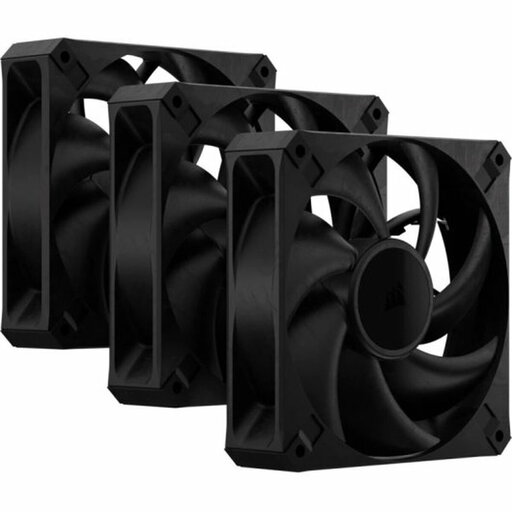
Why it suits this profile: A practical choice if you want to fill several fan positions in your case without needing RGB lighting. The set contains three black 120mm fans.
The product listing specifies PWM control and a 4-pin connection. Bear in mind that it’s 30 mm thick, so check the available clearance before installation.
Three fans, up to 2,000 RPM, stated airflow of 72 CFM and PWM support. RGB isn’t included, according to the product information.

Why it suits this profile: Designed for PC builders who want to combine multiple fans, cable management and RGB lighting in one system.
The set includes an iCUE LINK System Hub. This makes it less likely that you’ll need to find a separate controller after purchase.
Three fans, 400–2,100 RPM, stated airflow of 74.2 CFM, PWM control and eight RGB LEDs per fan, according to the product information.
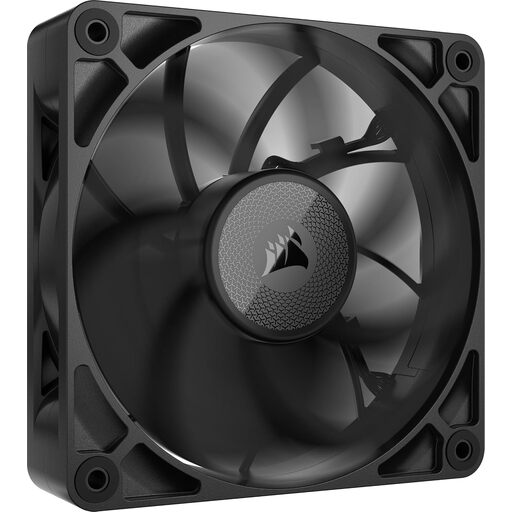
Why it suits this profile: A good option if you’re looking for an additional fan for an existing iCUE LINK setup or need extra pressure on a radiator.
At 30 mm thick, this fan makes it essential to check the measurements. That helps you avoid buying a powerful fan that won’t fit between the radiator, memory or side panel.
The listed model runs at 400–2,000 RPM and has stated airflow of 71.6 CFM and static pressure of 4.18 mmH2O.
We’ve put together a complete, up-to-date list of products that meet these strict selection criteria and the applicable European safety regulations.
Usually, fit intake fans at the front or bottom of the case, and use the rear or top for exhaust. Check the arrows on the frame to see which way the air will flow. Turn off the computer completely, unplug it from the mains and keep cables clear of the fan blades.
Then set an appropriate fan curve in the BIOS/UEFI or compatible software. Clean away dust regularly with compressed air, holding the fan firmly in place while you do so. Unusual vibrations or a new rattling noise are signs that you should check the installation and cables.
No. The case needs to have 120 mm mounting points. Check the fan thickness too, especially for 30 mm-thick models and radiator installations.
A PWM case fan typically uses a 4-pin connector and lets the motherboard adjust its speed more precisely. This helps you balance airflow and noise.
It depends on your case, hardware and preferred airflow. A Corsair 3-pack of fans is a practical option for a setup with several intake and exhaust positions. Check in advance how many fan headers or controller connections are available.
