Choose a controller based on the system and input methods supported by the game; a PC controller won’t automatically work with a console. For Overcooked! 2, Team17 says two players can share one keyboard when playing locally on PC, while Nintendo specifies one Joy-Con per player for the Switch version. So first count the usable controls you already have, then choose an extra controller and decide whether a wired or wireless connection is right for you.
Who is this guide for?
PC players sharing one screen
You want to play together on one computer and find out whether keyboard controls will do, or whether separate controllers would be more convenient. Team17 says two players can share a keyboard when playing Overcooked! 2 locally; check the available input options for any other game.
Switch players with friends or family
You want several players to join in on one Switch or Switch 2, so you need to match the game with the Joy-Cons and any extra controllers you have. Nintendo specifies one Joy-Con per local player for Overcooked! 2.
Console players adding another player
You play on Xbox or PS5 and want a controller that works with your console, without confusing PC compatibility with console compatibility. Xbox Support and PlayStation Support explain how to connect their own controllers to their respective platforms.
What should you look for when buying?
First check that the system and game support the controller, then count how many controls you need. Finally, consider the connection, playing distance and power supply.
| What to consider |
What should you check? |
Who is this important for? |
| System and game |
Check that the exact controller model is compatible with your PC or console, operating system and game. A stated PC connection doesn’t automatically confirm support on a console. |
If I play on a particular PC or console, I want to know in advance whether the game will recognise the controller. Around 36% of consumers prioritise compatibility with their system and game above all else. |
| Number of controls |
Count the players and the input methods available to them. Team17 says two players can share a keyboard on PC in Overcooked! 2; Nintendo specifies one Joy-Con per player for the Switch version. |
I want everyone to be able to join in without buying a controller I don’t need. Around 29% of consumers prioritise having enough controls for all players. |
| Connection and distance |
Check that the cable will reach your playing area and that your device and game support the USB or Bluetooth connection you plan to use. |
If my playing area isn’t close to the connection point, I want to know whether a cable is practical or wireless pairing would be a better fit. Around 21% of consumers prioritise playing distance and connection above all else. |
| Power and what’s included |
Check the power supply and what comes with the exact model. Also make sure your existing controls and playing set-up are suitable. |
I want to factor in charging, batteries or any extra items I might need before buying. Around 14% of consumers prioritise additional purchases and running costs. |
Common buying mistakes
-
Assuming a PC controller will work with every console
A controller listed for Windows won’t automatically work with Xbox, PlayStation or Switch. The 8BitDo Ultimate 2C Wired lists Windows and Android; the GameSir G7 SE also lists certain Xbox consoles.
Compare the exact model with your system and check that the game supports the controller as an input device.
-
Buying extra controllers before counting the controls you already have
What you need depends on the game and platform. For Overcooked! 2, Team17 says two players can share a keyboard on PC; Nintendo specifies one Joy-Con per player on Switch.
First check how local play works, then count only the compatible controls you’re still missing.
-
Expecting a wired Switch controller to work in every set-up
The manufacturer states that the PowerA Enhanced Wired Controller can only be used when the Switch is in its dock. This limitation applies to that model, not to all wired controllers.
For a wired Switch controller, check the required set-up, connections and supported playing style.
You may therefore need a different playing set-up or another controller.
Brands to consider
Microsoft Xbox
Controllers for Xbox and supported Windows PCs may be worth considering if you switch between those systems.
- Microsoft lists USB, Bluetooth and an Xbox Wireless Adapter as connection options for Windows.
- You’ll need a suitable PC for Bluetooth. Also check that the specific game supports the controller and what power supply the model uses.
Nintendo
Joy-Cons and the Nintendo Switch Pro Controller are options to consider for local play on Switch systems. Check whether the Joy-Cons you already have are enough for each game.
- Nintendo specifies one Joy-Con per local player for Overcooked! 2. According to Nintendo’s pairing instructions, the original Switch Pro Controller can also be paired with Switch 2.
- Nintendo says Joy-Con 2 controllers only work with Switch 2; don’t confuse them with Joy-Cons for the original Switch.
Sony PlayStation
The DualSense is a platform-specific option for PS5 players looking for an extra controller.
- PlayStation Support explains how to connect to compatible computers via USB and Bluetooth.
- A PC connection doesn’t confirm that a particular game supports the controller or all of its DualSense features.
8BitDo
The Ultimate 2C Wired is a wired option for playing on Windows, provided the cable reaches your playing area.
- 8BitDo lists Windows 10 and later and a USB connection for this model; the cable is included.
- The listed platform specifications don’t include Xbox, PlayStation or Switch support for this model.
GameSir
The G7 SE is a wired option for the Xbox systems and Windows versions listed by GameSir for this model.
- GameSir lists USB-C and compatibility with Xbox Series X|S, Xbox One and Windows 10/11.
- This model is listed as wired; wireless play isn’t among its stated connection options.
Controllers at Joybuy
This selection includes controllers for PS5, Nintendo Switch systems, Xbox and Windows PCs, with both wired and wireless models. Check that each model supports the game and playing set-up you have in mind.
 No image available
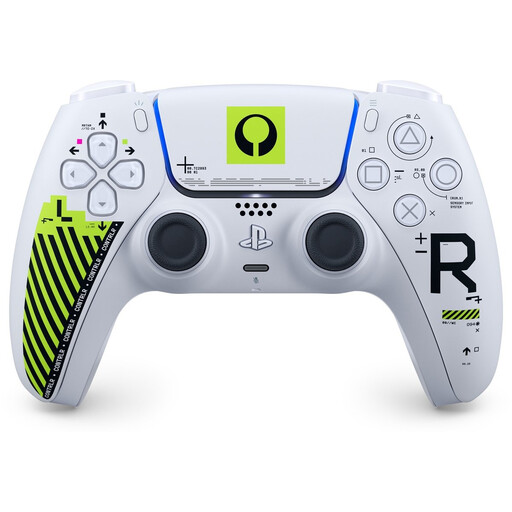
Sony PS5 DualSense Wireless Controller Marathon Limited Edition
A PS5 controller for anyone who wants to add another player on that console.
The product description lists Bluetooth or USB-C connections to PC, Mac and mobile devices. Check whether the game supports the connection you want to use.
View at Joybuy
 No image available
Turtle Beach Afterglow Wave Wireless Controller
A wireless option for playing on one of the listed Switch systems. Check the game and playing style before choosing an extra controller.
The product description lists Bluetooth, a rechargeable battery offering up to 40 hours of use, four RGB modes and two programmable buttons. Compatible systems listed are Switch 2, Switch, Switch Lite and Switch OLED.
View at Joybuy
 No image available
Hori Horipad Turbo Wired Controller, Pokemon Eevee Cottage Core Edition
A wired controller for the listed Switch systems, if a USB connection suits your playing area.
The product description lists USB and compatibility with Switch, Switch 2 and Switch OLED. It also states that the USB cable isn’t included.
View at Joybuy
 No image available
Wireless game controller for Switch and PC
A wireless option for the listed Switch and PC set-ups. Check that the game will recognise this controller.
The product title mentions dual vibration and gyro. The product description lists wireless control for Switch and PC.
View at Joybuy
 No image available
Xbox Wireless Controller Robot White
An option for playing on Xbox or a supported Windows PC; the game must also recognise the controller.
The product description lists Xbox Series X|S, Xbox One, Windows 10 PCs and Android. The listed connections are Xbox Wireless, Bluetooth and USB-C.
View at Joybuy
Frequently asked questions
Do you need to buy two controllers for two players on one PC?
Not necessarily for Overcooked! 2: Team17 says two players can share the keyboard when playing locally on PC. Check which input methods another cooking game supports.
Can you use any Joy-Con 2 with an original Nintendo Switch?
No. Nintendo says Joy-Con 2 controllers only work with Switch 2. Whether a Joy-Con can be used as a separate controller also depends on the game and playing style.
How do you pair an Xbox controller wirelessly with a Windows PC?
Microsoft explains how to pair it using the Pair button and Windows Bluetooth settings. Check that your PC has Bluetooth and that your Windows version is supported; USB is another documented connection option.
What can you do if a controller turns out to be faulty after purchase?
According to the Dutch government, if a product isn’t working properly, the seller must provide a solution. An additional commercial guarantee doesn’t replace your statutory rights.
Can you return a controller bought online in the Netherlands?
According to the Dutch government, distance sales are often covered by a 14-day cooling-off period. Check the terms of your specific purchase; this is separate from your statutory rights if the product is faulty.


