Start with the console or PC and the local play options for your cooking game. Then count how many players can join in using the controllers you already own. In Overcooked! 2 on Nintendo Switch, Nintendo says each chef can use a single Joy-Con, while a full gamepad is for one player. If you play with a wired controller, make sure its cable won’t block the route to the kitchen.
Who is this guide for?
Players with an existing console
You want to check first whether an extra controller works with your system and cooking game. Check the platform and the local play options for the specific game: a Bluetooth connection alone doesn’t mean a controller will work with every console.
Households playing and cooking together in-game
You want enough individual controls for everyone playing on the same screen, without buying an extra set if the Joy-Cons you already own will do the job. Nintendo describes how to use individual Joy-Cons to play Overcooked! 2 on Switch.
Players with a busy walkway
If you walk between your gaming area and a nearby kitchen, you’ll want to know whether a cable could get in the way. Compare a wireless option with a wired controller, and check how the cable would run in your setup.
What should you look for in a controller?
First check that it’s compatible with your device and game. Then count the controls available for each player, and decide whether a cable will work in your space.
| Concern |
What to check before buying |
Who does this matter to? |
| Device and game compatibility |
Check the exact platform, full model name, connection type and local play options for the game. |
If I want to play on my own console or PC, I want to be sure in advance that the game supports the controller. Around 33% of consumers put platform and game compatibility first. |
| Controls for every player |
Count the players and the individual controllers I already have that work with the specific game. |
When we play on the same screen with other people, I want everyone to be able to play at the same time without buying an extra set unnecessarily. Around 27% of consumers put having enough controls for all local players first. |
| Cables and room to move |
Check the distance to the device and keep the gaming cable out of the route to the kitchen. |
If the route between the gaming area and the kitchen is busy, I don’t want to trip over a controller cable. For around 20% of consumers, keeping the walkway clear is their main concern. |
| Grip and power |
Check how the exact model is powered and whether you want a wired or wireless setup. |
When we play together regularly, I want controls and a power supply that suit the way I play. Around 20% of consumers prioritise grip and how the controller is charged or powered. |
Common buying mistakes
-
Automatically assuming you need to buy two new controllers if you have a Joy-Con pair
In Overcooked! 2 on Switch, Nintendo says each chef can use a single Joy-Con. If the Joy-Cons you already own are suitable and there are enough for all the players, you may not need to buy any more.
First count the players and the individual Joy-Cons supported by the game.
Buying an extra set when your existing individual Joy-Cons already provide enough controls could be an unnecessary purchase.
-
Choosing a wired controller without checking your setup
According to PowerA, the Enhanced Wired Controller for Switch only works when the Switch is docked, and it has a 3 m cable. In a room with a walkway to the kitchen, this could affect where you place it.
Measure the distance to the device and keep the cable out of the walkway.
You may need to rearrange your gaming area to keep the cable out of the way.
-
Confusing the 8BitDo Ultimate 2C Wireless with the Ultimate 2C Bluetooth
8BitDo lists Windows and Android for the Wireless version, but Switch for the separate Bluetooth version. The similar names don’t mean the models are intended for the same platforms.
Check the full model name and platform support for your device.
-
Assuming the manufacturer’s warranty covers all your warranty rights
ACM ConsuWijzer distinguishes between a manufacturer’s warranty and your statutory rights. The seller is responsible under the statutory warranty if, with normal use, the product doesn’t do what you could reasonably expect it to do.
Assess any extra warranty for the additional cover it provides, and remember your statutory rights with the seller.
An extra warranty may be unnecessary if it doesn’t provide relevant additional cover.
Brands to consider
Nintendo
Nintendo distinguishes between using an individual Joy-Con and a full Switch gamepad.
- Nintendo confirms that you can play Overcooked! 2 on Switch using one Joy-Con per chef.
- According to Nintendo, original Joy-Cons can be used wirelessly with Switch 2, but they can’t be charged on that console. Joy-Con 2 is for Switch 2 only.
Sony PlayStation
The DualSense is an option if you’re looking for a gamepad for PS5.
- Sony also lists PC, Mac and mobile devices as compatible with the white DualSense.
- That list of compatible devices doesn’t mean every PC game will work without setup. When a problem with Overcooked! 2 was reported, Team17 referred players to the Steam Input settings.
Xbox
The Xbox Wireless Controller is an option for compatible Xbox systems and Windows PCs.
- Xbox lists support for Xbox consoles and Windows PCs, as well as Bluetooth.
- Check support for your specific game and connection method separately: a Bluetooth listing doesn’t confirm that the controller will work with every console.
PowerA
The Enhanced Wired Controller is a wired option for use with a docked Switch.
- PowerA lists a detachable 3 m cable for this model and says it doesn’t need batteries.
- According to PowerA, this model doesn’t support motion controls or amiibo NFC, and isn’t intended for use with an undocked Switch.
8BitDo
The Ultimate 2C Wireless and Ultimate 2C Bluetooth are separate versions with different platform support.
- 8BitDo lists Windows and Android for the Wireless version, and Switch for the Bluetooth version.
- For Switch 2, 8BitDo specifies firmware and system version requirements for the Ultimate 2C Bluetooth. The Wireless version’s specifications don’t confirm Switch support.
Controllers at Joybuy
This selection includes wireless gamepads for PS5 and Nintendo Switch, as well as a Joy-Con pair for local play on Switch. Before buying, check that your chosen model is compatible with your device and the local play options for your game.
 No image available
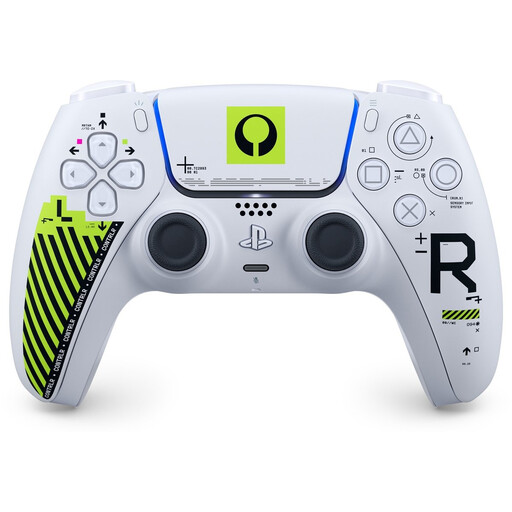
Sony PS5 DualSense Wireless Controller – Marathon Limited Edition
An option if you’re looking for a wireless gamepad for a PS5 setup; check support for your specific game.
Model version: Marathon Limited Edition.
View at Joybuy
 No image available
NAXSIR Wireless Gamepad for Switch – Bluetooth Controller
An option to consider for a Switch setup if you’re looking for a wireless gamepad; check that it’s supported by the game you want to play.
The product name mentions Switch and Bluetooth.
View at Joybuy
 No image available
Turtle Beach Afterglow Wave Wireless Controller (Bluetooth) – Switch 2, Switch, Switch Lite and Switch OLED
A wireless controller to consider for the Switch systems listed in the product name; check that it works with your specific game and play mode.
The product name mentions Bluetooth, RGB and TMR sticks.
View at Joybuy
 No image available
KONIX Nintendo Switch and Switch OLED JoyPad Controller Pair – blue and red
A controller pair to consider if you’re looking for two controllers for a Switch setup; check that they’re supported by your game and play mode.
The product name mentions Switch 2 compatibility, an 8-hour battery life, vibration and a blue and red design. The stated battery life is up to 8 hours per charge.
View at Joybuy
 No image available
Nintendo Switch Joy-Con pair – neon green and neon pink
An option for local play on Switch if your game supports individual Joy-Cons; Nintendo confirms this play style for Overcooked! 2.
Version: Joy-Con pair in neon green and neon pink.
View at Joybuy
Frequently asked questions
Does every player need to buy a full gamepad for Overcooked! 2 on Switch?
No, not if you have individual Joy-Cons available and the game supports this way of playing. Nintendo describes Overcooked! 2 on Switch as supporting up to four chefs, each using a Joy-Con. So first count how many suitable individual Joy-Cons you already own.
Why aren’t all connected controllers recognised at the same time?
Check the settings for the game and platform you’re playing on. When a problem with Overcooked! 2 on PC was reported, Team17 advised checking the relevant Steam Input settings. Nintendo also notes a limit on the number of connected wireless controllers when Bluetooth audio is connected.
Can I charge original Joy-Cons on a Switch 2?
No. Nintendo says original Joy-Cons can be used wirelessly with Switch 2, but can’t be charged on that console. To charge them, use an original Switch or a compatible charging accessory.
Does the manufacturer’s warranty provide full warranty cover in the Netherlands?
No. According to ACM ConsuWijzer, statutory rights apply alongside the manufacturer’s warranty. The seller is responsible if, with normal use, the product doesn’t do what you could reasonably expect it to do.


