What should you look for when buying?
First, check your console or PC and the exact version of the game. Then compare how many controllers you need, how much room you have for cables and how the controllers are powered.
| Buying concern |
What should you check? |
Who is this important for? |
| Compatibility |
Check your console or PC, the exact version of the game and the supported local play mode. |
I want to know in advance whether my controller works with both the system and the game. Around 36% of consumers say compatibility is their main buying concern. |
| Keeping the walkway clear |
Check whether your chosen controller is wireless and where any cables will be while you play. |
I don’t want a play cable crossing the walkway in my narrow living room. For around 29% of consumers, keeping the walkway clear is their main buying concern. |
| Enough controllers |
Count the usable controllers you already have and compare that number with the number of players. |
I want everyone to join in without buying more controllers than I need. Around 21% of consumers put the number of available player positions first when choosing. |
| Grip and power |
Check the controller’s shape, how it’s recharged and whether batteries or a cable are included. |
I want a controller that feels comfortable in my hands and suits the way I power it. Around 14% of consumers say grip and power are their top priorities. |
Controllers at Joybuy
These controllers are intended for wireless play with Switch and Switch 2 systems, PS5, Xbox or a compatible PC. Check that your specific model and game work together.
 No image available
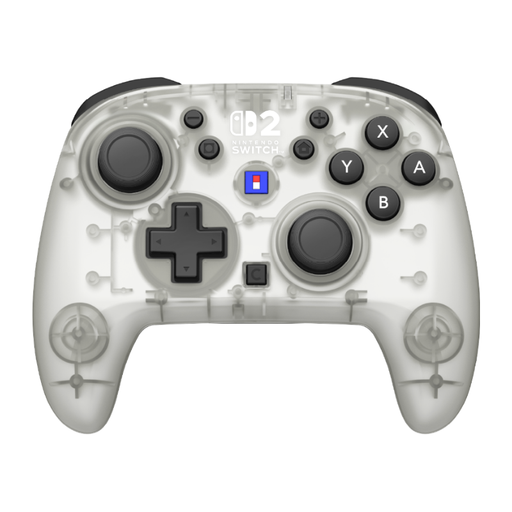
Hori Horipad Turbo Frost Wireless Controller for Nintendo Switch and Switch 2
A wireless controller for the Switch systems listed; check that your game and console support this version.
The product title states a battery life of up to 10 hours and a C button. According to the product information, it doesn’t have vibration or HD rumble 2.
View at Joybuy
 No image available
PS5 DualSense wireless controller V3, Cosmic Red
For a PS5 setup; if you’re using a PC, check that the game supports the controller and the features you want.
The product information lists Bluetooth, a built-in rechargeable battery, haptic feedback and adaptive triggers. Sony says the extra features depend on the game and connection.
View at Joybuy
 No image available
Xbox Wireless Controller, Robot White
A wireless controller for supported Xbox systems and Windows PCs; check that your game is compatible too.
The product information lists Xbox Wireless, Bluetooth and AA batteries, with a stated battery life of up to 40 hours. Check whether batteries are included with this version.
View at Joybuy
 No image available
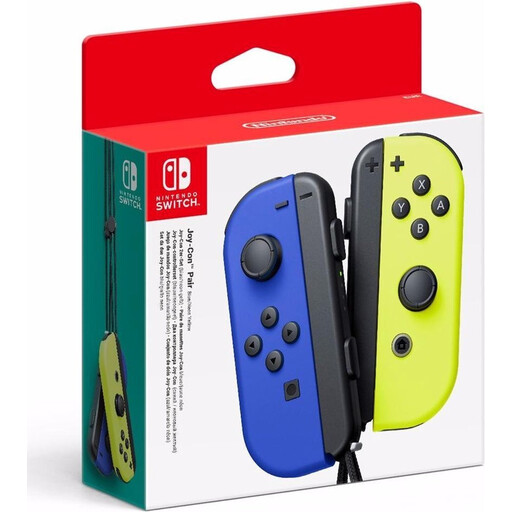
Nintendo Switch Joy-Con pair, Neon Blue and Neon Yellow
A left and right Joy-Con for players who want to use the controllers individually with a supported Switch setup.
Nintendo describes local play in Overcooked! 2 on Switch with one Joy-Con per player. Check the game version and compatibility with your console.
View at Joybuy
 No image available
GameSir Cyclone 2 Multiplatform Controller, White-Bundle Edition
The product information lists Switch, PC, iOS and Android; before you buy, check that your specific game and device are supported.
Listed connection options include Bluetooth, cable and dongle. This bundle includes a charging dock and an 860 mAh battery.
View at Joybuy
Frequently asked questions
Do you need an online subscription for local Overcooked! 2 on Switch?
For local play, Nintendo lists one compatible controller per player, not an online subscription. Nintendo says a paid Nintendo Switch Online membership is needed for online play; check which play mode you want to use.
How do you set up a single Joy-Con horizontally?
Nintendo says to select Controllers, then Change Grip/Order on the Switch, hold the Joy-Con horizontally and press SL and SR. This works with software that supports horizontal Joy-Con.
Can you use and charge older Joy-Con on a Switch 2?
According to Nintendo, you can pair older Joy-Con wirelessly with Switch 2, but you can’t attach them to the console. You can charge them with an original Switch or a suitable licensed charging accessory.
Is a rechargeable battery always included?
No, it varies by controller and version. Nintendo and PowerA list a rechargeable battery for the Switch models mentioned here; for other versions, check what’s included. A USB-C cable in an Xbox bundle doesn’t, by itself, prove that a rechargeable battery is included.
What are your rights if a controller bought online isn’t working properly?
When you buy online from a business, you generally have 14 days to change your mind, subject to legal exceptions, according to the Government of the Netherlands. A product must also be of satisfactory quality; the Netherlands has no fixed statutory guarantee period. If there’s a fault, contact the seller.


