
Switch players inviting extra chefs
You want to know how many individual controllers you need for the same Switch and game before buying another pair. Nintendo says that Overcooked! 2 on Switch supports one Joy-Con per player.


Start by choosing a controller that suits your console or PC, the version of the cooking game and the number of players. In Overcooked! 2 on Nintendo Switch, each player can use a single Joy-Con; a full gamepad may feel more comfortable if you prefer a controller with two grips. Wireless play keeps cables out of your way, while a wired controller is only suitable if its connection and cable can be positioned safely in your gaming space. Check how many controllers you already own before buying more.
You want to know how many individual controllers you need for the same Switch and game before buying another pair. Nintendo says that Overcooked! 2 on Switch supports one Joy-Con per player.
You want to play together on one screen and weigh up whether wireless play is more convenient than running a cable across the room. The wired PowerA controller we looked at has a 3 m cable and, according to the manufacturer, is designed for use with the Switch in its dock.
You want to use a full gamepad with your existing console or PC. So check that the exact model is compatible and that the game supports the controller features you want.
First, check that the controller works with your system and game. Then make sure there are enough controls for everyone and that the connection suits your space.
| Buying priority | What should you check? | Who is this important for? |
|---|---|---|
| Compatibility | Check your console or PC, the game version and the controller’s full model name. Nintendo says that Joy-Con 2 only work with Switch 2. | If you’re buying a controller for a specific system, you’ll want to make sure it works with your game. Around 36% of consumers prioritise compatibility. |
| Controls for everyone | Count the players and the working controllers you already have. Check whether your game supports individual Joy-Con. | If you’re having guests over to play, you’ll want to know whether everyone can use a single Joy-Con before buying extra gamepads. Around 29% of consumers prioritise having enough controls for all players. |
| Cables and playing space | Think about where everyone will sit and whether a 3 m cable can be positioned safely. The wired PowerA controller we looked at is designed for use with the Switch in its dock. | In a small room, you’ll want to play together without a controller cable crossing a seating or walking route. Around 21% of consumers prioritise having a clear space to play. |
| Power and aftercare | Check how your model is powered and which accessories it needs. If it develops a fault, keep information about your rights when dealing with the retailer. | If you want your controller ready for when guests arrive, factor in batteries, charging and what to do if it develops a fault. Around 14% of consumers put power and aftercare first. |
For Overcooked! 2 on Switch, Nintendo says each player can use one individual Joy-Con. If you already have enough working Joy-Con, you may not need another pair.
Count the players and test the Joy-Con you already own with the game version you want to play before buying more.
Nintendo says that Joy-Con 2 only work with Switch 2, so they are not a replacement for controllers on the original Switch.
Check which generation of Switch you have and compare it with the controller’s compatibility.
According to the manufacturer, the PowerA Enhanced Wired Controller we looked at is designed for use only when the Switch is in its dock.
Consider how you play and position the cable so it doesn’t cross a seating or walking route.
The Netherlands Authority for Consumers and Markets describes Nintendo’s commitment to repair Joy-Con with drift or response problems free of charge, following the procedure set out by Nintendo, even after the statutory warranty period.
Check Nintendo’s current repair terms, and contact the retailer too if your product isn’t working as it should.
Joy-Con are a good option for individual controls on Switch; Joy-Con 2 are a separate range for Switch 2.
The Xbox Wireless Controller we looked at is a full gamepad for supported Xbox consoles and Windows PCs.
Sony says the DualSense for PS5 can also connect to devices including Windows PCs via USB-C or Bluetooth.
The Ultimate 2C Bluetooth is a full gamepad for Switch; the Ultimate 2C Wireless is a separate version for Windows and Android.
The Enhanced Wired Controller we looked at is a wired gamepad for Switch when the console is in its dock.
This selection includes full gamepads for different systems and individual Joy-Con for Nintendo Switch and Switch 2. Before buying, check that the specific controller and the game you want to play work with your system.
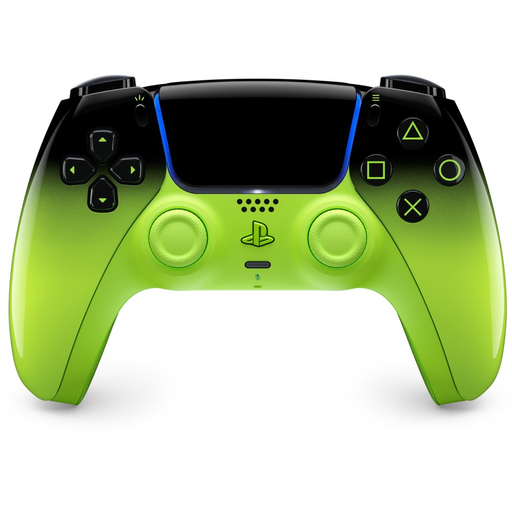 No image available
A full wireless gamepad for anyone looking for a controller for PlayStation 5.
The product name also lists Mac, Android, iOS and PC; check that your specific game and the features you want are supported.
 No image available
A full gamepad for anyone looking for a controller for several of the systems listed; check that it’s supported by the specific game you want to play.
The product name lists PC, Switch, iOS and Android, TMR sticks, a 1000 Hz polling rate, Hall and Micro triggers, RGB lighting and a charging dock.
 No image available
A full gamepad for anyone who plays on a Nintendo Switch and prefers to use a Pro Controller.
Check that this controller is compatible with your console and the cooking game you want to play.
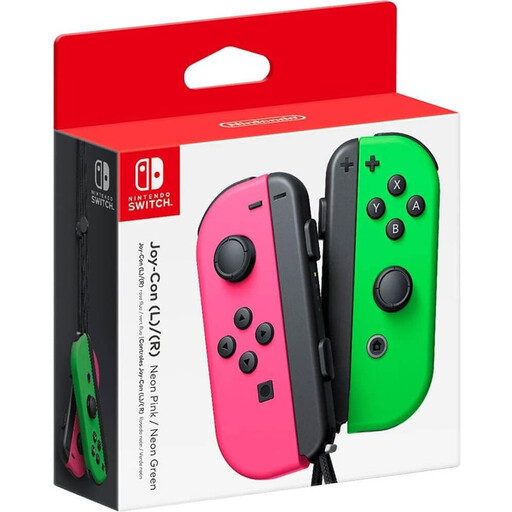 No image available
A pair of individual controllers for anyone who wants to invite extra players to join in on Nintendo Switch. Nintendo says that a Joy-Con can be used on its own in supported games.
Check how many players your game supports and count the Joy-Con you already own.
 No image available
An extra pair of Joy-Con 2 for anyone looking for individual controls on Nintendo Switch 2.
Nintendo says that Joy-Con 2 only work with Switch 2. Check whether your game supports local multiplayer with these controllers.
No, not necessarily: Nintendo says that the Switch version supports one individual Joy-Con per player, for up to four players. Count the Joy-Con you already have and check which controls another cooking game supports.
Not both ways. According to Nintendo, Joy-Con 2 only work with Switch 2; original Joy-Con can connect wirelessly to Switch 2, but can’t be attached to the console. You’ll need a compatible system or accessory to charge original Joy-Con on Switch 2.
First, check that your controller’s connection is suitable for your system and pair it in advance. For the wired PowerA controller we looked at, this means playing with the Switch in its dock; if you’re using individual Joy-Con, check beforehand that they’re sufficiently charged.
In the Netherlands, the retailer is your point of contact under the statutory warranty if the product doesn’t meet the reasonable expectations you had when buying it. A manufacturer’s warranty or paid extended warranty doesn’t replace this right.
The Dutch government says that online purchases usually come with a 14-day cooling-off period. Check the retailer’s information and the terms that apply to your purchase before buying; “usually” isn’t an unconditional promise for every transaction.