What should you look for when buying?
First check the console, game and game mode. Then count the controllers you already have and how many players need to join in at the same time.
| What to consider |
What should you check? |
Who should consider this? |
| Console and game mode |
Make a note of the full console name, game title and game mode. Check which controller layout that specific minigame requires. |
If I want to be sure the game mode I’m after works on the console we already own, I check that combination before buying. Around 36% of consumers prioritise compatibility with their console and game. |
| Number of players |
Count the compatible controllers you already have at home and compare that with the number of players and the controls required for each game mode. |
If you want to play with housemates at the same time, you’ll need enough controllers that the game actually supports. Around 29% of consumers give top priority to the number of simultaneous players and compatible controls. |
| Connection and space |
Check whether a cable can reach the seating area and whether a wireless model uses the right connection for your device. |
If you share the console and players sit around the same table or sofa, the connection needs to suit your setup. Around 21% of consumers prioritise connectivity and having enough space. |
| Existing controllers and charging |
Take stock of what you already have, how the controllers are charged and which accessories are included in a set. |
If you’d rather not buy another controller unnecessarily, count the ones you already own and check that they work with your console. Around 14% of consumers focus on existing equipment, charging and additional running costs. |
Controllers at Joybuy
This selection includes controllers for Nintendo Switch, Switch 2 and Xbox or PC setups. Before buying, check that your chosen game and game mode support the controls you want to use.
 No image available
Xbox Wireless Controller Robot White
An option if you play on Xbox or a compatible Windows PC and want an extra gamepad. Check whether your chosen game supports local multiplayer with multiple controllers.
View at Joybuy
 No image available
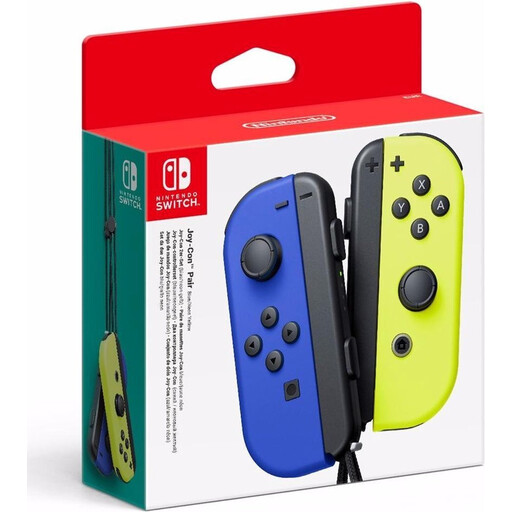
Nintendo Switch Joy-Con Pair Neon Blue/Neon Yellow
Suitable for a Switch game that supports separate Joy-Cons. Check how many players can use them for each game and game mode.
View at Joybuy
 No image available
Nintendo Switch Pro Controller Black
Worth considering for Switch game modes that use standard gamepad controls. Nintendo excludes this controller from Jamboree minigames that require motion controls.
View at Joybuy
 No image available
BEITONG PanGu Custom Modular Controller Wireless/Bluetooth
An option to compare for a compatible Switch or PC setup. Compatibility with your device doesn’t guarantee that your chosen game supports multiple local controllers.
The product name lists interchangeable modules for joysticks, buttons, D-pads and motors. Check that the stated platform support is right for your system.
View at Joybuy
 No image available
Nintendo Switch 2 Official Joy-Con 2 Pair Light Blue/Light Red
For extra controls on Switch 2 when a game requires separate controllers or motion controls. Nintendo says that Joy-Con 2 only works with Switch 2.
The set includes one left and one right Joy-Con 2. Check how many controllers already come with your console.
View at Joybuy
Frequently asked questions
Are two separate Joy-Cons automatically enough for two players?
Not always; it depends on the game and the supported play style. Nintendo specifies one Joy-Con per player for Super Mario Party. For other games and game modes, check which controller layout is supported.
How do you pair original Joy-Cons for a game night on Switch?
According to Nintendo, open ‘Controllers’ from the HOME Menu, then select ‘Change Grip/Order’. Press and hold the SYNC button on the Joy-Con you want to pair for at least one second, then check the player layout in the game.
Do I need Nintendo Switch Online for local Jamboree minigames?
Nintendo lists a Switch Online membership and a copy of the game for each system as requirements for online play. Those online requirements don’t automatically apply when you play together on one system.
Does your Dutch statutory guarantee expire after two years or if you don’t have extra warranty cover?
No. ACM ConsuWijzer distinguishes between your statutory rights and a retailer’s or manufacturer’s warranty. The retailer remains responsible if a product, when used normally, doesn’t meet what you could reasonably expect from it. This doesn’t mean that every controller has a fixed statutory warranty period of two years.
Where can you take a worn-out controller or used batteries?
According to the Dutch government, you can take unwanted electrical equipment to a collection point or recycling centre, among other places. When you buy a new, similar item, a shop must take back the old one. Used batteries should go to a battery collection point, not in the bin.


