
Group organiser with a Switch
You want to know whether individual Joy-Cons will be enough and how many players your platform game allows at once. Nintendo explains how to pair and use controllers on Switch.


Start by checking your game’s local player limit and your system’s controller limit: adding extra controllers won’t automatically raise either limit. Individual Joy-Cons can provide extra player slots in supported Switch and Switch 2 games; choose a full gamepad if that’s the layout the game requires or a player prefers. Then check that the controller is compatible with your system and game, and suits your setup.
You want to know whether individual Joy-Cons will be enough and how many players your platform game allows at once. Nintendo explains how to pair and use controllers on Switch.
You’re looking for gamepads and a connection that work with a local multiplayer game on your PC. Logitech G explains the F310’s PC connection and input modes.
You already own a console and want to choose extra controllers without confusing compatibility between Switch, Switch 2 and PS5. Nintendo and PlayStation explain which systems their controllers support.
First check how many players your game supports locally. Then compare the controller layout, system compatibility and connection type. Nintendo generally lists a maximum of eight wirelessly synchronised controllers for Switch and Switch 2, but a game’s limit may be lower.
| What to consider | What should you check? | Who is this more important for? |
|---|---|---|
| Compatibility | Make a note of the exact system and game, then check the full model name and supported play style. | I want to make sure my game and console work together first. Around 33% of consumers make compatibility their top priority. |
| Player slots | Check the local player limit for each game, then count the controllers it supports. | When I’m playing with a big group, I want to know how many guests can actually join in at once. Around 27% of consumers prioritise the number of player slots. |
| Controls | Check whether the game supports one individual Joy-Con or requires a full controller. | I choose the layout that best suits the actions in my platform game. Around 20% of consumers prioritise the controller layout. |
| Connection and charging | Measure the distance to the sofa and check the available connections and charging options. | If you want to have several controllers ready, check that the cables and charging setup work for your seating area. Around 20% prioritise getting ready for a gaming session. |
A system may pair more controllers than a particular game supports for local play. For example, Nintendo lists a maximum of four players in Super Mario Bros. Wonder on one Switch or Switch 2.
Check your platform game’s local player limit first, then only buy controllers the game supports.
Extra controllers won’t add more simultaneous player slots once the game has reached its limit.
Joy-Con 2 doesn’t work with the original Switch. Models with similar names may also be intended for different systems.
Check the full model name and confirm official support for your system and game.
According to PowerA, the wired PowerA controller reviewed here only works with the Switch in its dock and has a 3-metre cable. Make sure the cable suits your console setup and seating position.
Before choosing a controller, check the required console mode, USB port and distance from the dock to the sofa.
The cable may affect where players sit and how the console is positioned.
Nintendo says the Joy-Con 2 Charging Grip is not included as standard with a Switch 2 bundle currently available.
Decide how you’ll charge extra controllers between gaming sessions and whether you’ll need a separate charging grip.
You may need to buy a separate charging grip for extra controllers.
The Joy-Con, Joy-Con 2 and Pro Controller ranges are designed for use with Nintendo systems.
The wired F310 is a PC option for players who want to use USB and XInput or DirectInput modes.
PowerA makes wired Switch controllers; the NSGP0142-01 model reviewed here also lists Switch 2 support.
The Ultimate 2C models reviewed here differ in their stated platform support.
The DualSense is a good option for households adding controllers for a PS5.
This selection includes wireless controllers for PS5 and Switch, Joy-Con sets that can be shared between players, and a wired gamepad for PC, Switch and more. Before buying, check that your game supports the controller layout you’ve chosen.
 No image available
This wireless DualSense controller is an option for a group playing on PS5; PlayStation lists a maximum of four controllers in use at the same time on PS5.
The product name also lists use with PC, Mac and mobile devices. Support and features may vary by device and game.
 No image available
A full controller for players who prefer not to use individual Joy-Cons on Switch. Check that your chosen game supports this control layout.
Nintendo says an original Switch Pro Controller can be used wirelessly with Switch 2. This is not a Switch 2 Pro Controller.
 No image available
This pair can provide a shareable control option when a Switch game supports one individual Joy-Con per player.
The local player limit still depends on the game, so check it before expecting to add more player slots.
 No image available
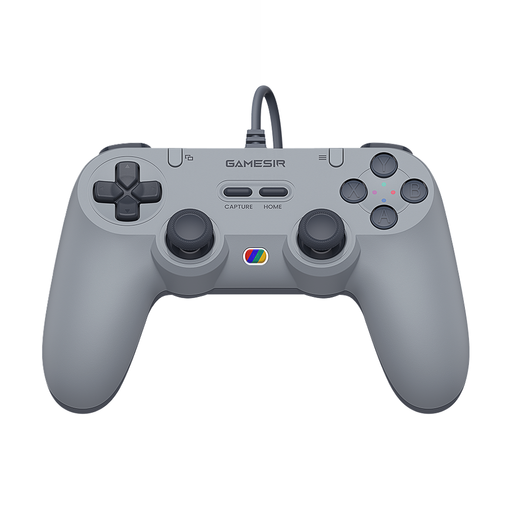
This wired gamepad is an option if you’re looking for a cable connection. Measure the distance between your seat and the system.
The product name lists Switch, Android, iOS, PC and Steam. Also check that the specific game supports the controller on your device.
 No image available
This pair is designed for use with Switch 2; Nintendo says Joy-Con 2 doesn’t work with the original Switch.
Check whether the game supports one individual Joy-Con 2 per player. Nintendo says the separate Joy-Con 2 Charging Grip isn’t included as standard with a Switch 2 bundle currently available.
No. The number of connected controllers doesn’t determine how many players a game supports locally. Nintendo lists a maximum of four players in Super Mario Bros. Wonder on one Switch or Switch 2.
According to PowerA, connect the Switch to your TV through its dock, then plug the controller into a USB port on the dock. For the model reviewed here, check that the 3-metre cable reaches your seat.
Nintendo says Joy-Con 2 controllers can be charged while attached to a powered Switch 2, or with a Joy-Con 2 Charging Grip, sold separately. Nintendo says a full charge takes around 3.5 hours.
In the Netherlands, online purchases generally come with a statutory 14-day cooling-off period from delivery, according to ACM ConsuWijzer. This is separate from your rights if the product is faulty: if it breaks too soon during normal use, the retailer must put a legitimate fault right free of charge.