Don’t choose based only on the number of controllers in a pack. First check whether the puzzle game supports local co-op and what controls each player needs. In some Switch games, one Joy-Con held horizontally per player may be enough; on PC, Xbox or PS5, you’ll need a full controller if the game requires one. Wireless controllers keep walkways clear, while a wired controller means running a cable across your seating area.
Who is this guide for?
A Switch duo playing a puzzle game
You play side by side and want to know whether the Joy-Con you already own are enough. Whether one Joy-Con per player works depends on the game and Switch model; Nintendo describes this way of playing in games such as Snipperclips.
A PC duo in a small living room
You’re looking for two controllers that work with your PC game, without dealing with cables or the wrong input mode. Logitech lists XInput and DirectInput for the F310; check which mode your game uses too.
A console duo looking for a second gamepad
You already have an Xbox or PS5 and want to check whether the game needs a second full controller. Microsoft and PlayStation describe platform connections, but you should also check whether the specific game supports local co-op.
What should you look for when choosing?
First check the player input the game supports, then choose a controller to suit your platform, and finally make sure cables won’t cross a walkway in your seating area.
| What to consider |
What should you check? |
Who should prioritise this? |
| Game and platform support |
Check local co-op, the number of players and the controls required for your game and console version. |
I want to be sure we can play together and find out whether one Joy-Con per player is enough; around 36% of consumers prioritise compatibility. |
| Cables and room to move |
Check where your console or PC is positioned and whether a cable can be kept out of the way. |
I don’t want a cable between the seats in a small living room; around 29% of consumers prioritise room to move and cable management. |
| Controls for both players |
Compare the buttons and grip needed with what the game requires; a single Joy-Con is not the same as a full gamepad. |
I want the controls to suit the game for both players; around 21% of consumers say comfort and ease of control are their main consideration. |
| A complete set |
Count the usable controllers you already own and check which controllers and charging options come with the set you choose. |
I don’t want to buy a controller or charging accessory I don’t need; around 14% of consumers prioritise the cost of a complete two-player set. |
Common buying mistakes
-
Buying a second controller without checking the game’s controls
Some Switch games support one Joy-Con held horizontally per player, but this doesn’t work for every game. Nintendo gives Snipperclips as an example of a game that supports this.
Check the local multiplayer options and set up the controllers as separate players before buying an extra set.
-
Treating a Switch Lite like a standard Switch in TV mode
Nintendo states that Switch Lite does not support TV mode. Tabletop mode requires a suitable stand or accessory.
Check that the game supports tabletop mode, and make sure you have the stand and external controllers you need before choosing your setup.
-
Choosing a wired Switch controller for motion controls
PowerA states that the Spectra Enhanced Wired Controller can only be used with the Switch in its dock and does not have motion controls, IR, amiibo NFC or HD rumble.
Compare the features and limitations of the exact model with the controls the game requires.
-
Assuming a manufacturer’s warranty covers all your legal rights
ACM ConsuWijzer distinguishes between your statutory guarantee rights and a voluntary warranty from the retailer or manufacturer. In the Netherlands, statutory guarantee rights do not have a fixed two-year time limit.
Check your statutory rights first, then compare the terms of any additional warranty. For statutory guarantee claims, contact the retailer.
Relevant brands to compare
Nintendo
Joy-Con and Joy-Con 2 are options for supported Switch games with local multiplayer.
- Nintendo explains that, in some games, a Joy-Con can be used horizontally as a separate controller.
- Nintendo says older Joy-Con can be used wirelessly with Switch 2, but can’t be attached to the console; check which charging option is compatible.
Microsoft Xbox
The Xbox Wireless Controller is designed for supported Xbox and Windows setups when a full gamepad is needed.
- Microsoft lists Xbox, Windows PC and Bluetooth as compatible with the controller.
- A connection to the platform doesn’t automatically mean that your chosen co-op game supports two controllers.
Sony PlayStation
DualSense is a full controller for PS5 and supported PC games.
- PlayStation describes connecting to a Windows PC via USB-C or Bluetooth.
- PlayStation states that haptic feedback and adaptive triggers only work in supported games and under certain conditions.
Logitech G
The F310 is a wired PC gamepad for setups where a cable is suitable.
- Logitech lists XInput and DirectInput.
- According to Logitech, DirectInput requires software installation; the information provided does not support choosing it for Switch or PS5.
PowerA
The Spectra Enhanced Wired Controller is a specific wired option for using a Switch in its dock.
- PowerA lists a detachable 3 m cable for this model.
- According to PowerA, it does not have motion controls, IR, amiibo NFC or HD rumble; these limitations apply to this model.
8BitDo
The Ultimate 2C Wireless and Ultimate 2C Bluetooth are designed for different platforms, so choose the exact version that suits you.
- For the Wireless version, 8BitDo lists Windows via 2.4 GHz or cable, and Android via Bluetooth; the Bluetooth version is designed for Switch.
- For using the Bluetooth version with Switch 2, 8BitDo specifies a firmware requirement. Don’t assume the versions are interchangeable just because their names are similar.
Controllers on Joybuy
This selection includes Joy-Con pairs for supported Switch games and full wireless controllers for PS5 and Xbox setups, among others.
 No image available
KONIX JoyPad controller pair, blue and red
A pair for two players on Nintendo Switch, Switch OLED or Switch 2; check that the game supports the controls you need.
The product name lists an 8-hour battery life and vibration function.
View on Joybuy
 No image available
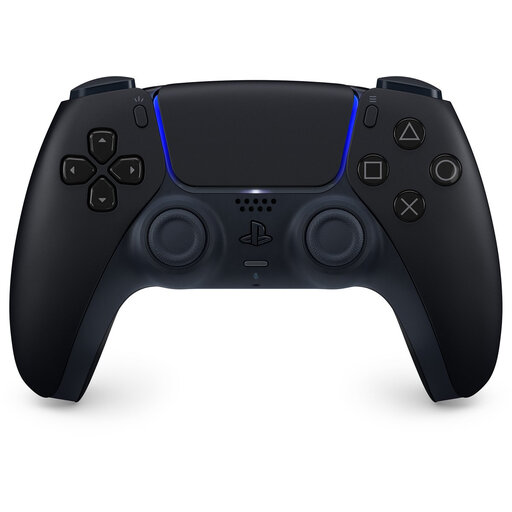
Sony PlayStation PS5 DualSense, Midnight Black
A full controller for a PS5 setup when the game requires those controls for the player.
PlayStation states that haptic feedback and adaptive triggers are only available in supported games and under certain conditions.
View on Joybuy
 No image available
Xbox Wireless Controller, Robot White
A full controller for a supported Xbox or Windows setup; check that the specific game supports your input method.
The product name identifies this as a wireless Xbox controller.
View on Joybuy
 No image available
Nintendo Switch Joy-Con pair, Neon Red/Neon Blue
A pair to consider if your Switch game lets each player use one Joy-Con.
Nintendo describes using a single Joy-Con horizontally in some games; don’t assume this applies to every puzzle game.
View on Joybuy
 No image available
Nintendo Switch 2 Joy-Con 2 pair, Light Blue/Light Red
A pair for local multiplayer on Switch 2 when the game supports Joy-Con 2 controls.
The product name identifies this as a Joy-Con 2 pair for Nintendo Switch 2.
View on Joybuy
Frequently asked questions
Can you play a puzzle game together on a standard Switch, with one Joy-Con each?
Yes, if the specific game supports horizontal controls with one Joy-Con per player. Nintendo gives Snipperclips as an example; set up each controller’s play style separately, and don’t assume this applies to every puzzle game.
Do existing Joy-Con controllers work with Switch 2?
Nintendo says you can sync existing Joy-Con wirelessly with Switch 2, but you can’t attach them to the console. Check your charging options too: older Joy-Con can be charged using a compatible earlier Switch or a suitable charging accessory.
What changes if you have a Switch Lite?
Switch Lite does not support TV mode. For a game that supports tabletop mode, you can connect compatible controllers wirelessly; Nintendo says you’ll need a separate stand or suitable accessory for this setup.
What are your rights when you buy a controller online in the Netherlands?
ACM ConsuWijzer says that online purchases generally come with a statutory 14-day cooling-off period from the date of delivery, with some exceptions. Statutory guarantee rights in the Netherlands do not have a fixed two-year duration: what you can reasonably expect from the product is taken into account, and the retailer is your point of contact.


