
Players who want to share controllers
Wondering whether one pair of controllers is enough for two people? It depends on the play styles supported by the game. Nintendo outlines different ways to play for each software title.


Start by checking the exact game system and its local multiplayer requirements: one Joy-Con per player only works if the game supports that play style. Then choose the right number of compatible controllers, balancing freedom of movement against grip, cable placement and charging. The Dutch Authority for Digital Infrastructure (RDI) says electronic equipment must carry the correct CE marking; wireless controllers must also meet radio equipment requirements.
Wondering whether one pair of controllers is enough for two people? It depends on the play styles supported by the game. Nintendo outlines different ways to play for each software title.
If your co-op game requires a full controller per player, the system and the number of compatible gamepads will determine what you need.
If people will be moving around the table, you may want to weigh up wireless play against using a cable. Think about grip too, and how you’ll power the controller.
First, check the system and the game’s multiplayer settings. Then count how many controllers you need, before looking at connectivity, grip and power.
| What to consider | What to look for | Who is this important for? |
|---|---|---|
| Compatibility | Make a note of the exact system, game version, supported controller and play style. Check the full model name too: similarly named versions may be designed for different systems. | If I want to be sure my controller works with both the system and the game I’ve chosen, compatibility comes first. That’s the main priority for around 36% of consumers. |
| Number of controllers | Check the game’s local multiplayer requirements and count the compatible controllers you already own. Some games support separate Joy-Cons for each player; others require a full pair or a gamepad per player. | If I want to avoid not having enough suitable controllers around the table, I’ll first check how many player controls the game requires. Around 29% of consumers make the number they need their top priority. |
| Connection and space | Check whether the controller works wirelessly or with a cable on your system. Keep any USB cable clear of the route people take around the table. | If we’re moving around the kitchen table, I want to know whether a cable could get in the way. This is the main consideration for around 21% of consumers who prioritise freedom of movement and connectivity. |
| Power and grip | Check how the controller is powered or charged, and what’s included. Also consider whether you’d prefer to hold a single Joy-Con or a full gamepad. | If I want to keep playing without hassle and hold the controller comfortably, I’ll consider both power and grip. This is the top priority for around 14% of consumers. |
The available Joy-Con play styles vary from game to game. For It Takes Two on Switch, Electronic Arts specifies a separate pair of Joy-Cons or a gamepad for each player.
Check the local multiplayer requirements for the exact game version, then count the compatible controllers you already own.
The manufacturer lists different platforms for these versions. A similar model name doesn’t mean they’ll work with the same system.
Before buying, check the full model name, platform support and any firmware requirements.
According to ACM ConsuWijzer, your statutory guarantee rights apply in addition to any guarantee offered by the retailer or manufacturer.
Check the terms of any additional cover separately, and remember that your statutory rights still apply.
The controller ranges listed here differ in the systems they support, their controls and how they’re powered. Always check the exact version and your game’s requirements.
Joy-Con and Switch Pro controllers are designed for Switch systems; Joy-Con 2 and the Switch 2 Pro Controller are for Switch 2.
The Xbox Wireless Controller is designed for Xbox consoles and compatible Windows PCs, as a full gamepad for each player.
DualSense is designed for PS5 and other supported devices, when a game uses a full gamepad.
The Ultimate 2C Bluetooth and Ultimate 2C Wireless are separate versions with different platform support.
The Enhanced Wireless Controller Rechargeable reviewed here is a full wireless controller for compatible Switch systems.
This selection includes shareable Joy-Con sets for compatible Switch games, as well as full controllers for specific systems. For each version, check game compatibility and the correct CE marking. Wireless controllers must also meet radio equipment requirements, as explained by the Dutch Authority for Digital Infrastructure.
 Image unavailable
A shareable pair for Switch games that support separate Joy-Cons for each player.
The product description lists wireless controls, HD Rumble and up to 20 hours of play per charge. The Joy-Cons can be used separately; check that your game supports this play style.
 Image unavailable
A Joy-Con 2 pair for local multiplayer in compatible Switch 2 games.
The product description lists Bluetooth, HD Rumble 2, a built-in battery and included wrist straps. Joy-Con 2 doesn’t work with the original Switch; also check whether your game supports separate controllers.
 Image unavailable
A full wireless gamepad for a compatible Xbox or Windows PC setup.
The product description lists wireless connectivity and two included AA batteries. Check that your game and system support this version.
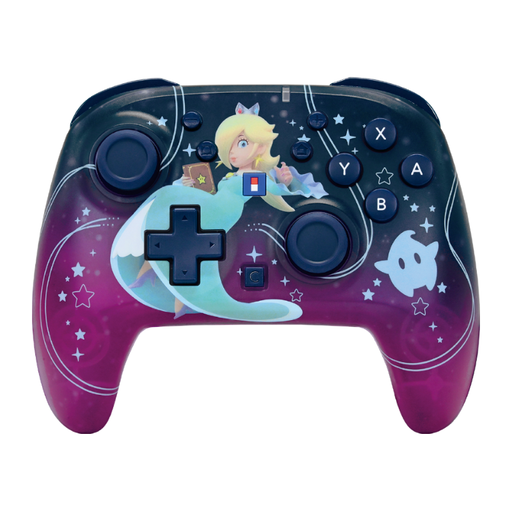 Image unavailable
A full wireless controller for a compatible Switch or Switch 2 setup.
The product description lists Bluetooth, a rechargeable battery, a range of up to 10 m and up to 10 hours of battery life. Check your game’s requirements.
 Image unavailable
A full wireless controller for players using a compatible Switch 2 or Switch OLED setup.
The product name lists a TMR joystick, 40-hour battery life, a C button and two programmable buttons. Check that this version is right for your system and game.
No, it depends on the game. Nintendo says a single Joy-Con per player is an option for compatible software. For It Takes Two on Switch, Electronic Arts specifies a separate pair of Joy-Cons or a gamepad for each player.
No, Joy-Con 2 is designed for Switch 2 and doesn’t work with the original Switch. Nintendo says older Joy-Cons can be paired wirelessly with Switch 2, but can’t be attached to the system.
According to 8BitDo, enable ‘Pro Controller Wired Communication’ on the Switch, then connect the controller using a USB cable. Also check whether your game supports these controls.
According to ACM ConsuWijzer, if a product is faulty, the retailer must provide a free solution, such as a repair, replacement or refund. Your statutory guarantee rights aren’t automatically limited to the term of any manufacturer’s guarantee offered.
The Dutch Authority for Digital Infrastructure says electronic equipment must carry the correct CE marking. Wireless radio equipment must also meet the relevant requirements of the Radio Equipment Directive. Check the marking on the specific controller.