
Player sharing a bedroom
Wants to avoid unnecessary controller vibration while reading. Assess button noise separately, as product specifications don’t compare it.


First, check whether the specific visual novel supports controller input on your device. Steam Support says that input using gamepad commands only works in games with gamepad support. Then choose based on connection and controls, and reduce vibration where possible: according to 8BitDo, the Lite has no vibration function, while Nintendo lets you turn off vibration on a Switch in the settings. Assess button noise separately from vibration; they are different features.
Wants to avoid unnecessary controller vibration while reading. Assess button noise separately, as product specifications don’t compare it.
Needs controls that work with the support offered by each game. Steam Support says a gamepad profile won’t work automatically in a game without gamepad support.
Wants to assess a separate controller for comfort, charging and how vibration is controlled. Nintendo says the stated battery life of a Switch Pro Controller depends on use.
First check that your game and device are supported, then compare vibration, controls and power to suit your reading setup.
| What to consider | What should you check? | Who is this important for? |
|---|---|---|
| Game and device compatibility | Check support for both your device and the specific game. Also see whether a suitable Steam Input configuration can map keyboard or mouse commands. | If I want to be sure my device and visual novel work with a controller, compatibility comes first; around 36% of consumers say this is their main concern. |
| Vibration and possible button noise | Check whether the controller vibrates and whether you can turn off this feature on your system. Assess button noise separately. | When someone is sleeping next to me, I want to be able to reduce vibration and assess button noise separately; around 29% of consumers prioritise minimising disturbance. |
| Controls for long reading sessions | Look at the directional and confirmation buttons. If possible, try the grip and check the button layout in your game. | For long reading sessions, I want to advance text and make choices using controls that feel comfortable; around 21% of consumers prioritise the controls and how the controller feels to hold. |
| Power and connection | Check how the model connects to your device and whether batteries, a cable or an adapter are needed or included. | If I play wirelessly, I want to know how the controller is powered and what connection accessories I’ll need; around 14% of consumers say power and connection are their main concern. |
A controller can connect to your PC without the game supporting every action you want to perform. Steam Support warns that input using only gamepad commands depends on the game having gamepad support.
Check the information and settings for the specific game, and test text navigation, choices and menus before relying on the controller.
A suitable input configuration may take extra time to set up; a controller profile won’t automatically make up for missing support.
No vibration only tells you about that feature, not the sound made by physical buttons.
Check vibration and button noise separately. See whether you can turn off vibration on your controller or system, and assess button noise on its own.
Joybuy Netherlands lists a Switch Pro Controller at 100 g, while Nintendo gives the Nintendo Switch Pro Controller’s weight as approximately 246 grams. Check the exact model before treating these listings as comparable.
Compare the full model name and the seller’s listing specifications with the manufacturer’s details; don’t rely on a similar product name alone.
The Lite and Ultimate 2C Wireless are different options for specific platforms and connection types.
The Xbox Wireless Controller is a conventional option to consider if you play on a supported Windows PC, Xbox or mobile device.
The Nintendo Switch Pro Controller is a separate controller to consider if you read or play on a Nintendo Switch.
This Joybuy selection includes controllers for PC, Xbox, Nintendo Switch and PS4. Check whether your device and the specific visual novel are supported for each model.
 Image unavailable
An option to consider if you play on an Xbox or Windows PC and want to be able to customise the buttons.
The product description lists Bluetooth, Xbox Wireless, a hybrid D-pad and textured grips. The stated compatibility includes Xbox Series X|S, Xbox One and Windows 10/11 PCs. Two AA batteries are included; a USB-C cable is sold separately.
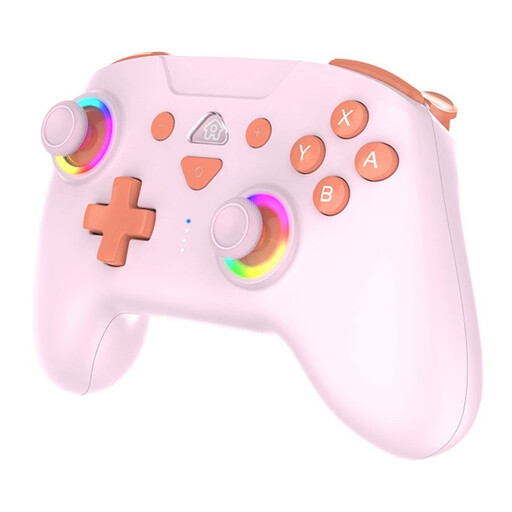 Image unavailable
An option to consider if you use one of the listed Nintendo Switch consoles and want to be able to adjust vibration.
The product description lists compatibility with Switch, Switch OLED, Switch Lite and Switch 2, as well as three vibration levels that can be adjusted using the console settings or controller. It also mentions Bluetooth, a rechargeable battery and an included USB-C cable.
 Image unavailable
An option to consider if you’re looking for a controller for the listed PS4 models or a PC.
The product description lists compatibility with PS4, PS4 Slim, PS4 Pro and PC. It also mentions a touchpad, gyroscope and a USB cable for the initial pairing.
 Image unavailable
An option to consider if you’re looking for a controller for Switch or PC and the listed features suit your needs.
The product title mentions dual vibration and a gyroscope. Check whether you can adjust vibration for your game and device.
 Image unavailable
An option to consider if you play on a PC and want to use programmable buttons.
The product description mentions PC use and programmable rear buttons. The product name lists Hall Effect joysticks, 255-level Hall triggers, RGB lighting, a 1000 mAh battery and USB-C. Check what the stated PS5 layout means for your device.
No, it depends on whether the specific game supports it. Steam Support says that input using only gamepad commands works only in games with gamepad support. With a suitable Steam Input configuration, you can map certain buttons to keyboard or mouse commands; test whether this covers the actions you need.
On a Nintendo Switch, you can change this through the HOME Menu: open System Settings, choose Controllers and Sensors, then Controller Vibration. Check with the manufacturer of a third-party controller to find out how it responds to this setting.
Xbox Support lists a USB cable, Bluetooth or an Xbox Wireless Adapter as possible ways to connect. The option that works depends on the controller and your PC; also check whether the required cable or adapter is included with the model.
For online purchases made as a consumer in the Netherlands, you generally have a 14-day cooling-off period, according to the Dutch Government; exceptions apply. You’re also entitled to a product that meets reasonable expectations. ACM ConsuWijzer explains these legal protections.
The Dutch Government lists collection points and civic amenity sites, among other options, for old appliances. When you buy a new electrical appliance of a similar type, you can also use the like-for-like take-back scheme, including for online purchases.