
Switch players who want to share controllers
You want to know whether the Joy-Cons you already own will work for your game’s local multiplayer mode. Nintendo Support explains that controls can vary from game to game.


You don’t automatically need an extra controller: on Switch or Switch 2, two players can use Joy-Cons in games that support separate controls. For PS5, Xbox or PC, choose a controller that suits your system and multiplayer mode. In a shared bedroom, it’s also worth considering whether a cable will be practical.
You want to know whether the Joy-Cons you already own will work for your game’s local multiplayer mode. Nintendo Support explains that controls can vary from game to game.
You’re looking for a second controller for the system you already have and want to check that the game itself supports multiple players. PlayStation Support and Xbox list the systems their controllers are compatible with.
You’re choosing between wireless play and a wired controller with a cable running across the bedroom. PowerA describes the Advantage Wired controller as having a detachable 10 ft cable.
First, check which multiplayer mode the game supports and which system you’re using. Then work out how many separate controls you need and whether a cable will suit your gaming space.
| What to consider | What should you check? | Who is this important for? |
|---|---|---|
| Compatibility with your system and game | Check the supported system version, multiplayer mode and controls for the game you’ve chosen. | When I play with someone else, I want to be sure the controller works with both my system and the game’s multiplayer mode. Around 33% of consumers prioritise compatibility with their system and game. |
| Enough separate controls | Count the number of controllers required by the game settings, not just the number of devices in a set. | I want each player to have a usable control without buying an extra controller if sharing already works. Around 27% of consumers prioritise having the right number of separate controls. |
| Cables and gaming space | Check how the controller connects and, if it’s wired, consider the cable route and distance from the system. | When sharing a room, I want to be able to choose where we sit without a cable getting in the way. Around 20% of consumers prioritise the layout of their gaming space and cable routing. |
| Power and essential features | Check the power source and whether the game requires features supported by the controller. | I want to know in advance what power source and features are needed, so the controller suits the way I play. Around 20% of consumers focus mainly on power, essential features and additional running costs. |
Whether Joy-Cons can be used separately depends on the game’s multiplayer options.
Check the game’s local multiplayer mode and controls before deciding how many controllers you need.
8BitDo lists different platforms for the two versions: the Bluetooth version is listed for Switch, while 8BitDo says the Wireless version is designed for Windows and Android.
Check the full version name and compatibility information for the exact model.
PowerA says the Advantage Wired only works when the Switch 2 is docked. According to PowerA, the controller doesn’t support motion controls and isn’t suitable for games that use Joy-Cons exclusively.
Check which controls the game requires and whether the cable can run conveniently from the dock to where you sit.
ACM ConsuWijzer distinguishes between statutory guarantees and additional seller or manufacturer warranties.
Read any additional warranty terms and remember your legal rights against the seller.
Joy-Con and Joy-Con 2 are designed for Nintendo systems; which controls work depends on the game.
DualSense is an option for a second player on PS5 and for compatible PC games.
The Xbox Wireless Controller is designed for supported Xbox consoles and Windows PCs.
The Ultimate 2C Bluetooth and Ultimate 2C Wireless are different versions, with different platform information.
The Advantage Wired is an extra wired controller for a docked Switch 2.
This Joybuy selection includes controllers for Switch and Switch 2, Xbox and PS5. Before ordering, check that both the specific controller and your game’s multiplayer mode are suitable for your system.
 No image available
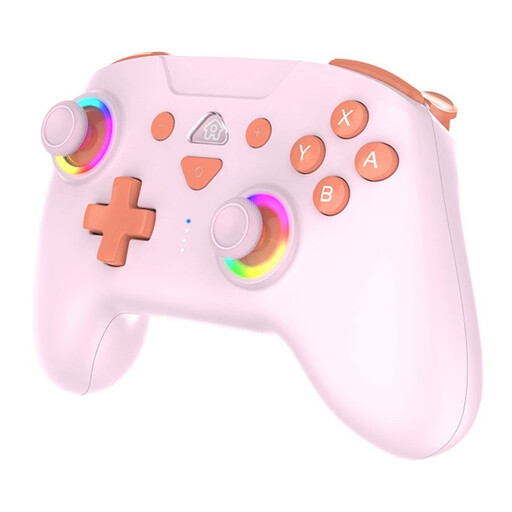
A wireless option if you’d rather not have a controller cable running to your system.
The product name lists SW2 and SW, LED and the colour Pink. Check that your game and system support the multiplayer controls you need.
 No image available
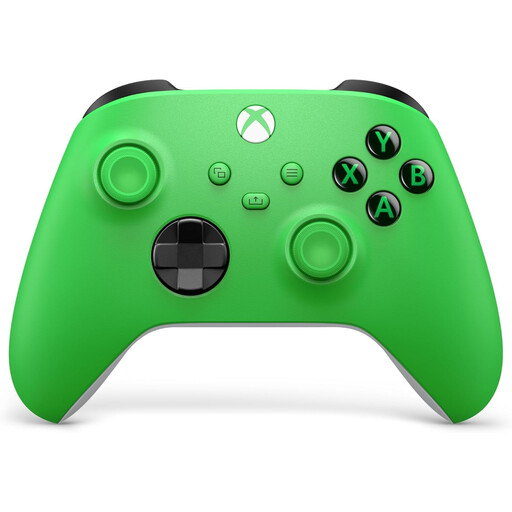
An option for an Xbox set-up if you’re looking for a separate wireless controller for another player.
The product name lists Xbox Series X/S and Xbox One. Check that your game supports it and that the power source suits the way you play.
 No image available
A second DualSense is designed for a PS5 set-up where the game supports multiple controllers.
The product name lists a wireless controller for PlayStation 5 in White. PlayStation says PC features depend on the game, and that haptic feedback on PC requires USB.
 No image available
A full-size controller for a Switch 2 set-up, provided your game supports this type of controller.
The product name lists Nintendo Switch 2 and the colour Black. Check the game’s multiplayer mode and how many controllers you’ll need.
 No image available
For supported Switch 2 games, a Joy-Con 2 can be used horizontally as a separate controller.
The set includes a left and right Joy-Con 2 and two wrist straps. Using the controllers separately depends on support in the game; Nintendo recommends attaching the wrist straps when playing wirelessly.
Not always: if the game supports using Joy-Cons horizontally and separately, two players can use one Joy-Con each. Check how the game is played and, if needed, set the play style and order under Controllers.
No. Nintendo says Joy-Con 2 can only be used with Switch 2. Original Joy-Cons can be paired wirelessly with Switch 2, but can’t be attached to the system.
Check that the console is set up as required and that the cable reaches where you sit. According to PowerA, the Advantage Wired for Switch 2 can only be used when Switch 2 is docked and doesn’t support games that use Joy-Cons exclusively.
Attach the supplied wrist straps before using Joy-Con 2 wirelessly. Nintendo recommends tightening the strap so it won’t slip off your wrist.
No. Statutory guarantees apply in addition to any seller or manufacturer warranty. ACM ConsuWijzer says you can contact the seller if a product breaks sooner than you could reasonably expect with normal use; there isn’t one fixed period that applies to every controller.
According to ACM ConsuWijzer, online purchases generally come with a statutory cooling-off period of up to 14 days after delivery. Check the applicable terms and any exceptions. The cooling-off period is separate from your rights if a product is faulty or was described incorrectly.