
Console co-op players
You’re looking for a second controller that works with your PS5, Xbox, Switch or Switch 2 and can be paired separately. PlayStation, Xbox and Nintendo explain the options and requirements for their systems.


Choose a controller that works with your console or PC and the game’s local co-op mode; a wireless connection won’t make that mode available by itself. Then assess the connection from where you sit and check the power supply and features offered by the exact model. A quoted range doesn’t guarantee a stable connection in every room.
You’re looking for a second controller that works with your PS5, Xbox, Switch or Switch 2 and can be paired separately. PlayStation, Xbox and Nintendo explain the options and requirements for their systems.
You play together from the sofa and want to know whether the connection between both controllers and the PC will work reliably where you sit. Microsoft warns that the Bluetooth card and connecting multiple controllers can affect performance. 8BitDo quotes a range for one model under ideal laboratory conditions.
You want a practical charging or battery solution for both players, and need to check which features the controller does and doesn’t have. Nintendo and PowerA describe the features and limitations of their controllers.
First, check that the controller and game work with your system and local co-op. Then assess the wireless connection where you sit, how the two-player controls work, and what the controller needs during longer sessions.
| What to consider | What should you check? | Who should pay extra attention? |
|---|---|---|
| Platform and game | Check the exact system and controller model, and whether the game supports local co-op with two controllers. | If I want to play together, both my system and the game need to support the controller I’ve chosen and two players. Around 36% of consumers put compatibility first. |
| Connection from the sofa | Measure the distance to your console or PC, and consider where any receiver will be placed and how it connects to both controllers. | If I’m sitting further away from the screen, I want inputs to register without interruption. Obstacles and the room layout can make a difference. Around 29% of consumers give reliability where they sit top priority. |
| Two separate players | Check the player count and local game mode, then pair both controllers according to your system’s instructions. | If we both want to play independently, the game needs to recognise the second controller as a separate player. Around 21% of consumers prioritise separate controls. |
| Power and features | Check the power supply, included batteries or cables, and the features your game requires for each model. | For longer sessions, I want to know how both controllers are charged or powered by batteries, and which game features are missing. Around 14% of consumers give power and features the most weight. |
8BitDo quotes a range of 10 m for the Ultimate 2 Wireless under ideal laboratory conditions. Microsoft warns that performance can suffer when multiple controllers are connected to a PC via Bluetooth.
Assess the connection where you play and position a compatible receiver where it works well for both players.
Nintendo says the older Switch Pro Controller can be paired wirelessly with Switch 2, but the Switch 2 Pro Controller is only compatible with Switch 2.
Check which Switch system you have and whether you need the extra features of the Switch 2 Pro Controller.
If a controller isn’t compatible with your system, you may need a different, compatible controller for the second player.
According to PlayStation, haptic feedback on PC requires game support and a USB connection.
Check which features your game supports with the connection you plan to use.
The Dutch government describes the legal guarantee as the right to a product that works as it should. In the Netherlands, there’s no fixed statutory time limit for this.
Compare the terms of any extra warranty package with your existing rights before paying for it.
An optional warranty package comes at an extra cost.
DualSense controllers are designed for PS5 co-op and can also be used with supported PC games.
Xbox Wireless Controllers are designed for compatible Xbox systems and Windows PCs.
Nintendo offers a Switch Pro Controller and a separate Switch 2 Pro Controller.
The Ultimate 2 Wireless is a receiver-based option for a compatible PC setup.
PowerA describes the Enhanced Wireless Controller Rechargeable as a wireless alternative for Switch and also says it can be used with Switch 2.
This selection includes controllers for Xbox and PC, PS5, PC or Switch, and Nintendo Switch or Switch 2. Before buying, check that the exact model works with your system and game.
 No image available
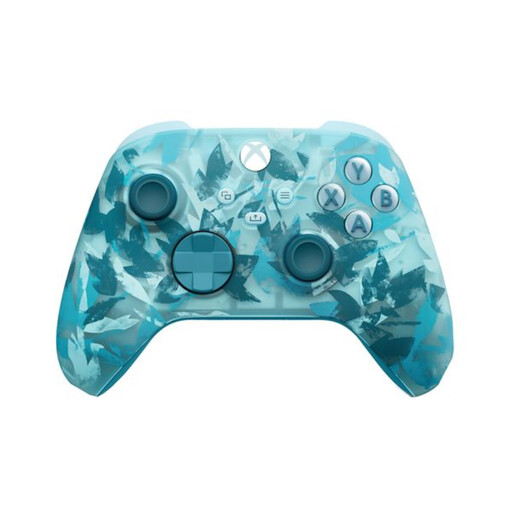
An option if you’re looking for a wireless Xbox controller for local co-op. Check that your game and system support it.
The product name specifies Xbox Series/PC and the Ice Breaker Special Edition.
 No image available
Suitable for a PS5 setup for local co-op when the game supports two controllers.
The product name specifies a wireless PS5 DualSense controller in Cosmic Red.
 No image available
An option if you’re looking for a controller for PC or Switch. Check that your games and setup support the connection you plan to use.
The product name specifies Mag-Res TMR sticks, Hall and Micro 2-in-1 triggers, and a charging dock.
 No image available
Suitable for a Switch setup; Nintendo confirms that this model can also be paired wirelessly with Switch 2.
Check that the features of this model suit the game you play.
 No image available
An option if you have a Switch 2 specifically; Nintendo says this model is only compatible with Switch 2.
Check that the features of this model suit the games you want to play.
Yes. PlayStation explains how to pair a second DualSense via the Bluetooth accessories menu. The game must also support local co-op with separate players.
No. 8BitDo quotes a range of 10 m for the Ultimate 2 Wireless under ideal laboratory conditions. Microsoft warns that with PC Bluetooth, the Bluetooth card and the number of connected controllers can affect performance. So, check the connection where you sit.
No. Nintendo says the Switch 2 Pro Controller is only compatible with Switch 2. However, Nintendo says the older Switch Pro Controller can be paired wirelessly with Switch 2.
Check the power supply for both exact controller models and whether any batteries or cables you need are included. According to the Dutch government, when you buy at a distance you often have 14 days to change your mind. The legal guarantee is your right to a product that works as it should; in the Netherlands, there’s no fixed statutory time limit for this. A paid warranty package is separate.