
Players who stick to one platform
You mainly play on one console or PC and want to check that the controller works with it and your games before you buy. PlayStation, Xbox and Nintendo set out compatibility by device and feature.


First, choose a controller that works with your console or PC, then check whether your games support the features you want. Compatible PS5 games can offer extra tactile effects with a DualSense; according to PlayStation, haptic feedback on Windows requires a USB connection. A wired controller means you don’t have to manage batteries, while a wireless one gives you more freedom to move around.
You mainly play on one console or PC and want to check that the controller works with it and your games before you buy. PlayStation, Xbox and Nintendo set out compatibility by device and feature.
You value supported vibration, trigger or motion features in story-driven games and want to know which ones are available on your platform. PlayStation and Nintendo describe these features for specific controllers and use cases.
You’re looking for a controller without unnecessary extras and weighing up a USB cable against battery management and freedom to move around. Manufacturers offer both wired models and wireless controllers with different power requirements.
Start by choosing your platform and game. Then compare extra effects, power options and the freedom to play without a cable.
| What to consider | What should you check? | Who is this important for? |
|---|---|---|
| Platform and game | Compare the full model name with the compatibility information for your device, and check that your game supports the controller. | I want to know for sure that the controller works with both my console or PC and my games. Around 33% of consumers put compatibility first. |
| Tactile effects | Check which haptics, triggers or motion controls each game supports; according to PlayStation, DualSense haptics on Windows require USB. | If extra feedback or motion controls matter to me, I want my game and device to support them. Around 27% of consumers prioritise a gaming experience with features like these. |
| Connection and power | Check the supported platform, the cable included and the power requirements of the version you’re considering. | I want to connect the controller easily and would rather not manage batteries. Around 20% of consumers put simplicity and power options first. |
| Wireless play | Check that the wireless connection works with your device and which cables or batteries come with the version you’re considering. | If I don’t want to sit right next to my PC or console, wireless convenience matters more to me than a cable. Around 20% of consumers say freedom to move around is their main priority. |
Connecting a DualSense to a PC doesn’t automatically mean haptic feedback will work in every game. PlayStation says this feature on PC depends on game support and a USB connection.
Before buying, check that your game supports the feature and find out which connection is required. Also check whether the version you’re considering includes the cable you need.
To get the haptic feedback you want on Windows, you’ll need a USB cable and enough room to run it to your playing space.
According to PowerA, the Enhanced Wired version reviewed here only works when the Switch is docked. It doesn’t support HD rumble, motion controls or amiibo.
Choose this version only if you play with your Switch docked and the missing features aren’t essential for your games.
Xbox says that some wireless controllers bought from December 2025 onwards may not come with AA batteries.
Check what’s in the box for the exact version. If batteries aren’t included, check with Xbox to see whether the arrangement they describe applies to your purchase.
If the version you choose doesn’t include batteries, you’ll need to provide a suitable power source yourself.
An additional warranty doesn’t replace your statutory rights. The Dutch government says there is no fixed statutory warranty period in the Netherlands.
Compare the extra terms with the statutory protection that applies to your purchase, and check what additional rights the warranty actually offers.
DualSense controllers are designed for PS5 and compatible games on other supported devices.
Xbox says its Wireless Controllers are designed for Xbox consoles and Windows PCs.
The Switch Pro Controller is designed for Switch players; Nintendo also confirms wireless pairing with Switch 2.
According to 8BitDo, the Ultimate 2C Wired is a wired option for use with Windows or Android.
The Enhanced Wired version reviewed here is designed for a docked Nintendo Switch.
According to GameSir, the G7 SE is a wired controller for Xbox and PC.
These controllers suit a range of Xbox, PlayStation, Nintendo Switch and PC set-ups. Check that your device and games are supported for each model.
 No image available
A good fit if you want to play wirelessly on a compatible Xbox console or Windows PC.
The description lists Xbox Wireless and Bluetooth, compatibility with Xbox Series X|S, Xbox One and Windows PC, and a 3,5 mm headset connection.
 No image available
An option for PS5 and compatible games on other supported devices. Check which features are available in each game.
The description lists Bluetooth, USB-C, a built-in microphone and speaker, a motion sensor and a built-in battery. According to PlayStation, haptic feedback on Windows requires USB.
 No image available
A good fit if you’re looking for a wired controller for a compatible Xbox console or Windows PC.
The description lists Hall Effect sticks and triggers, two programmable rear buttons, vibration feedback and a 3,5 mm connection. The USB cable gives you less freedom to move around than wireless play.
 No image available
An option if you play on Nintendo Switch and want to use motion controls or HD rumble.
The description lists a wireless connection, a built-in rechargeable battery, HD Rumble, motion controls and amiibo functionality.
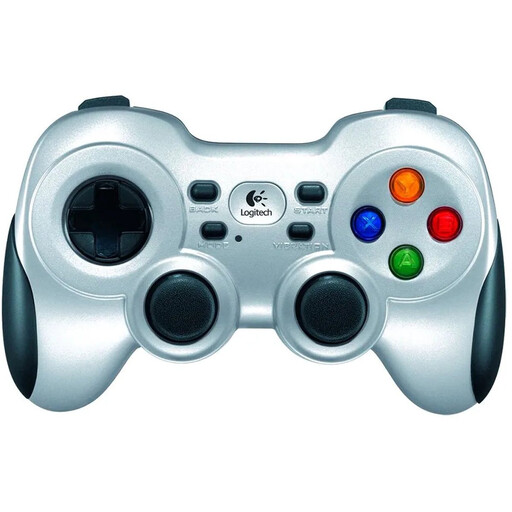 No image available
A wireless option for PC gamers who want to use a controller with a receiver.
The description lists a 2,4 GHz connection via a nano receiver, a four-way D-pad and dual vibration feedback.
No, don’t assume they do. PlayStation says haptic feedback requires a supported game and a USB connection to your PC. A wired connection is also required to use the headset connection on PC.
Yes. Nintendo confirms you can pair the Switch Pro Controller wirelessly with a Switch 2. Nintendo also says it can be charged via USB on the Switch 2 dock.
When you buy from a business online, you usually have 14 days to change your mind in the Netherlands, according to the Dutch government. Your statutory protection for faulty products is separate from any manufacturer’s warranty offered; the Dutch government says there is no fixed statutory warranty period in the Netherlands.