First, choose a controller that works with your console or PC and the RPG you want to play; the sci-fi theme doesn’t determine compatibility. If plug sockets are scarce, AA batteries, charging through an existing USB port or a wired USB controller could all be suitable, depending on your available ports, cable reach and preference for batteries or charging. Microsoft Xbox, Sony, Nintendo and PowerA describe different power and connection options. Always check support for extra game features with the specific controller, connection and title.
Who is this buying guide for?
Players with limited access to plug sockets
If you play long RPG sessions on a supported system, you can compare AA batteries, charging through an existing USB port and wired USB power. Microsoft Xbox describes AA battery power for the standard wireless Xbox controller, while Nintendo and PowerA describe USB charging or connection options for specific controllers.
Console RPG players
If you mainly play on Xbox, PS5 or Nintendo Switch, first check that the controller is compatible with your console and chosen game. Sony and Nintendo describe features that depend on the platform and game; a wireless connection alone doesn’t tell you which features are available.
PC players with multiple games
If you switch between PC games, check the connection supported by each model and the features you want in each game. For example, Sony states that haptic feedback on PC requires game support and a USB connection.
What should you look for when buying?
| What to consider |
What should you check? |
Who should prioritise this? |
| Compatibility |
Check the exact console or operating system, and whether your game supports the controller and the features you want. |
If I’m buying a controller for a specific console and RPG, I want to be sure they’ll both work with it. Around 36% of consumers prioritise compatibility with their platform and game. |
| Power without an extra plug socket |
Compare replaceable AA batteries, charging through an existing USB port and wired USB power. Also check which cable is included. |
If I don’t want to use an extra mains adapter, I’ll check whether I can swap the batteries or use a spare USB port. Around 29% of consumers prioritise power options that don’t need an extra plug socket. |
| Playing through long sessions |
Check whether you can charge or connect the controller while playing, and treat the stated battery life as dependent on how it’s used. |
If I want to spend as little time as possible waiting for a charge, I’ll look for a spare battery or an available way to charge. Around 21% of consumers mainly want to minimise interruptions while playing. |
| Controls and game features |
Check whether each game and connection supports any extra buttons, vibration or other features you want. |
If I play an RPG that needs specific controls, I want to know whether those features will actually work in my game. Around 14% of consumers choose mainly for extra controls or supported game features. |
Common buying mistakes
-
Assuming every wireless controller works with your console
Wireless describes the connection, not compatibility. The 8BitDo Ultimate 2C Wireless, for example, has different platform and connection modes from specific Nintendo and Sony controllers.
Before buying, check the exact model, your platform and operating system, and whether your game supports it.
-
Assuming USB-C charges standard AA batteries
The standard wireless Xbox controller uses AA batteries; having a USB port doesn’t make standard AA batteries rechargeable inside the controller.
Check the type of power the model uses and what’s included in the box.
With AA batteries, you’ll need to keep replacements handy or have a separate way to charge rechargeable AA batteries.
-
Treating stated battery life as guaranteed playing time
Nintendo estimates that the Switch Pro Controller lasts around 40 hours, depending on use. 8BitDo describes playing-time measurements taken under ideal laboratory conditions; those figures can’t predict exactly how long your session will last.
Plan for a way to charge or have spare power, and check the conditions behind the stated battery life.
-
Counting extra features without checking the game
Features such as haptics, extra buttons and amiibo support vary by controller, platform and game. Sony’s requirements for haptic feedback on PC include game support and a USB connection; the wireless PowerA model for Switch mentioned here doesn’t support HD rumble or amiibo NFC.
Check that your game supports the feature you want with that exact controller and connection method.
Brands to consider
Microsoft Xbox
The standard Xbox Wireless Controller is an option for supported Xbox consoles and Windows PCs if AA batteries suit your setup.
- Microsoft Xbox describes AA battery power, wireless pairing and a USB connection.
- You’ll need suitable batteries for wireless use. USB-C doesn’t charge standard AA batteries inside the controller.
Sony PlayStation
DualSense is designed for PS5 and is also listed for supported PC, Mac and mobile games.
- Sony describes charging and playing via USB-C.
- According to Sony, haptic feedback on PC requires both game support and a USB connection. Check whether a cable is included with the offer you choose.
Nintendo
The Switch Pro Controller is suited to Nintendo Switch; Nintendo also describes pairing it with Switch 2.
- Nintendo lists an included USB-C cable, HD rumble and an estimated battery life of around 40 hours, depending on use.
- Check which controls your game requires on Switch 2. The Switch 2 Pro Controller is a different product.
8BitDo
The Ultimate 2C Wireless offers a rechargeable option for Windows via 2.4 GHz or cable, and for Android via Bluetooth.
- The manufacturer lists a built-in battery, extra assignable buttons and several connection modes.
- According to the specifications, the Windows version doesn’t use Bluetooth. Don’t confuse this model with the separate Ultimate 2C Bluetooth for Switch.
PowerA
PowerA offers, among other options, a wired controller for Xbox and Windows, as well as a separate rechargeable wireless model for Nintendo Switch.
- PowerA lists a detachable 3 m USB cable for the Enhanced Wired Controller for Xbox Series X|S, and also names Xbox One and Windows as compatible.
- The wired controller needs to stay connected to a USB port. The wireless Switch controller mentioned here doesn’t support HD rumble or amiibo NFC; this doesn’t necessarily apply to other PowerA models.
Controller options at Joybuy
These controller options are aimed at wireless play on the PlayStation and PC systems listed, with an additional model that lists PC, Nintendo Switch and mobile devices. Check the platforms listed for each product, and whether each game supports the features you want.
 No image available
Wireless Dualshock controller for PS4 and PC
An option if you want to play wirelessly on a supported PS4 system or PC; check which features work with each RPG.
The product description lists a touchpad, gyroscope, dual vibration motors and an included charging cable.
Joybuy
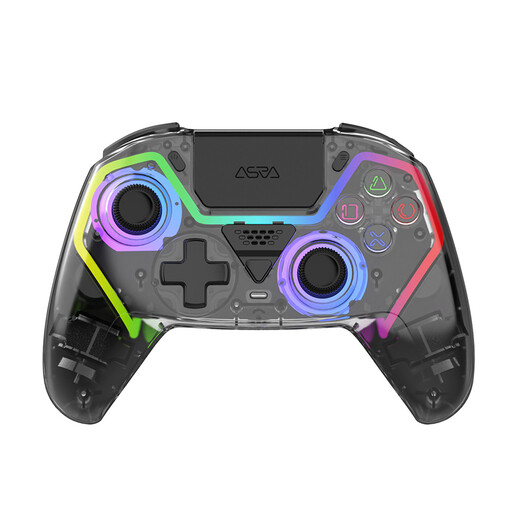 No image available
NAXSIR wireless PS5 controller
Suited to a PS5 setup if you want to play wirelessly and charge via USB-C; check whether your game supports it.
The product information lists a 1000 mAh battery, Hall effect sticks, programmable buttons and RGB lighting.
Joybuy
 No image available
VIELLAN wireless PC controller
An option for PC gaming if you’re looking for a wireless controller with a rechargeable battery; check which games and connections are supported.
The product information lists a 1000 mAh battery, USB-C charging, Hall effect joysticks, programmable buttons and RGB lighting.
Joybuy
 No image available
PS5 DualSense wireless controller V3 – Cosmic Red
Suited to PS5 gaming if you want a built-in battery and the option to charge via an existing USB port; check extra features for each game.
The product information lists a built-in battery, USB-C, haptic feedback, adaptive triggers, a touchpad and motion sensors.
Joybuy
 No image available
GameSir Cyclone 2 – Black-Bundle Edition
An option if you need your controller to work with PC, Nintendo Switch, iOS and Android, as stated in the product information; check the connection and game support for each device.
The bundle includes a charging station. The product information lists USB-C, Bluetooth and 2.4 GHz, as well as TMR sticks and Hall effect and microswitch triggers.
Joybuy
Frequently asked questions
Can I use a wired controller without an extra plug socket?
Yes, if your Xbox or Windows PC has a suitable spare USB port and the cable reaches where you sit. PowerA lists a 3 m USB cable for the Enhanced Wired Controller for Xbox Series X|S, and also names Xbox One and Windows as compatible.
Do DualSense haptics and adaptive triggers work in every PC RPG?
No, not automatically. According to Sony, the game must support these features; a USB connection is also required for haptic feedback on PC. Check the title and connection method you plan to use.
What can I do if my controller develops a fault?
An additional commercial warranty doesn’t replace your statutory rights. According to the official EU consumer information, the seller must repair or replace a faulty product free of charge under the applicable conditions. The minimum statutory period is two years from receipt; national rules may offer more protection.
What product requirements apply to wireless controllers in the Netherlands?
The Dutch Authority for Digital Infrastructure describes European requirements for radio equipment, including requirements relating to electrical safety and susceptibility to interference, as well as CE marking for equipment that meets the applicable requirements. Check the product information and marking; a platform listing alone doesn’t prove that a specific item meets those requirements.
Where can I recycle used AA batteries or an old controller?
According to the Dutch government, used batteries must not go in the bin; you can take them to shops that sell batteries, among other places. An old electrical controller can be taken to a suitable collection point. For household equipment, the Dutch government also describes a take-back scheme when you buy a similar new appliance.


