First, choose a controller that works with your device and puzzle game. Then decide whether to connect your headphones to the controller or directly to your device. A 3.5 mm socket on a controller doesn’t guarantee that audio will work with every connection method: Xbox Support says that Bluetooth on PC doesn’t support headset accessories through the Xbox controller. Sony says you need a wired controller connection to use the DualSense headset socket on PC or Mac.
Who is this guide for?
Players who connect their headphones to the controller
If you want to listen through a wired connection to your controller, it’s worth checking both the socket and whether audio works with your device and chosen connection method. Xbox Support and Sony list different requirements for headset audio on PC.
Console puzzle gamers
If you mainly play on your own PS5, Xbox, Switch or Switch 2, check the full model name and console generation. A controller for one generation isn’t necessarily the same model as one for another.
PC players at a desk or on the sofa
On PC, you can choose between greater freedom of movement and a wired connection. Check whether your headphones work through the controller with the specific connection method you plan to use.
What should you look for?
First, check that your device and puzzle game support the controller. Then see where your headphones connect and whether the chosen connection carries audio.
| What to consider |
What to look for when buying |
Who this matters most to |
| Audio through your headphones |
Check where you connect your headphones and whether audio works with the connection method you choose. Xbox Support says headset accessories aren’t supported through Bluetooth on PC; Sony requires a wired connection to use the DualSense socket on PC or Mac. |
If I want to connect my wired headphones to the controller, I want to be sure the sound will follow the route I’ve chosen. Around 36% of consumers prioritise sound through their headphones. |
| Device and game |
Check that the exact controller model is compatible and that the puzzle game supports controller input. Note the difference between a Switch Pro Controller and a Switch 2 Pro Controller. |
If you’re looking for a controller that suits your device and puzzle game, check that the two work together in advance. Around 29% of consumers give this compatibility top priority. |
| Navigation and grip |
Look at the layout of the directional pad and buttons. Decide for yourself whether the grip feels comfortable; the layout alone doesn’t prove that it offers a comfort advantage. |
If I often move around grids or menus, I want a layout that suits the way I play. Around 21% of consumers put controls and grip at the top of their list. |
| Cable and power |
Check that the cable reaches your playing position and which power option applies to the exact model. |
If you’re mainly concerned with freedom of movement, cable length or power, make sure the setup is practical for you. Around 14% of consumers make this their top priority. |
Common buying mistakes
-
Assuming a 3.5 mm socket guarantees audio over Bluetooth on PC
The socket on the controller doesn’t mean your headphones will receive audio with every connection method. Xbox Support says that Bluetooth on PC doesn’t support headset accessories through the Xbox controller; Sony requires a wired connection to use the DualSense socket for audio on PC or Mac.
Before buying, check the entire route from your gaming device to your headphones and choose a supported connection method.
-
Confusing a Switch Pro Controller with a Switch 2 Pro Controller
Nintendo lists the audio socket as one of the differences between the Switch 2 Pro Controller and the original Switch Pro Controller.
Check the full model name and your console’s generation before ordering.
-
Choosing a wired Switch controller for use without the dock
PowerA says that the Enhanced Wired model mentioned here only works when the Switch is docked.
Check that you play in TV mode and that the 3 m cable reaches your seat. You may need a different controller for another way of playing.
Brands to consider
Xbox / Microsoft
An option to compare if you use an Xbox console or a supported Windows, Android or iOS device and want to match the audio connection to your gaming setup.
- For the model described, Microsoft lists Bluetooth, a hybrid D-pad and a 3.5 mm socket.
- Xbox Support says that Bluetooth on PC doesn’t support headset accessories through the controller. Check the power requirements for the exact model too.
PlayStation / Sony
The DualSense is worth considering if you play on PS5 or can check whether a specific PC game supports it.
- Sony lists a headset socket and haptic features.
- On PC or Mac, the headset socket requires a wired controller connection. Haptic support depends on the game.
Nintendo
The Switch 2 Pro Controller is designed for use with a Switch 2; check the exact model if you want to connect your headphones through the controller.
- Nintendo lists an audio socket on the Switch 2 Pro Controller.
- The original Switch Pro Controller and the Switch 2 Pro Controller are different models; Nintendo lists the audio socket as one of the differences.
PowerA
The Enhanced Wired Controller mentioned here is an option for a docked Switch setup with wired headphones.
- For the Heroic Link model, PowerA lists a 3.5 mm socket and a 3 m cable.
- PowerA says this model is only intended for use with the Switch in its dock. It doesn’t have HD Rumble, motion controls or amiibo NFC.
GameSir
The G7 SE is worth considering if you’re looking for a wired controller with a headset socket for the Xbox systems or Windows devices listed by GameSir.
- GameSir lists Hall effect sticks, a 3.5 mm socket and a detachable 3 m USB-C cable.
- It uses a wired connection, so check that the cable is long enough for your playing position.
Joybuy product picks
These controllers are designed for a range of Switch, PC and Xbox setups. Check each model to see whether it supports your puzzle game and whether your headphones work with the connection method you want to use.
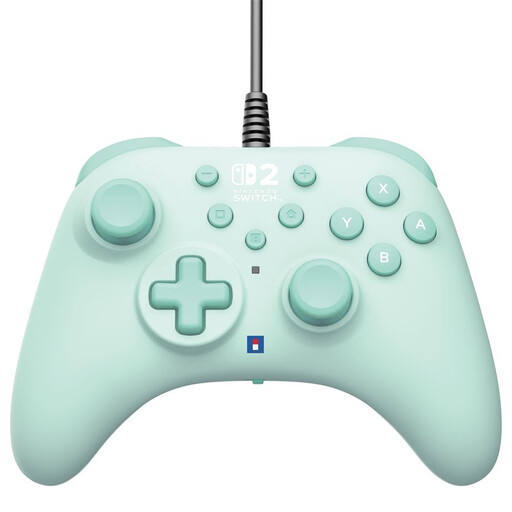 Image unavailable
Hori HORIPAD Turbo wired controller for Switch and Switch 2, green
A good fit if you’re looking for a wired controller for Switch or Switch 2 games; check that your specific puzzle game supports controller input.
The product name specifies a Turbo model in green. The wired connection means you’ll need to stay within reach of the cable.
View at Joybuy
 Image unavailable
Game controller with dual vibration and gyroscope for Switch and PC
An option if you’re looking for a controller for Switch or PC games; check the controls required by your specific puzzle game.
The product name specifies dual vibration and a gyroscope.
View at Joybuy
 Image unavailable
VIELLAN wireless controller with Hall effect sticks for PC, PS5 layout
For PC players looking for a wireless controller; the PS5 layout mentioned in the product name doesn’t by itself confirm PS5 compatibility.
The product name specifies Hall effect sticks, Hall effect triggers, programmable rear buttons, a 3.5 mm socket and a 1000 mAh battery. Check that audio works with the connection method you want to use.
View at Joybuy
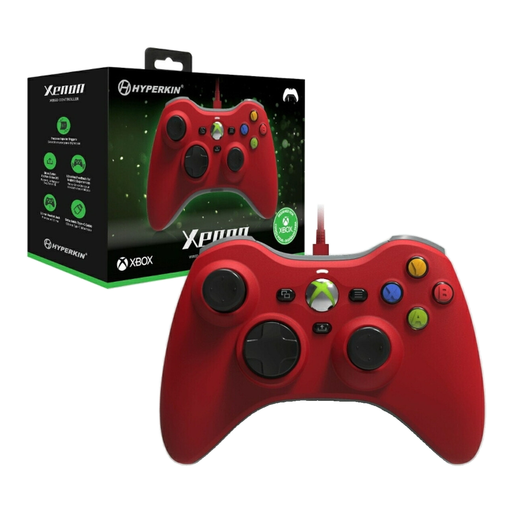 Image unavailable
Hyperkin Xenon wired controller for Xbox Series X|S, Xbox 1 and Windows 11/10, red
A good fit if you’re looking for a wired controller for the systems listed in the product name; check that your puzzle game also supports controllers.
The product name specifies a wired connection and a red model. Bear in mind the distance between your playing position and your device.
View at Joybuy
 Image unavailable
BEITONG KP70 Elite wireless controller for PC, Nintendo Switch, Switch 2, Steam and Android
An option if you’re looking for a wireless controller for the platforms listed in the product name; check whether your puzzle game supports controller input.
The product name specifies haptic triggers, adjustable joystick resistance and six programmable buttons.
View at Joybuy
Frequently asked questions
Will headphones connected to an Xbox controller work if it’s connected to my PC via Bluetooth?
No, not as a headset accessory through that Bluetooth connection. Xbox Support recommends USB or an Xbox Wireless Adapter for using a headset through the controller; you can also connect your headphones directly to the PC.
Can I use the DualSense wirelessly with a PC and connect my headphones to the controller?
Not through the headset socket while the controller is connected wirelessly: Sony says this socket requires a wired controller connection on PC and Mac.
How do I connect a wired PowerA controller and headphones to the Switch?
PowerA says to connect the controller to the Switch dock via USB and plug the 3.5 mm jack into the controller. This setup is for use with the Switch in its dock. Start with the volume low and gradually raise it to a comfortable level.
Can I return a controller I buy online in the Netherlands, and what about the warranty?
When you buy from a business at a distance, the Dutch government says you’ll often have a 14-day cooling-off period; check the applicable terms and exceptions. Faulty products are also covered by statutory consumer protection, and you should contact the seller. The Dutch government says there is no fixed statutory warranty period in the Netherlands.


