
Console player using a headset
You want a controller that works with your PS5, Xbox or Switch model, and need to know whether you can plug your headset into it.


First, choose a controller that works with your console or PC, then check where you can plug in your headset. For platform games, the shape and position of the directional pad also matter, as does whether you prefer wired or wireless play. Compatibility and audio connections vary by model and set-up.
You want a controller that works with your PS5, Xbox or Switch model, and need to know whether you can plug your headset into it.
You’re considering the position and design of the directional pad, as well as whether your system supports the model.
You’re comparing the freedom of movement offered by a wireless controller with the cable route and stated cable length of a wired model.
A good fit if: you have a Switch 2 and want to plug a headset into the Switch 2 Pro Controller; Nintendo lists an audio connection on this controller.
Keep in mind: Nintendo says the Switch 2 Pro Controller only works with Switch 2.
A good fit if: you’re looking for an Xbox option; Xbox lists a connection for a compatible 3.5mm headset on its wireless controller.
Keep in mind: a wired model limits where you can play to the reach of the cable; 8BitDo lists a length of 2,5 m for the Ultimate Wired for Xbox.
A good fit if: PS5 compatibility is your priority; Sony lists a headset connection on the DualSense.
Keep in mind: Sony says features may vary between games and between PS5 and PC; check your PC set-up separately.
A good fit if: you play on the original Switch and want a separate Switch Pro Controller; Nintendo describes it as having a single directional pad.
Keep in mind: don’t assume it has the audio connection found on the newer Switch 2 model. According to Nintendo, when Bluetooth audio is connected, a maximum of two wireless controllers can be connected.
| Buying priority | What should you check? | Who this matters most to |
|---|---|---|
| System compatibility | Compare the exact system and full model name with the manufacturer’s compatibility information. Nintendo says the Switch 2 Pro Controller is only for Switch 2. | If I want to play on my console, I first want to make sure the controller is compatible with the right generation. System compatibility is the top priority for around 31% of consumers. |
| Headset connection | Check the connection on the exact controller model and whether it works with your system, game and connection type. | If I want to plug my headset into the controller, I want to know whether that connection will work with my own set-up. Around 25% of consumers give audio through the controller top priority. |
| Directional controls | Look at the shape and position of the directional pad on the exact model. Xbox lists a hybrid D-pad on its wireless controller; Nintendo describes a single directional pad on the original Switch Pro Controller. | If I use the directional pad a lot in platform games, I want to choose a layout that suits the way I play. Directional controls are the top priority for around 25% of consumers. |
| Wired or wireless | Check the connection type and, for a wired controller, the cable length of that exact version. GameSir lists a length of 3 m for the G7 SE. | If I play from a particular spot, I want to know whether a cable will work there or whether I’d prefer to play wirelessly. The connection type is the main priority for around 19% of consumers. |
According to Nintendo, the Switch 2 Pro Controller only works with Switch 2. The older Switch Pro Controller is a different model; don’t assume the newer controller’s audio connection is available without checking.
Check the full product name and your Switch generation before buying.
A connection on the controller doesn’t automatically mean audio will work with every combination of system, game, headset and connection type.
Check that your complete audio set-up is compatible. If needed, plug your headset into another supported connection instead of relying on controller audio.
The wired models we looked at have different cable lengths: 8BitDo lists 2,5 m for the Ultimate Wired for Xbox, while GameSir lists 3 m for the G7 SE.
Measure the distance to your playing spot and compare it with the cable length of the exact version.
Options for the original Switch and Switch 2; make sure you know the difference between the Pro Controllers.
An option for supported Xbox systems and Windows PCs, with a hybrid D-pad on the wireless controller we looked at.
The DualSense is the PS5 option we looked at and, according to Sony, can also be used with certain other devices.
The Ultimate Wired Controller for Xbox we looked at is a wired option for the Xbox and Windows systems listed by 8BitDo.
The G7 SE we looked at is a wired option for the Xbox and Windows systems listed by GameSir.
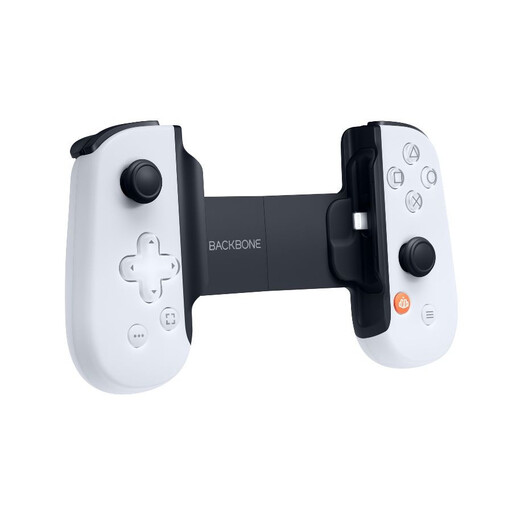
The selection below includes controllers for Nintendo Switch, Xbox and PC, plus a mobile PlayStation controller for iPhone and iPad with a Lightning connection. Check that each full model is compatible with your system and where you can plug in your headset.
 No image available
A wireless controller option for Nintendo Switch; check exact system compatibility and where to plug in your headset.
Bluetooth; 7-colour LED; vibration feedback; stated range of 10 m.
 No image available
A mobile controller option for playing PlayStation games on a compatible iPhone or iPad; check that your device has a Lightning connection.
Gen 2; PlayStation Edition; Lightning connection for iPhone/iPad.
 No image available
A controller option if you’re considering Switch or PC as your gaming platform; check exact compatibility and the audio connection for your set-up.
Dual vibration; gyro; listed for Switch and PC.
 No image available
A wireless Xbox controller option if you want to plug a headset into your controller; check that your headset and system are compatible.
Xbox lists a hybrid D-pad and a connection for a compatible 3.5mm headset on its wireless controller.
 No image available
A controller option for the original Nintendo Switch; check separately how to connect your headset to your system.
Nintendo describes this model as having a single directional pad. The Switch 2 Pro Controller is a different model and, according to Nintendo, only works with Switch 2.
No. Nintendo says the Switch 2 Pro Controller can only be used with Switch 2. The original Switch Pro Controller is a different model.
According to Nintendo, when a Bluetooth audio device is connected, no more than two wireless controllers can be connected to the system. Also check the requirements of your game and your Switch set-up.
No. Check the combination of controller model, system, game and connection type. Xbox lists a connection for a compatible 3.5mm headset on its wireless controller; Sony warns that features may vary between games and between PS5 and PC.
ACM ConsuWijzer says that online purchases generally come with a statutory cooling-off period of up to 14 days after delivery, subject to legal exceptions. If a product doesn’t meet what you could reasonably expect from normal use, the seller is responsible for the statutory guarantee; this is separate from any manufacturer’s warranty.