Choose a controller that works with your console or PC and suits the input options in the specific mystery game; the genre alone doesn’t guarantee that you can use a controller. If daylight is making it hard to see, check for reflections and adjust the screen brightness first, as a different controller won’t change the picture. Then compare the controls and power options: batteries, charging and a cable each come with different considerations.
Who is this guide for?
Mystery game player with a dedicated console
You want to know whether the controller works with your Xbox, PlayStation or Switch, and whether the game supports controller input. Check the exact console version too, as Nintendo specifies for its different Switch Pro models.
PC player of point-and-click mystery games
You want to find out whether pointing and combining objects feels comfortable with a controller, or whether a mouse is a better fit. Valve explains how Steam Input can translate physical inputs, but you should also check the input options for the specific game.
Player in a bright room
You want to be able to make out clues on screen clearly. RTINGS identifies ambient light, screen brightness and reflections as factors that affect visibility; Nintendo explains the brightness settings for Switch systems in handheld and tabletop mode.
What should you look for when buying?
First, check that your system and game support the controller. If the main problem is glare or a hard-to-see picture, start with the screen.
| What to consider |
What to check before buying |
Who should consider this? |
| System and game compatibility |
Check the exact console version, connection and the game’s controller support. |
I want to make sure the controller and mystery game both work with my system before anything else. Around 36% of consumers give system and game compatibility top priority. |
| Visibility in daylight |
Check reflections and screen position, and see which brightness settings are available. |
I want to see small or dark clues despite the daylight, so I’m starting with the screen. Around 29% of consumers put visibility first. |
| Pointing and actions |
Check the game’s input options and whether its settings can replicate mouse actions. |
I want to select objects and clues easily, without assuming that controller controls will work well straight away. Around 21% of consumers give accurate pointing top priority. |
| Power and freedom of movement |
Check which batteries, charging solution, adapter or cable are included with the version you’ve chosen. |
I want to know whether I’ll need to allow for batteries or a cable before choosing a model. Around 14% of consumers put power and ease of use first. |
How to avoid common buying mistakes
-
Buying a controller to fix glare
Ambient light and screen reflections affect what you can see; a controller won’t change the picture.
First, check the screen position, reflections and available brightness settings. Switch systems have brightness settings in handheld and tabletop mode.
-
Assuming the Switch Pro and Switch 2 Pro controllers are interchangeable
Nintendo says that the Switch 2 Pro Controller does not work with the original Switch. The original Switch Pro Controller can be used wirelessly with Switch 2, but it cannot wake the console from sleep using the HOME button.
Check the full model name and your console version before ordering.
-
Assuming USB-C charges AA batteries
The stated battery test for the wireless Xbox controller is based on standard AA batteries. A USB-C port doesn’t automatically mean those batteries can be charged through the controller.
Check the power source for the version you’ve chosen and whether you want to use a separate charging solution.
For wireless use, you’ll need to allow for AA batteries or a separate compatible charging solution.
Brands to consider
Xbox
A system-focused option for supported Xbox consoles and Windows PCs.
- Microsoft lists Bluetooth, a hybrid D-pad and button mapping.
- The stated battery test uses AA batteries. Check whether you’d also like a separate charging solution; game support still needs to be checked separately.
PlayStation
DualSense is primarily designed for PS5; PlayStation also lists compatibility with PC, Mac and mobile devices.
- PlayStation lists haptic feedback and adaptive triggers.
- According to PlayStation, these features depend on game support and may require USB. They won’t make clues easier to see.
Nintendo
The original Switch Pro Controller and the Switch 2 Pro Controller are designed for different system requirements.
- Nintendo confirms that the original Pro Controller can be used wirelessly with Switch 2.
- The original controller cannot wake Switch 2 from sleep using the HOME button; the Switch 2 Pro Controller doesn’t work with the original Switch.
8BitDo
The Ultimate 2C Wireless is an option for Windows, using a 2.4GHz adapter or a cable.
- According to the specifications, this version has Hall-effect sticks and triggers and comes with a USB-A adapter.
- For this version, 8BitDo lists Bluetooth for Android, not Windows. Check the version and don’t confuse it with an Ultimate 2C with different specifications.
PowerA
The Enhanced Wired Controller for Xbox Series X|S is a wired option for the Xbox and Windows systems listed by PowerA.
- PowerA lists two mappable buttons and a detachable 3 m USB cable.
- You’ll need a spare port and enough cable reach. These specifications apply to the version listed.
Joybuy products for these gaming systems
This selection includes controllers for PC, Xbox, PlayStation 5, Nintendo Switch and Nintendo Switch 2. Check that each model and game supports controller input; a controller won’t fix screen reflections.
 Image unavailable
GameSir Cyclone 2 Black-Bundle Edition
A multi-platform option for PC or Switch, provided the mystery game supports controller input.
The product name lists PC, Switch, iOS and Android. The description mentions wired, 2.4GHz and Bluetooth connections, Mag-Res TMR sticks, Hall & Micro 2-in-1 triggers, a 1000Hz report rate and a charging station.
Joybuy
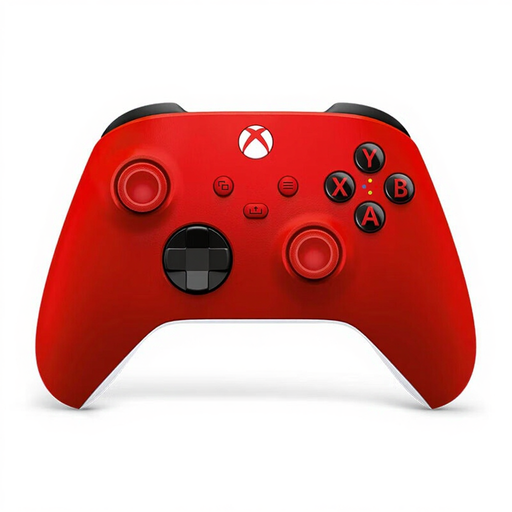 Image unavailable
Xbox Wireless Controller Pulse Red
An option for Xbox or Windows PC, provided the specific mystery game supports controller input.
The product information lists Xbox Series X|S, Xbox One and Windows PCs, as well as button mapping through the Xbox Accessories app. Check the power source for this version; the wireless Xbox controller uses AA batteries.
Joybuy
 Image unavailable
Nintendo Switch Pro Controller, black
Designed for Nintendo Switch; also check whether the mystery game supports controller input.
Nintendo confirms that the original Pro Controller can be used wirelessly with Switch 2, but not that the HOME button can wake Switch 2 from sleep. The product information lists a built-in battery and wireless controls.
Joybuy
 Image unavailable
PS5 DualSense wireless controller, Cosmic Red
An option for PS5, provided the mystery game supports controller input.
The product information lists haptic feedback, adaptive triggers, a touchpad and motion sensors. According to PlayStation, haptic feedback and adaptive triggers depend on game support and may require USB; these features don’t change how clearly you can see the screen.
Joybuy
 Image unavailable
Nintendo Switch 2 Pro Controller, black
A controller for Nintendo Switch 2; according to Nintendo, this model doesn’t work with the original Switch.
The product information lists HD Rumble, motion controls and a rechargeable battery. Check whether the specific mystery game supports controller input.
Joybuy
Frequently asked questions
Will a different controller make clues easier to see in daylight?
No. Ambient light, reflections and screen brightness all affect what you can see on screen; a controller won’t change the picture. Check the screen first. On Switch and Switch 2, you can adjust the brightness in handheld or tabletop mode.
Can I play any point-and-click mystery game with a controller?
You can’t tell from the genre alone: check the input options for the specific game. On PC, Steam Input can map buttons to mouse actions, but that’s different from built-in support or a guarantee of comfortable controls.
How do I charge the original Nintendo Switch Pro Controller?
Nintendo lists a USB-C port and an included USB-C cable. Nintendo quotes a battery life of around 40 hours; actual battery life depends on conditions.
What if a controller I bought online doesn’t fit or breaks too soon?
For an online purchase in the Netherlands, ACM ConsuWijzer says you generally have a 14-day cooling-off period from delivery, subject to exceptions that may apply to your purchase. Separately, if a product develops a fault during normal use sooner than you could reasonably expect, the seller must provide an appropriate solution free of charge. There is no general fixed two-year period for the statutory guarantee.


