Start with your console or PC, then check whether your mystery game fully or partially supports controller input. A working connection doesn’t guarantee that you can use the controller in every menu. For a shared bedroom, listening privately and being able to adjust controller sounds are useful, but a headset won’t silence physical button clicks. Headset audio and control options vary by system and model.
Who is this relevant for?
Quiet evening gamer
Plays while someone else is resting in the room and wants to listen to game audio privately, with the option to adjust controller sounds and vibration. The right headset connection depends on the system, controller and connection method. PlayStation and Xbox outline the headset options for their controllers, while Nintendo specifies an audio socket on the Switch 2 Pro Controller.
PC puzzle gamer
Wants to play a mystery game from bed or at a desk. Check in advance whether the specific game supports controller input and whether that support is full or partial; GnomeKing Games lists Lunar Mystery 2103 as having partial controller support via Steam.
Switch gamer with long sessions
Compares their Switch generation, the location of the audio socket and their charging needs. Nintendo says the Switch 2 Pro Controller doesn’t work with the original Switch, while the original Switch Pro Controller can be paired with Switch 2.
What should you look for?
First, check that both your system and the specific game work with the controller. Then consider how you’ll listen privately and which sounds or practical limitations matter in your bedroom.
| What to consider |
What should you check? |
Who is this important for? |
| System and game |
Check compatibility with your console or PC, as well as support for the exact game. Partial support may mean that you can’t use the controller for every action. |
If I want to play a mystery game on my own system, I want to know whether the controls actually work in that title. Around 28% of consumers make compatibility their top priority. |
| Private listening |
Check that the headset socket works with your device and chosen connection, and where the game audio is routed. |
If I’m gaming while someone else is resting in the bedroom, I want to hear the sound through a headset. Around 28% of consumers prioritise private listening. |
| Keeping things quiet |
Check whether speaker volume and vibration can be adjusted. Consider button noise separately if it’s a deciding factor. |
When my roommate is asleep, I also want to consider vibration and noise from the controller itself. Around 17% of consumers make keeping things quiet their top priority when choosing. |
| Freedom of movement and power |
Check which cable or adapter you need, and whether the stated battery life or operating time suits your sessions. |
If I play from bed, I don’t want an awkward cable to dictate where I sit or to have to stop unexpectedly. Around 16% of consumers prioritise freedom of movement and power. |
| Grip and accessories |
Check that the shape feels comfortable and find out which cables, adapters or batteries are needed or included. |
If I’m solving puzzles for a long time, I want a layout and grip that suit my hands, and to know what I need to play. Around 11% of consumers pay most attention to this. |
Buying pitfalls
-
‘Controller support’ doesn’t always mean everything works
With partial support, a game may not let you use the controller for certain menus or actions. For example, GnomeKing Games lists Lunar Mystery 2103 as having partial controller support via Steam.
Check the listing for your exact game and see whether support is full or partial.
-
A headset socket won’t necessarily work with every connection
According to PlayStation, the DualSense headset socket only works on PC and Mac when the controller is connected by cable.
Before buying, check how audio works with your device and connection method. You may need a cable for this PC connection.
-
The two Nintendo Pro Controllers aren’t interchangeable
Nintendo says the Switch 2 Pro Controller only works with Switch 2. The original Switch Pro Controller can be paired with Switch 2, but the models also differ in their audio sockets.
Check the full model name and your Switch generation before choosing.
-
A headset won’t silence button clicks
Game audio, the controller speaker, vibration and the physical sound of buttons are separate things. 8BitDo describes the bumpers and D-pad on the Ultimate 2C Wireless as ‘clicky’; that doesn’t tell you how loud other models are.
Adjust sounds and vibration where possible. If button noise is a deciding factor, assess it separately.
Brands to compare
Microsoft Xbox
Xbox wireless controllers are designed for Xbox and supported Windows games. Xbox lists features including USB-C, wireless connections and a 3,5mm headset socket.
- The headset socket gives you the option of using a compatible headset.
- Connection methods aren’t all the same, so check which audio features work with your device and connection. This doesn’t show that the buttons are quiet.
Sony PlayStation
DualSense is designed for PS5 and supported games on other devices. On PS5, you can adjust settings including speaker volume and vibration intensity.
- You can adjust speaker volume and vibration on PS5.
- You need a cable to use the headset socket on PC. Haptic feedback also requires game support and a USB connection.
Nintendo
The Switch Pro Controller and Switch 2 Pro Controller are designed for different Switch generations. Nintendo lists an audio socket for the Switch 2 model covered here.
- According to Nintendo, the original Switch Pro Controller can also be paired with Switch 2.
- The Switch 2 Pro Controller doesn’t work with the original Switch. The audio socket is listed for the Switch 2 model and shouldn’t be assumed to be available on both.
8BitDo
According to 8BitDo, the Ultimate 2C Wireless connects to PC via 2,4 GHz or cable, and to Android via Bluetooth.
- The manufacturer lists an adapter and cable among the included items.
- 8BitDo calls certain buttons ‘clicky’; that doesn’t mean they’re quiet.
PowerA
PowerA describes the Enhanced Wireless Controller Rechargeable covered here as a licensed alternative for original Switch models that also works with Switch 2.
- For this model, the manufacturer lists compatibility with original Switch models and Switch 2.
- According to PowerA, this specific model has no C button and doesn’t support HD rumble, IR or amiibo NFC.
Controllers at Joybuy
This selection includes controllers for PS4 and PC, PS5, PC and Switch, and Switch 2. Before buying, check that your chosen game and the audio features you want are supported by your system.
 No image available
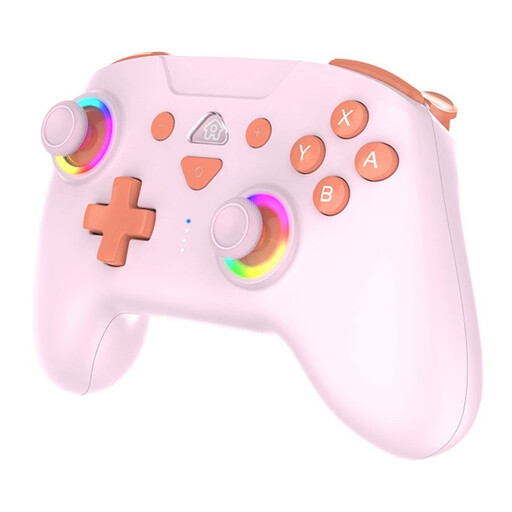
SUBSONIC Wireless Controller SW2 & SW with LED, pink
An option if you want to connect a compatible headset to a PS4 or PC; check support for your exact game.
Wireless; compatible with PS4 and PC according to the product description. Has a 3,5mm headset socket and two vibration motors.
View at Joybuy
 No image available
Black Wireless Dualshock Controller, compatible with PS4 and PC
A wireless option for PC if your game supports controller input; check compatibility with your title.
The description lists a 2,4GHz connection via the included nano receiver, two vibration motors and a four-way D-pad.
View at Joybuy
 No image available
Game Controller with Dual Vibration and Gyroscope for Switch and PC
An option if you switch between Switch and PC games; check whether controller input is supported for each game.
The description lists three vibration levels, a 6-axis gyroscope, a rechargeable battery and an included USB-C cable.
View at Joybuy
 No image available
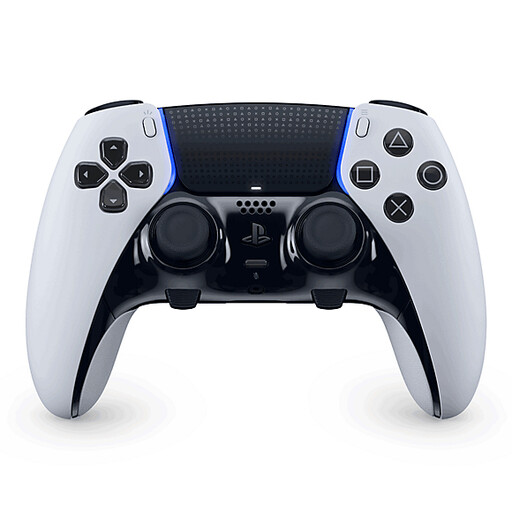
Sony PlayStation DualSense Edge V2 Wireless Controller for PS5
An option for PS5 if you want to use the listed adjustment options; check that your game supports the features you want.
The product description lists adjustable vibration intensity, customisable controls, non-slip grips and interchangeable stick caps. Haptic feedback depends on game support.
View at Joybuy
 No image available
Nintendo Switch 2 Official Pro Controller, black
An option for Switch 2 if you want to connect a headset through the controller. Nintendo says this model doesn’t work with the original Switch.
The product description lists wireless use and a rechargeable battery. Nintendo specifies an audio socket for the Switch 2 Pro Controller.
View at Joybuy
Frequently asked questions
Does every controller work with every mystery game on PC?
No, it varies by game. Check which controllers the specific title supports and whether that support is full or partial. GnomeKing Games lists Lunar Mystery 2103 as having partial controller support via Steam.
How can I make a DualSense less disruptive on PS5?
On PS5, you can adjust the speaker volume and vibration intensity under Settings > Accessories > Controller (General), according to PlayStation. This doesn’t adjust the physical sound of the buttons.
Can I use a Switch 2 Pro Controller with the original Switch?
No. Nintendo says the Switch 2 Pro Controller only works with Switch 2. According to Nintendo, the original Switch Pro Controller can be paired with Switch 2.
What if I’m unhappy with a controller or it breaks after an online purchase in the Netherlands?
For online product purchases, ACM ConsuWijzer says you generally have a statutory 14-day cooling-off period from delivery, with some exceptions. You’re also covered by the statutory guarantee if a product doesn’t perform as you could reasonably expect under normal use; this isn’t automatically limited to a fixed two-year period. The cooling-off period for a product you don’t want to keep and your rights if a product is faulty are separate matters.


