First, choose a controller that works with your console or computer and your puzzle game. Then check that it feels comfortable in your hands and consider how you’ll keep it powered during a long session: a wired controller means you won’t need to charge a controller battery, while wireless play gives you more freedom to move. Extra features are only relevant if your device and game support them.
Who is this buying guide for?
Players who enjoy long sessions
For a long puzzle game, you’ll want a controller that feels comfortable to hold and won’t unexpectedly lose power. Consider its shape for yourself and check how the version you’re looking at is powered. Xbox, Nintendo and 8BitDo list different grip and power features for each model.
Console puzzle players
You play on PS5, Xbox or Switch and want to know in advance whether a controller is compatible with your console version. Pay particular attention to the difference between Pro Controllers for the original Switch and Switch 2: Nintendo says the Switch 2 Pro Controller doesn’t work with the original Switch.
PC puzzle players
You play on Windows and are comparing options such as a wired controller, an Xbox controller, DualSense or a controller with a 2.4 GHz receiver. As well as checking the connection, make sure your game supports the buttons and extra features you want. Xbox, PlayStation, GameSir and 8BitDo list different platform and connection options.
What should you look for when buying?
Start with your device and game, then decide which controls and power option will suit your gaming sessions.
| What to consider |
What should you check? |
Who should pay particular attention? |
| Compatibility |
Check the console version or operating system, the connection and whether the game supports the controller. |
If you want to be sure your controller, device and puzzle game will work together, compatibility should come first. Around 31% of consumers say this is their main buying priority. |
| Comfort and controls |
Consider the size, stick layout, D-pad and how easily you can reach the buttons. Try the controller yourself if possible. |
If you play for a long time, you’ll want a shape and button layout that remain comfortable. Around 31% of consumers prioritise comfort when holding and using a controller for long periods. |
| Power |
Check the battery type and whether a cable or receiver is included. Find out if you can keep playing while the controller charges. |
If you don’t want to stop partway through a session to deal with power, the choice between a cable, charging or batteries matters. Around 25% of consumers prioritise uninterrupted play. |
| Extra features |
Check whether your game supports haptics, triggers or customisable buttons, and whether a particular connection is needed to use them. |
If you want to use specific haptic features or customise buttons, first check whether your game and device support them. Around 13% of consumers give these extra features top priority. |
Pitfalls to avoid when choosing
-
Choosing the wrong Switch generation
Nintendo says the Nintendo Switch 2 Pro Controller doesn’t work with the original Switch.
Before buying, check the full model name and your console generation.
-
Assuming every wireless controller connects to Windows via Bluetooth
According to the manufacturer, Bluetooth on the 8BitDo Ultimate 2C Wireless is for Android; 2.4 GHz and a cable are listed for Windows.
Check which connections are available for each platform and whether your PC has the USB-A port needed for the included receiver.
-
Assuming haptics are always an advantage
DualSense features depend on whether the game supports them. On PC, haptic feedback may also require a USB connection.
Check support in the specific puzzle game you play before letting these features influence your choice.
-
Only checking how to keep playing after you’ve bought it
A wireless controller means you’ll need to keep an eye on its batteries or charging; a wired controller needs a cable that’s suitable for your gaming setup.
Check how the version you’re considering is powered and plan how you’ll keep playing during a long session.
Brands worth comparing
Xbox
Wireless controllers for supported Xbox consoles and Windows PCs, if you want similar controls on both.
- Xbox lists sculpted surfaces, textured grip and a hybrid D-pad as features of its wireless controller.
- These features don’t prove that the controller will be comfortable for everyone. Also check which batteries, cable or charging solution comes with the version you’re considering.
PlayStation
DualSense is designed for PS5 and can also be used with other compatible devices.
- Haptic feedback and adaptive triggers may be useful if your game and device support them.
- PlayStation says support varies by game; haptics on PC may require USB. The immersive experience described isn’t proof that every puzzle game will benefit from these features.
Nintendo
The Pro Controller ranges are designed separately for the original Switch and Switch 2.
- Nintendo quotes around 40 hours of use after a full charge for the original Switch Pro Controller; battery life depends on the software and features used.
- Nintendo says the Switch 2 Pro Controller doesn’t work with the original Switch. The models aren’t interchangeable.
GameSir
The G7 SE is a wired option for supported Xbox consoles and Windows 10/11.
- GameSir lists Hall Effect sticks and two lockable back buttons.
- You’ll still need the USB-C cable. GameSir’s claim that the controller prevents stick drift isn’t an independently proven guarantee of the device’s lifespan.
8BitDo
According to 8BitDo, the Ultimate 2C Wireless offers 2.4 GHz for Windows and Bluetooth for Android.
- The manufacturer lists an included USB-A receiver and up to 19 hours of use over 2.4 GHz under ideal laboratory conditions.
- According to the manufacturer, this version doesn’t support Bluetooth gaming on Windows. The quoted battery life isn’t a guarantee of how long it will last during a gaming session at home.
Controllers at Joybuy
This selection includes wired and wireless controllers for various platforms, including PC, PlayStation, Xbox and Nintendo Switch. Before buying, check that the version you choose is compatible with your device and game.
 No image available
Wireless DualShock game controller for PS4 and PC
An option if you’re looking for a wireless controller for the PS4 and PC platforms named in the product title.
The product description lists a touchpad, gyroscope and dual vibration motors.
View at Joybuy
 No image available
GameSir Cyclone 2 Black-Bundle Edition
For anyone looking for a controller with several connection options and support for PC or Switch.
The product information lists PC, Switch, iOS and Android, as well as wired, 2.4 GHz and Bluetooth connections. The bundle includes a charging dock; the title lists Mag-Res TMR sticks, a 1000Hz report rate and Hall and Micro 2-in-1 triggers.
View at Joybuy
 No image available
GameSir G7 SE, Dynamic Blue
A wired option if you play on a supported Xbox or Windows 10/11 PC and don’t want to manage a controller battery.
The product name lists Xbox Series X/S, Xbox One and Windows 10/11. The product description lists Hall Effect sticks and triggers, two programmable back buttons, a 3.5mm jack and a detachable USB cable.
View at Joybuy
 No image available
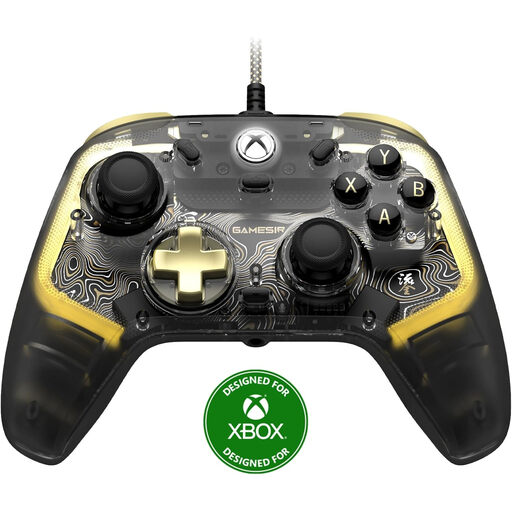
GameSir Kaleid Flux, smoke transparent
A wired option if you’re looking for a controller for a supported Xbox or Windows 10/11 PC.
The product information lists ALPS sticks, mechanical face buttons, vibration motors and an app for button customisation.
View at Joybuy
 No image available
Nintendo Switch Pro Controller, black
A wireless controller for Nintendo Switch; check that you’re looking at a model for the original Switch generation.
The product description lists motion controls, HD Rumble, amiibo functionality and a built-in rechargeable battery. Nintendo quotes around 40 hours of use after a full charge for the original Switch Pro Controller, depending on the software and features used.
View at Joybuy
Frequently asked questions
Can I use a Switch 2 Pro Controller with my original Switch?
No. Nintendo says the Switch 2 Pro Controller doesn’t work with the original Switch. There’s a separate Switch Pro Controller for the original Switch, so check the model name and console generation.
How do I pair an original Nintendo Switch Pro Controller?
Nintendo explains that you can pair it using the included USB cable and grip, or through the controller menu using the SYNC button. Follow the steps for your Switch generation.
Do DualSense haptics and adaptive triggers work in every PC puzzle game?
No. According to PlayStation, the game needs to support these features; haptic feedback on PC may also require a USB connection. Check support for the specific game you play.
What if my controller breaks too quickly during normal use?
According to ACM ConsuWijzer, in the Netherlands you’re entitled to a legal guarantee for as long as you could reasonably expect the product to last. If a fault occurs through normal use, the seller must resolve it free of charge, for example by repairing or replacing the product. This isn’t the same as a fixed guarantee of just two years.
Can I return a controller bought online if I don’t find the controls comfortable?
For online purchases, ACM ConsuWijzer says you’ll often have a 14-day cooling-off period from the date of delivery. Check which terms apply to your order. This is separate from your rights if a controller is faulty.


