
Switch duo playing adventures together
You want to know whether the Joy-Con you already have will do, or whether the game requires a full controller for each player. Nintendo says using a Joy-Con on its own depends on the software and how you play.


Start with your console or PC and the game's controller requirements; only then buy an extra controller. Nintendo says that one Joy-Con can work as a separate controller in supported games, but EA states that It Takes Two on Switch requires each player to have a pair of Joy-Con or a full controller. Wireless play means you don't have a cable running across the room, but remember to factor in charging or batteries too.
You want to know whether the Joy-Con you already have will do, or whether the game requires a full controller for each player. Nintendo says using a Joy-Con on its own depends on the software and how you play.
You're looking for an extra controller for your Switch 2, Xbox or PS5 and want to avoid choosing a version that isn't compatible with your system. Compatibility varies by controller and platform.
You want to play with two people and work out whether a cable, Bluetooth or a USB receiver will suit your PC and the space you have available.
Choose in this order: your system, the game's controller requirements, the connection options in your gaming space, and how the controller is powered.
| What to consider | What should you check? | Who is this important for? |
|---|---|---|
| System compatibility | Check compatibility with your exact console model or PC and the complete controller version. | I want to avoid choosing a controller that isn't compatible with my system. Compatibility is the top priority for around 36% of consumers. |
| Controls for each player | Check the game's local multiplayer requirements, including the number of players and the required controller set-up. | I want to know in advance whether the controllers we have will let us both play comfortably. Having enough controls for each player is the main priority for around 29% of consumers. |
| Connecting in a small room | Check whether the model connects via Bluetooth, a 2.4GHz receiver or a USB cable, and whether you have a free port for it. | I want to position cables and receivers neatly around my seating area. Keeping the connection tidy is the main concern for around 21% of consumers. |
| Power and charging | Check how the version you choose is powered, where you can charge it and what accessories are included. | I want to know in advance whether I'll need batteries or a suitable place to charge it. Power and additional accessories matter most to around 14% of consumers. |
Whether one Joy-Con works as a separate controller depends on the game. EA says that It Takes Two on Switch requires each player to have a pair of Joy-Con or a full controller.
Before buying, check the controller set-up and how many controllers the game you want to play requires.
Joy-Con 2 are designed for Switch 2. Nintendo says older Joy-Con can connect wirelessly to Switch 2, but can't be attached to the console.
Check your console model, the exact controller name and how you can charge the version you choose.
8BitDo lists a 2.4GHz receiver or a wired connection for the Ultimate 2C Wireless on Windows; Bluetooth is listed for this model on Android.
Check the connection method for the exact model and consider whether you can free up a USB port for a receiver.
A good option for shared controls on Switch and for controllers designed for Switch 2.
A full controller for supported Xbox consoles and Windows PCs.
DualSense is an extra controller for PS5 and may suit supported PC games.
Connection options vary by model, so check the full model name.
The Enhanced Wireless Controller Rechargeable is a licensed controller for the listed Switch models.
This selection includes controllers for PS5, Xbox and Windows PC, Nintendo Switch and Nintendo Switch 2. Choose a connection and controls to suit your system and the game you want to play together.
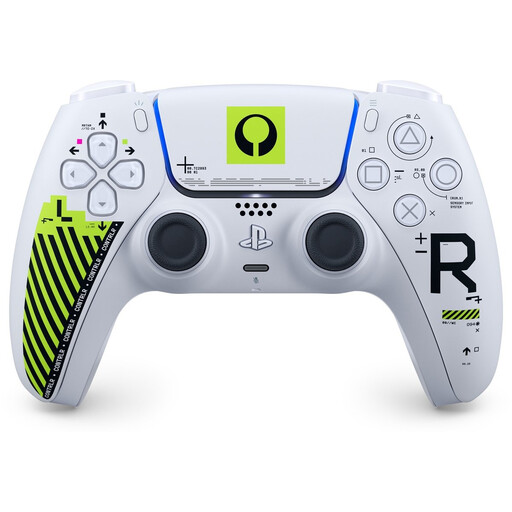 Image unavailable
An extra DualSense for local co-op on PS5; check separately whether a PC game supports the controller.
Bluetooth and USB-C connection options; rechargeable battery.
Haptic feedback and adaptive triggers depend on support from the game.
 Image unavailable
An extra controller for supported Xbox consoles or Windows PCs; check the game's requirements too.
Bluetooth and USB-C are listed as connection options.
 Image unavailable
A pair for Switch games that let two players use one Joy-Con each.
Whether one Joy-Con is enough depends on the game. EA says that It Takes Two on Switch requires each player to have a pair of Joy-Con or a full controller.
On Switch 2, original Joy-Con can work wirelessly, but can't be attached to the console. To charge them, you'll need an original Switch or a suitable charging accessory.
 Image unavailable
A full controller for an extra player on Nintendo Switch 2.
Bluetooth connection and rechargeable battery.
 Image unavailable
A left and right Joy-Con 2 for Switch 2; the set also includes two wrist straps.
Joy-Con 2 are for Switch 2 only. Charge them through the console or with a separate charging grip.
No, it depends on the game. Nintendo says a single Joy-Con works as a separate controller only in software that supports this way of playing. For It Takes Two on Switch, EA specifies a pair of Joy-Con or a full controller for each player.
Put the second DualSense into pairing mode and select it via Settings > Accessories > General > Bluetooth Accessories. Sony describes this process for pairing an extra controller.
Yes. Nintendo says original Joy-Con can be paired wirelessly with Switch 2, but can't be attached to the console. To charge them, you'll need an original Switch or a suitable licensed charging accessory.
According to ACM ConsuWijzer, online purchases generally come with a statutory cooling-off period. It ends 14 days after delivery, and exceptions may apply. This is separate from your statutory guarantee: if a product is faulty, it must meet what you could reasonably expect. Contact the seller for help.
The Dutch government lists shops and supermarkets that sell batteries as collection points for used household batteries. Old electrical appliances can also be taken to local authority collection points, among other options; arrangements vary by area.