
Sofa players with a fixed console
If you play together from the sofa, you need a controller that works with both your console and the player setup in your adventure game. Check that combination before comparing extra features.


Start with your console or PC and check that your chosen game supports local multiplayer and the controller layout you want. Then choose between full-size controllers, shareable Joy-Cons or a wired model with lighting. RGB doesn’t automatically mean the button labels light up, and a cable needs to be long enough to reach the sofa safely.
If you play together from the sofa, you need a controller that works with both your console and the player setup in your adventure game. Check that combination before comparing extra features.
A single Joy-Con may be enough for each player, but only if the game supports that way of playing. Nintendo says that using individual Joy-Cons horizontally depends on the software.
Lighting can make a controller easier to find, but illuminated strips or zones aren’t the same as readable button labels. Also check whether a cable will reach from your sofa to your device.
First, check that your system and the specific game support the controller and local play. Then work out how many player controls you need, before considering lighting, cables and power.
| What to consider | What should you check? | Who should give this extra thought? |
|---|---|---|
| Compatibility | Check the exact system, connection and the game’s controller support. | I don’t want to find out after buying that my console or adventure game doesn’t support the controller; around 36% of consumers prioritise compatibility with their system and game. |
| Controls for each player | Check how many controllers the game requires and whether it supports one Joy-Con held horizontally per player. | When we play together, I want to know that everyone has enough buttons and controls; around 29% of consumers make having enough player controls their first requirement. |
| Visibility | Check which parts actually light up and whether the button labels are illuminated. | I want to find the right controls in a dark room, not just see lighting effects on the casing; around 21% of consumers prioritise visibility. |
| Cable and power | Measure the cable route to the sofa. For wireless models, check which batteries or charging options are needed. | I want to sit comfortably without running out of power halfway through a gaming session; around 14% of consumers start by considering freedom of movement and power. |
For the wired models described, the lighting refers to light zones, strips or lighting around the sticks. That doesn’t prove that the button labels light up.
Check product photos of the controller switched on in low light, and see which parts the manufacturer says are illuminated.
A single Joy-Con held horizontally only works if the software and play style support it. Some games require each player to have a full controller.
Check the information for the specific game to see how many players it supports and what controls each player needs.
A wired controller can be inconvenient if the cable won’t reach your sofa. A wireless Xbox controller requires AA batteries or a compatible rechargeable battery. Original Joy-Cons can’t be attached to a Switch 2.
Measure the distance and plan a safe cable route in advance. Also check which batteries or charging accessories work with your chosen controller and system.
Depending on what you already own, you may need a separate battery or charging solution.
The DualSense is an option if you need an extra full-size controller for a PS5, and it can also be used with supported PCs.
The Xbox Wireless Controller is designed for supported Xbox consoles and Windows PCs.
Joy-Con and Joy-Con 2 offer a shareable controller option for Switch games that support this way of playing.
The Kaleid Flux is a wired option for the Xbox consoles and Windows systems listed by GameSir.
Advantage Wired with Lumectra is a wired lighting option for Xbox and Windows.
The Ultimate C Wired Controller for Xbox is a wired option for Xbox and Windows.
The Joybuy options below are controllers for Nintendo Switch, PS5, PC and Xbox. Before choosing, check that the specific game supports the controller and which parts light up in the dark.
 No image available
A wireless Switch gamepad for anyone looking for LED lighting without a fixed cable running to the sofa.
The product title lists Bluetooth, 7-colour LED lighting, vibration feedback and a range of 10 m.
 No image available
A wireless controller for the Nintendo Switch systems listed, with adjustable RGB lighting.
The product title lists Bluetooth, four RGB modes, two programmable buttons and 40 hours of battery life. Check which parts are actually illuminated.
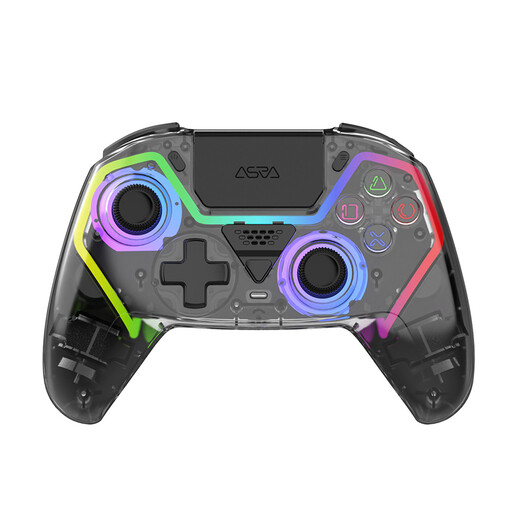 No image available
A wireless controller which, according to the product title, is designed for PS5, with lighting for a dark gaming area.
The product title lists Hall effect sticks, programmable buttons, RGB lighting and a 1000 mAh battery.
 No image available
A wireless controller for PC with RGB lighting. The product title refers to a PS5 button layout, not PS5 compatibility.
The product title lists Hall effect sticks, 255-level Hall triggers, programmable rear buttons and a 1000 mAh battery.
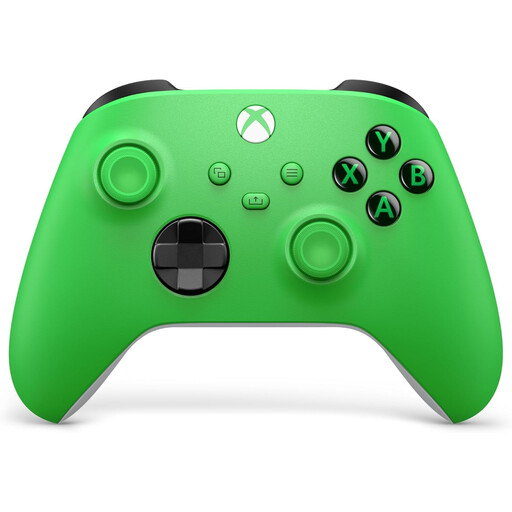 No image available
A wireless Xbox controller for anyone who wants to play from the sofa without a fixed cable to the device.
The product title lists support for Xbox Series X/S and Xbox One. For PC use, check the connection and support for the specific game.
No, it depends on the software and the supported play style. Nintendo describes an individual Joy-Con held horizontally as a possible control option when the game supports it, so check the player setup for the specific game.
According to Nintendo, original Joy-Cons can be used wirelessly with Switch 2, but can’t be attached to the system. You’ll need a Switch system or a suitable licensed charging accessory to charge them.
Check the battery level before you play and have a compatible spare or charging option ready. Microsoft lists AA batteries and a compatible rechargeable battery as options; rechargeable AA batteries can’t be charged inside the controller.
Not necessarily. According to the Dutch government, a manufacturer’s or retailer’s warranty is in addition to your statutory guarantee. If a product is faulty, the retailer must provide a solution. Compare any extra terms with the rights you already have.
The Dutch Authority for Digital Infrastructure states that electrical and electronic equipment must have the correct CE marking. Check the marking and model information on the product you receive; a product photo alone doesn’t prove that the model shown matches the one you receive.