What should you look for when buying?
Start by checking compatibility with your system and game. Then consider the cable route or wireless connection, and work out how many players need their own compatible controller.
| What to consider |
What to look for |
Who is it important to? |
| System compatibility |
Check the exact console or PC operating system, the controller model and whether the game supports it. |
I want to avoid buying a controller that doesn’t work with the system I already own; around 33% of consumers put compatibility first. |
| Freedom to move from your seat |
For wired use, measure the entire cable route and make sure it’s safe. For wireless use, check the connection in your own set-up. |
If I’m sitting off-centre, I want to play without a cable restricting where I sit; around 27% of consumers prioritise freedom of movement. |
| One controller per player |
Count the players and the controllers you already have. Check the game’s multiplayer mode and pair the controllers beforehand. |
I want an extra player to be able to join in straight away; around 20% of consumers prioritise having working controls for every local player. |
| Power and accessories |
Check whether batteries, a charging cable, an adapter or a charging station are included with the exact version, and what you already own. |
I want to know what I’ll need to use and charge the controller; around 20% of consumers give the greatest weight to power and accessories. |
Joybuy products for different systems
These Joybuy products are designed for a range of console and PC set-ups. Choose based on the compatibility listed, and check your game’s requirements too.
 No image available
Black wireless Dualshock controller for PS4 and PC
An option to consider if you’re looking for a wireless controller for a listed PS4 or PC set-up.
The product description mentions a USB cable for initial pairing.
Joybuy
 No image available
Xbox Wireless Controller Robot White
A wireless Xbox controller to compare if you want to play from different seats.
This version uses AA batteries for wireless play.
Joybuy
 No image available
Sony PlayStation 5 DualSense Wireless Controller, white
A wireless controller for anyone looking for an extra controller for PS5.
Sony lists haptic feedback and adaptive triggers; support depends on the game. PlayStation says a USB connection is required for haptic feedback on PC.
Joybuy
 No image available
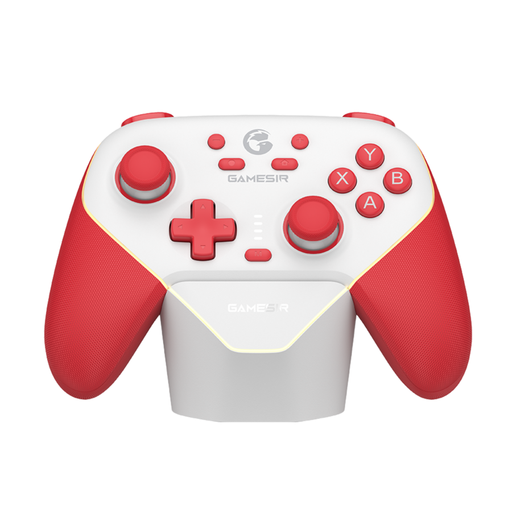
GameSir Super Nova Switch Tri-Mode controller, red and white
Worth considering if you’re looking for a controller for a Switch or PC set-up; check that the connection type you choose works with your device and game.
The product name lists Tri-Mode connectivity.
Joybuy
 No image available
Nintendo Switch 2 Official Pro Controller, black
An option for an extra controller for local games on Nintendo Switch 2. For NBA 2K26’s multiplayer mode, Nintendo says each player needs a compatible controller.
Nintendo lists a USB charging cable as included with the Switch 2 Pro Controller.
Joybuy
Frequently asked questions
Can a controller improve a poor view of the basketball court from the side?
No, a controller won’t change the screen’s viewing angle. Check your screen set-up separately from the seats where players will actually be sitting.
Does every player need their own controller?
For NBA 2K26 multiplayer on Switch 2, Nintendo says each player needs a compatible controller. For another game or system, check the requirements for that specific version.
How do I connect an extra Xbox controller?
According to Xbox Support, you can pair an Xbox controller wirelessly using the pairing buttons on the console and controller, or connect it with a suitable USB cable. For the standard wireless model described, make sure you have AA batteries or suitable rechargeable batteries.
Do you need an internet connection or subscription for a local basketball game?
It depends on the game and game mode. Nintendo says Play Now in NBA 2K26 on Switch 2 is available offline; other game modes may require internet access and possibly account registration. Check the requirements for the version of the game you’re playing.
What are my rights when buying a controller online in the Netherlands?
According to ACM ConsuWijzer, online purchases usually come with a statutory 14-day cooling-off period from delivery, although there are exceptions. You also have a statutory guarantee if a product doesn’t perform as you could reasonably expect under normal use; this is separate from any manufacturer’s guarantee.


