What should you look for when choosing?
First, check that your system and game are supported. Then choose the power option that works with the connections available and the space around where you play.
| What to consider |
What to look for |
Who is this important to? |
| No spare power socket |
Check the power option, included cable or batteries, available USB ports and cable routing. |
If I don’t want to use an extra plug while playing, I compare USB power, batteries and charging via an existing dock connection. Around 33% of consumers give top priority to playing without an extra power socket. |
| Compatibility |
Check the exact console version, model name, connection and game support. |
I want to know before buying whether the controller works with my system and game, rather than relying on a similar model name. Around 27% of consumers put compatibility first. |
| Controls for long sessions |
Consider grip, how easy the buttons are to reach and, for a wired controller, the cable length. |
For long quests, I want the buttons to be comfortable to reach and enough room to move. With a wired controller, the cable also needs to reach where I play. Around 20% of consumers give comfortable controls for extended play top priority. |
| In-game features |
Check whether the specific game supports the buttons, triggers or haptic feedback you want. For DualSense on PC, also check the connection requirements. |
If I’m choosing a controller for specific game features, I want to know whether my game actually supports them on my device. Around 20% of consumers make supported controls and features their main requirement. |
Controller options at Joybuy
These Joybuy products include wireless controllers with rechargeable batteries and wired options for the consoles or PC setups listed.
 No image available
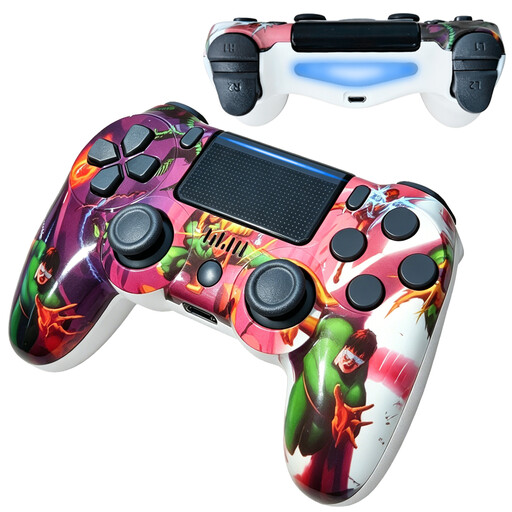
VIELLAN wireless PS4 controller
A wireless option for PS4 with a built-in battery that needs to be charged via USB.
The product description lists a 600 mAh battery and up to 8 hours of play time.
The description also mentions dual vibration and an ergonomic grip.
View at Joybuy
 No image available
Wireless game controller for Switch and PC
A wireless option for the Switch and PC setups listed in the product name. Check that the connection is compatible with your system and game.
The product description lists a gyroscope, dual vibration motors and an ergonomic design.
View at Joybuy
 No image available
VIELLAN wireless PC controller
A wireless PC option with a built-in battery; bear in mind that it will still need charging.
The product name lists Hall effect sticks, 255-level Hall triggers, programmable rear buttons, RGB lighting and USB-C.
According to the product description, the battery has a capacity of 1000 mAh and provides up to 10 hours of play time.
View at Joybuy
 No image available
GameSir G7 SE wired Xbox controller, Dynamic Blue
According to the product information, this wired option works with Xbox Series X|S, Xbox One and Windows. You’ll need a suitable USB port and a safe route for the cable.
The product description lists Hall effect sticks and triggers, two programmable rear buttons, vibration and a textured grip.
View at Joybuy
 No image available
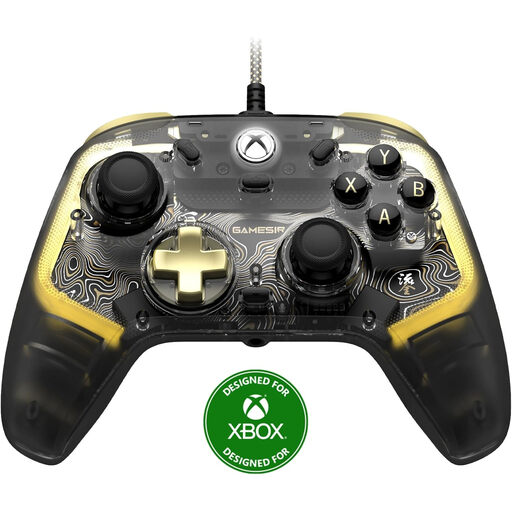
GameSir Kaleid Flux wired Xbox controller
According to the product information, this wired option works with Xbox Series X|S, Xbox One and Windows. Make sure you have a USB port available and plan the cable route.
The product description lists ALPS sticks, mechanical face buttons, vibration motors and RGB lighting.
View at Joybuy
Frequently asked questions
Can I use a USB-C cable to charge the AA batteries in any controller?
No. According to Microsoft, rechargeable AA batteries don’t charge inside the Xbox Wireless Controller. You’ll need a compatible rechargeable battery pack to charge that controller; check what’s included with the version you choose.
How can I charge the original Nintendo Switch Pro Controller without using a separate plug?
Nintendo describes charging it via an available USB port on the Switch dock, using the USB charging cable included with the controller. The dock needs to be connected to a suitable power supply. Nintendo says a full charge takes around six hours.
Does the Switch 2 Pro Controller work with the original Switch?
No. Nintendo says the Switch 2 Pro Controller only works with Switch 2. According to Nintendo, the original Switch Pro Controller can be paired with Switch 2.
What can I do if a controller I bought in the Netherlands turns out to be faulty?
According to the Dutch government, the retailer must provide a solution if a product is faulty. There is no fixed statutory guarantee period in the Netherlands; what you can expect depends, among other things, on the product and the information provided at the time of purchase. Normal wear and tear or damage caused by you doesn’t automatically entitle you to a free repair.
Where can I take used controller batteries or an old controller?
Take used batteries to a separate collection point, such as a shop or supermarket that sells batteries, and don’t put them in general waste. For discarded electrical appliances, the Dutch government lists options including collection points, recycling centres and the old-for-new scheme when buying a similar appliance.


