
Players of choice-driven stories
If you want to navigate dialogue and choice menus at your desk, first check whether your game supports controller input. Support in one interactive game tells you nothing about other titles.


A controller is most useful when the interactive fiction you play supports gamepad input, or when you can comfortably assign the actions you need to buttons. If a game regularly asks you to enter free text, keep a keyboard handy. Then choose between wired, wireless or more configurable options based on your PC and desk setup.
If you want to navigate dialogue and choice menus at your desk, first check whether your game supports controller input. Support in one interactive game tells you nothing about other titles.
If you regularly type words or sentences, it’s important to know whether you can assign set actions to buttons and whether you’ll still need a keyboard for free text.
If you want to play after work without a cable getting in the way or settings needing constant attention, compare the connection, receiver, Bluetooth connection and power requirements of the specific controller.
A good choice if: your PC and game support gamepad input, you sit close to your desk and you don’t want to use a wireless connection.
The trade-off: the cable needs to run neatly around or across your desk. Logitech says software installation is required for the DirectInput mode on the Logitech F310.
A good choice if: you’d rather not have a controller cable at your gaming spot and your PC supports the connection method you choose.
The trade-off: check the connection and power requirements of the exact version; going wireless won’t make a game that expects text input playable by controller.
A good choice if: you mainly want to assign set choices or repeated actions to buttons. Valve describes Steam Input as configurable for Steam.
The trade-off: assigning actions to buttons doesn’t necessarily replace typing arbitrary words or sentences.
A good choice if: your interactive fiction regularly asks for free-text commands, or a controller setup you want to use doesn’t work.
The trade-off: you may find it less convenient to rely on a gamepad for menus, but you’ll still have a straightforward way to enter text.
First check the input options in your own game, then see which connection and controls suit your desk.
| What to consider | What to look for | Who is it most relevant to? |
|---|---|---|
| Game support | Check whether your title supports gamepad input and whether you can access all the choices, menus and confirmation prompts. | I want to know first whether I can play my own game at my desk with a controller. Around 33% of consumers prioritise game compatibility. |
| Free text or set buttons | Work out which commands you can assign, and keep a keyboard available if you need to type free text. | If my game asks for words or sentences, I want to know which set actions I can assign and when I’ll need to type. Around 27% of consumers prioritise text input. |
| Connection at your desk | Check the cable route, available USB ports and Bluetooth support. For Windows, the 8BitDo Ultimate 2C Wireless lists 2.4 GHz or a cable; according to 8BitDo, Bluetooth is for Android. | I want to play without a cable getting in the way at my shared desk, and I want to know which connections my device supports. Around 20% of consumers prioritise the connection. |
| Controls while reading | Consider whether the D-pad, buttons and grip suit the way you navigate dialogue and menus. | During longer reading sessions, I want a layout that feels comfortable for repeated choices, rather than extra features my game won’t use. Around 20% of consumers prioritise comfort and ease of use. |
A mention of controller support for one visual novel doesn’t mean another text-based game accepts the same input.
Before choosing a controller, check the input options for the games you actually play.
If the controls don’t work as expected straight away, it may take extra time to try out the input settings.
The connection method can vary by version and target device. For the Ultimate 2C Wireless, 8BitDo lists 2.4 GHz and wired use on Windows, and Bluetooth for Android.
Read the connection details for the exact model and check which connections your PC supports.
According to Sony, adaptive triggers depend on support from the game. Haptic feedback on PC also requires a USB connection.
First check that the basic controls work in your games; consider the extra features only after that.
Worth considering if you want to configure input for Steam games.
An option to consider if you’re looking for an all-purpose controller for Windows and Xbox.
The F310 is a wired PC option for a desk setup.
The Ultimate 2C Wireless is an option for Windows, using a 2.4 GHz receiver or cable.
The DualSense is worth considering if you also play compatible PlayStation or PC games and want this layout.
These Joybuy picks include controllers whose product names mention PC or console use. Before buying, check that your device and game support the controller listed.
 No image available
For a PC game with gamepad support; the product name specifies Xbox Series and PC, and identifies the Ice Breaker Special Edition.
Keep a keyboard handy if your game asks for free-text commands.
 No image available
For a PC or PS4 setup where you want a wireless controller; the product name lists compatibility with PS4 and PC.
Check whether your interactive game supports gamepad input.
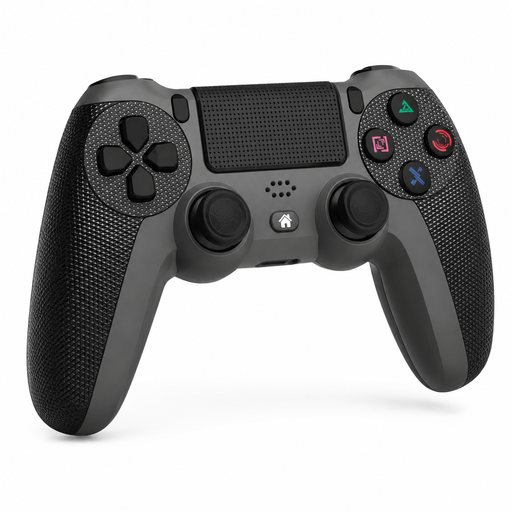 No image available
For a PS4 setup with a game that supports gamepad input; the product name lists Slim/Pro, a touchpad, dual vibration and turbo.
Check whether the individual interactive game works with this controller.
 No image available
For a PC game with gamepad support; the product name lists Switch and PC, dual vibration and a gyroscope.
Check which input your game supports before relying on extra features.
 No image available
For a PC game with gamepad support; the product name specifies a PS5 layout, not compatibility with every PS5 game.
The product name lists Hall effect sticks, 255-level Hall triggers, programmable rear buttons, RGB lighting, a 1000 mAh battery and USB-C.
No. Check the input options for the specific game. Valve explains that gamepad commands require a game that supports them. You may be able to assign keyboard or mouse actions to buttons if the controls allow it, but that’s not the same as typing free text.
Follow the instructions for the exact model. The Logitech F310 uses USB; Microsoft lists Bluetooth for the Xbox Wireless Controller. For the 8BitDo Ultimate 2C Wireless, 8BitDo lists a 2.4 GHz receiver or cable for Windows, not the Bluetooth mode for Android.
You don’t need an extended warranty to claim your statutory rights under Dutch consumer law. According to the Dutch government, a product must be fit for purpose, and the retailer is your point of contact if it isn’t. The Netherlands has no fixed statutory warranty period that applies to every product; compare paid-for extra cover with the rights you already have.
According to the Dutch government, in many cases you have 14 days to change your mind when you place an order remotely with a business. There are exceptions; according to the same guidance, a purchase from a private individual isn’t covered by the same distance-selling rules.