What should you look for when choosing?
First check your game’s input options and the device you’ll be using. Then decide how much space, how many buttons and how much grip you need.
| What to consider |
What should you check? |
Who is this important for? |
| Game controls |
Check which inputs your game supports and whether you can use the controller to continue, make choices, read back and navigate menus. |
If I want to be sure that my particular visual novel can be played with a controller, I’ll check the game page and the actions it requires; around 33% of consumers say game controls are their main reason for buying. |
| Space required |
Compare the dimensions and button layout of the exact version with the space available on your desk. |
If I want to keep space free next to my keyboard, I’ll weigh up the controller’s size against the buttons I need; around 27% of consumers prioritise a compact size. |
| Grip and buttons |
Check the position of the buttons and sticks, and try the grip yourself if possible. |
If I’m planning to read and make choices for longer periods, I’ll focus on easy-to-reach buttons and a comfortable grip; around 20% of consumers prioritise comfort and ease of use. |
| Connection and power |
Check that your device supports the Bluetooth or USB connection you’ve chosen, and find out what type of power the exact version uses. |
If I want to keep cables to a minimum on my desk, I’ll check which connection and power options my device and controller use; around 20% of consumers cite connection or power as their main reason. |
Joybuy products
This selection includes controllers for Nintendo Switch, models whose product titles mention PC and Switch, and an Xbox and PC controller. Check which inputs are supported by each game and device.
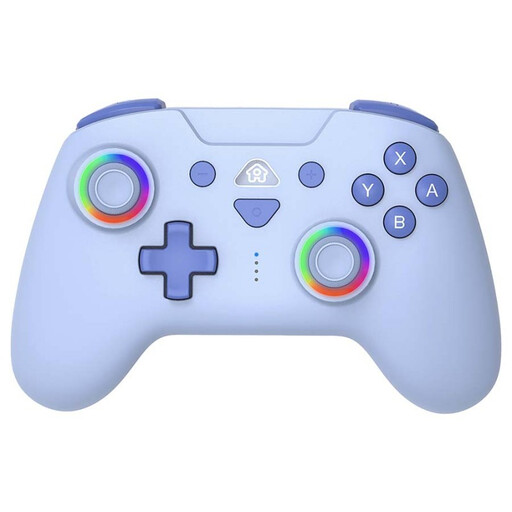 No image available
SUBSONIC wireless controller for Switch and Switch Lite, Blue
Designed for playing on Nintendo Switch or Switch Lite; check that it’s compatible with your visual novel.
The product title describes a wireless controller for Switch and Switch Lite.
Joybuy
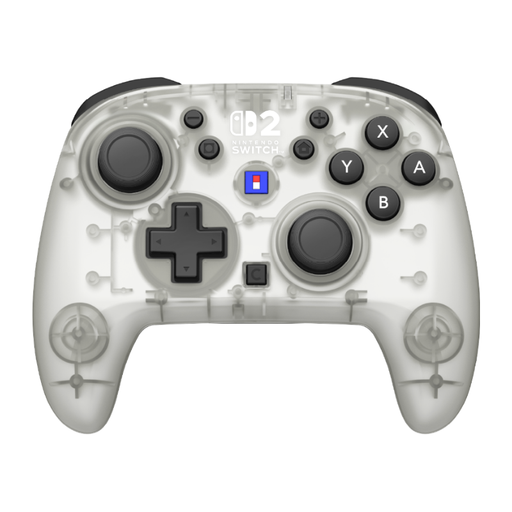 No image available
HORI Horipad Turbo Frost Wireless Controller for Nintendo Switch and Switch 2
An option for playing on Nintendo Switch or Switch 2, once you’ve checked the input options for your game.
The product title mentions Assign Function, C Button and a battery life of 10 h.
Joybuy
 No image available
Xbox Wireless Controller, Pulse Red
A good option if you’re considering a larger controller for PC games and also play other games; check whether your visual novel supports controller input.
The product title mentions Xbox, PC and cloud gaming.
Joybuy
 No image available
BEITONG KP70 Haptic Feedback Elite Wireless Controller
An option if you’re looking for a controller for PC or Switch and need more controls than just directional and choice inputs.
The product title lists PC, NS, NS2, iOS and Android, as well as six programmable buttons. Check that it’s compatible with your device and game.
Joybuy
 No image available
GameSir Cyclone 2 Multiplatform Controller, White-Bundle Edition
An option if you play other games as well as visual novels on one of the listed platforms; check that your game supports it.
The product title lists PC, Switch, iOS and Android, and mentions Mag-Res TMR Sticks.
Joybuy
Frequently asked questions
Will every PC controller work with every visual novel?
No. PC compatibility doesn’t guarantee that a specific game supports controller input. Eliza’s Steam page lists full support for Xbox controllers, but doesn’t confirm support for other devices. Check the information for your game and the actions you need.
Can the 8BitDo Micro also replace mouse clicks on Windows?
No, not in the keyboard mode that 8BitDo describes for the Micro. The manufacturer says you can’t assign mouse buttons or actions in this mode, so check whether you can control your visual novel entirely with keyboard keys.
How do I connect an SN30 Pro to Windows?
The 8BitDo manual describes Bluetooth and a wired USB connection for Windows 10 (1903) or later. For the Bluetooth pairing process, the manual specifies X + Start. Then check the game’s input settings.
What are my rights when I buy a controller online in the Netherlands?
According to ACM ConsuWijzer, for a standard online product purchase you generally have a statutory cooling-off period of up to 14 days after delivery, subject to applicable exceptions. Your statutory guarantee rights are separate from any manufacturer’s guarantee. Contact the retailer if a product doesn’t meet reasonable expectations.
What should I look out for when buying a controller from an online shop outside the EU?
The Dutch government advises checking that electronic products from online shops outside the EU meet European safety requirements, and lists the CE marking as something to look for. Check the specific version and seller; a brand name alone doesn’t confirm that the item being sold meets the requirements.


