
Switch player on the sofa
Wants to play a farming game on Switch in a dark room, with a particular focus on button layout and compatibility. Nintendo confirms that the Switch Pro Controller can be used wirelessly with Switch 2.


First, choose a controller that works with your device and the farming game you play. For Switch, the Switch Pro Controller is a different option from an Xbox controller for Xbox or PC; if you choose a controller with multiple connection options, make sure it’s in the right mode. RGB ambient lighting doesn’t automatically mean the button lettering lights up.
Wants to play a farming game on Switch in a dark room, with a particular focus on button layout and compatibility. Nintendo confirms that the Switch Pro Controller can be used wirelessly with Switch 2.
Wants to connect a controller to their PC and avoid reaching for the keyboard or mouse so often while playing. For Stardew Valley, the developer lists support for Xbox One and Xbox 360 controllers on PC.
Wants to distinguish the buttons easily in low ambient light. GameSir describes customisable RGB light strips on the Super Nova; this doesn’t automatically mean the button lettering is illuminated.
Start by checking that your platform and game are supported. Then check the button lighting, grip and how the controller connects and gets its power.
| What to consider | What should you check? | Who is this important to? |
|---|---|---|
| Platform and game | Check that your console or operating system and the specific game are supported. | If I play on Switch, Xbox or PC, I want to know first whether my game supports the controller. Around 33% of consumers prioritise compatibility with their platform and game. |
| Seeing the buttons | Check whether the button lettering itself is illuminated, or just the casing or light strips. | In a dark room, I want to see the controls, not just ambient lighting; around 27% of consumers give clear visibility of the buttons top priority. |
| Grip and button placement | Compare the grip and the position of frequently used buttons; if possible, try holding the controller. | For longer gaming sessions, I look at how the controller feels in my hand and whether the buttons are easy to reach. Around 20% of consumers prioritise long-term comfort. |
| Connection and power | Check the connection mode for your device and whether the controller uses batteries or a rechargeable battery. | I don’t want to be caught out while playing by an unsuitable connection or a flat battery. Around 20% of consumers give connection and power top priority. |
GameSir describes RGB light strips on the Super Nova, but this doesn’t confirm that the lettering on the buttons lights up.
If you’re choosing a controller specifically for illuminated buttons, look for explicit information about the lettering itself.
The 8BitDo Ultimate 2C Wireless and Ultimate 2C Bluetooth have different listed platforms and connection options.
Check the full variant name and the connection that works with your device before choosing a model.
According to PlayStation, DualSense features on PC vary by game and connection method. Haptic feedback requires a USB connection on PC.
Check which basic controls and extra features your game supports; don’t assume they’ll all be available.
Xbox lists AA batteries or a separate rechargeable battery pack as power options for the Xbox Wireless Controller.
Check the power requirements and what’s in the box for the exact version you’re considering.
These product ranges suit different platform options. Always check the exact version and whether your game is supported.
The Switch Pro Controller is an option for farming games on Nintendo Switch. Nintendo also confirms that it can be used wirelessly with Switch 2.
The Xbox Wireless Controller is an option for Xbox and compatible Windows devices. The developer of Stardew Valley lists support for Xbox One controllers on PC.
DualSense is an option for PS5 and for PC games that support the controller.
The Super Nova is a multi-platform option for players who want to switch between supported devices.
The Ultimate 2C Wireless is a separate option for Windows and Android.
This selection includes controllers whose product names mention a Switch, Xbox, PlayStation or PC option. Check that the exact version and the game you play are compatible.
 No image available
The product title describes a wireless PS5 controller; the product description mentions an ergonomic design for longer gaming sessions.
 No image available
The product name mentions Bluetooth for Switch and a 7-colour LED; LED lighting doesn’t prove that the button lettering is illuminated.
The product name also mentions vibration feedback and a stated range of 10 m.
 No image available
The product title lists Xbox Series and PC as compatible platforms.
This version uses 2 AA batteries. According to the product description, the USB-C cable for wired use is sold separately.
 No image available
The product name lists compatibility with PS4 and PC. Check that your game and device support this controller.
 No image available
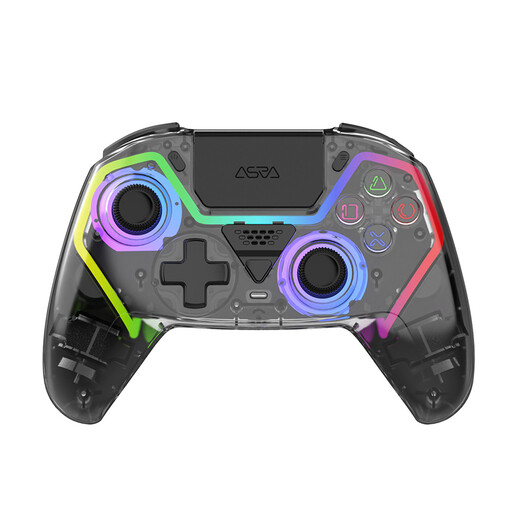
The product name lists PS5, Hall Effect sticks, programmable buttons, RGB lighting and a 1000 mAh battery.
RGB lighting doesn’t tell you whether the button lettering lights up; check this feature separately.
No, don’t assume universal support. The developer of Stardew Valley lists Xbox One and Xbox 360 controllers for PC, and full controller support on Xbox One, PlayStation 4 and Nintendo Switch. For other combinations, check the information for your game and device.
Yes. Nintendo confirms that you can pair the Switch Pro Controller wirelessly with a Switch 2.
According to the GameSir manual, you can plug the supplied receiver into a USB port and set the controller to 2.4GHz mode, or connect the controller using a USB-C cable. Follow the manual for the pairing steps.
Not necessarily. GameSir describes customisable RGB light strips on the Super Nova, but this doesn’t confirm that the button lettering is illuminated. Check the information about button lighting for the exact version.
Xbox lists AA batteries or a separate rechargeable battery pack as options. Check which power source is included with the version you choose.