
PC gamers who want a reliable connection
You want to check in advance that your controller, connection method and farming game will work together. Stardew Valley’s creator specifically lists Xbox One and Xbox 360 controllers for the PC version.


First, choose a controller that works with your device and the farming game you play. Then compare grip, buttons, connectivity and power for your gaming sessions. A different controller won’t make a hard-to-see screen any brighter: also consider where the screen is positioned and, where available, its brightness settings.
You want to check in advance that your controller, connection method and farming game will work together. Stardew Valley’s creator specifically lists Xbox One and Xbox 360 controllers for the PC version.
You play on a Switch or Switch 2 and are considering not just the controller, but also the screen’s position and brightness. Nintendo explains the brightness settings for both systems.
Once you’ve settled on your device, you can compare grip, button positions and how the controller charges or connects. Microsoft describes features including a textured grip, while Nintendo gives an estimated battery life for the Switch Pro Controller.
Start by checking that your device and game are compatible, then consider screen visibility, controls and power.
| What to consider | What should you check? | Who is this important for? |
|---|---|---|
| Compatibility | Check the exact model name, your device, the connection and whether your game supports the controller. A platform being listed doesn’t confirm that every game will work. | I want to make sure my controller and game work together before choosing. Around 36% of consumers give compatibility top priority. |
| Screen visibility | Check where light falls on the screen. On Switch and Switch 2, you can adjust the brightness in handheld or tabletop mode. | When I play in a bright room, I want to be able to see the screen clearly; a new controller won’t solve glare. Around 29% of consumers prioritise screen visibility. |
| Grip and buttons | Consider the grip and button positions for your hands. Check whether any extra buttons can be customised on your device and in your game. | I want to reach the controls comfortably during repeated actions, without choosing extra buttons I won’t use. Around 21% of consumers focus mainly on controls and comfort. |
| Power and freedom of movement | Check how the controller is powered and whether the cable is long enough for where you sit. Stated battery life can depend on software and features. | I want to know whether I’ll need a cable while playing, whether I’ll need to recharge, or whether I’ll have enough room to sit comfortably while playing wirelessly. Around 14% of consumers focus most on power or freedom of movement. |
The 8BitDo Ultimate 2C Wireless and Ultimate 2C Bluetooth have different platform compatibility and connections. The manufacturer lists Windows and Android for the Wireless version, and Switch for the Bluetooth version.
Check the full model name, compatibility and connection type before you order.
A controller operates the game, but won’t change the light falling on your screen or its brightness. Nintendo explains the brightness settings for Switch and Switch 2.
First consider the screen’s position and available brightness settings. Then choose a controller that suits your device and game.
A manufacturer’s warranty doesn’t replace your statutory rights. According to ACM ConsuWijzer, the seller is responsible for providing an appropriate remedy free of charge if a product breaks sooner than you could reasonably expect during normal use.
Keep your proof of purchase and contact the seller if a product is faulty.
An Xbox controller is an option for supported Xbox consoles and Windows PCs.
The Switch Pro Controller is designed for Switch systems; the separate Switch 2 Pro Controller is for Switch 2.
The Ultimate 2C Wireless and Ultimate 2C Bluetooth are versions designed for different platform needs.
DualSense is an option for PS5 and for PC games that support the controller.
The Enhanced Wired Controller for Xbox Series X|S is a wired option for the Xbox consoles and Windows listed by PowerA.
This Joybuy selection includes controllers for PC and Xbox gaming, as well as Nintendo Switch. Before buying, check that the exact model is right for your device and game.
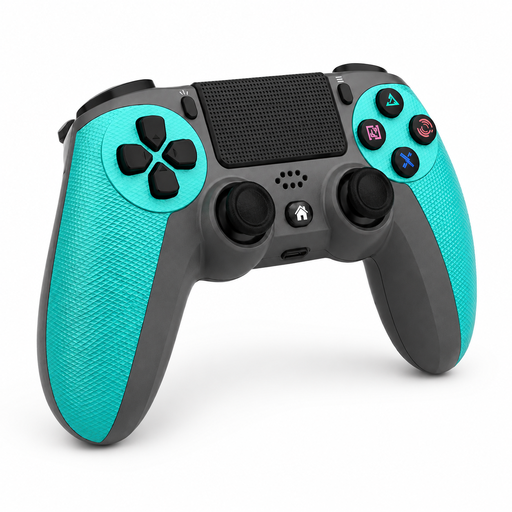 No image available
An option if you’re looking for a wireless controller for the PS4 and PC platforms listed in the product name; also check that your game supports it.
The product name specifies a wireless connection and compatibility with PS4 and PC.
 No image available
An option if you play on PC and programmable rear buttons matter to you; check that the listed features suit your game and setup.
The product name specifies Hall-effect joysticks, 255-level Hall triggers, programmable rear buttons, RGB lighting, a 1000 mAh battery and USB-C.
 No image available
A wired option if you play on one of the Xbox systems or Windows platforms listed in the product name; check that your farming game supports it.
The product name lists Xbox Series X/S, Xbox One and Windows 10/Windows 11.
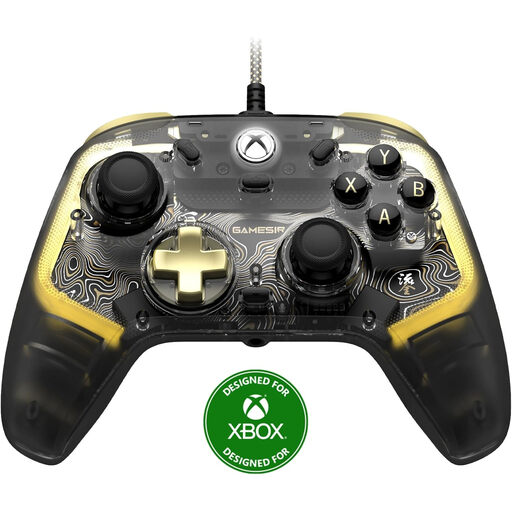 No image available
A wired option if you play on one of the Xbox systems or Windows platforms listed in the product name; check that your farming game supports it.
The product name lists Xbox Series X/S, Xbox One and Windows 10/Windows 11, in a smoke-transparent RGB design.
 No image available
An option if you’re looking for a separate controller for a Nintendo Switch setup. Nintendo also describes pairing it with Switch 2, but the older controller can’t wake that console from sleep using the HOME button.
Nintendo estimates that the battery lasts for around 40 hours on a full charge, depending on software and features.
No, a controller won’t change the screen’s brightness. Nintendo explains the brightness settings for Switch and Switch 2 in handheld or tabletop mode; also consider where the screen is positioned and where the light is coming from.
No, a platform listing on the controller isn’t enough to confirm that. Stardew Valley’s FAQ lists Xbox One and Xbox 360 controllers for PC; for other models, check that your game setup supports them.
Nintendo explains that you can pair it using the SYNC button from CONTROLLERS > CHANGE GRIP/ORDER, or via USB in the console setup described. Follow the instructions for the correct console version.
No, you don’t need extra warranty cover to exercise your statutory rights. According to ACM ConsuWijzer, the seller is responsible for providing an appropriate remedy free of charge if a product breaks sooner than you could reasonably expect during normal use.
For online consumer purchases, ACM ConsuWijzer says you will generally have 14 days from delivery to change your mind. There are exceptions, so check the information about cancellation periods and returns before buying.