First, check that both your device and detective game support controller use: according to Steam, not every game supports a controller, and partial support may mean you still need a mouse or keyboard. Then decide how you’d like to listen privately, and check that the headset connection works with your device and setup. On Nintendo Switch systems, you can turn off controller vibration in the settings.
Who is this guide for?
Players who want to check compatibility
You play a particular detective game on PC or console and want to check in advance that both your device and the game support controller use. Steam Support explains that game support varies by title, while Nintendo Support makes clear that controllers for different Switch generations aren’t always interchangeable.
Players who share a bedroom
You want to listen privately while playing and avoid vibrations that might disturb your room-mate. The audio connection that works depends on the controller, device and connection you choose. Nintendo Support explains how to turn off vibration on Switch systems.
Players who enjoy long puzzle sessions
You’re weighing up grip, button layout and freedom of movement against the practicalities of a wired or wireless setup. Microsoft and Nintendo describe the features of their controllers, but how a controller feels in your hands is a personal choice.
What should you consider when choosing?
| What to consider |
What should you look for? |
Who is this important for? |
| Game and device support |
Check support for your exact device and detective game. For PC games, look for full or partial controller support. |
If I don’t want to reach for a mouse and keyboard halfway through a puzzle, I’ll check first that my game works fully with a controller. Around 36% of consumers put compatibility first. |
| Private listening and vibration |
Check where the headset plugs in and whether audio works with your device and connection. Also check the controller vibration setting. |
If I share a room, I want to listen through a headset and reduce vibration where possible. Around 29% of consumers prioritise quiet, private gaming. |
| Comfort during puzzle sessions |
Compare the grip and button layout, and consider whether a cable will suit your playing space. |
For longer sessions, I want a controller that feels comfortable to hold and has controls that suit my game. This is the main consideration for around 21% of consumers. |
| Buying and using the controller |
Check what’s included in the box and whether you already have a suitable cable, power supply or headset. Consider any additional warranty alongside your existing rights. |
If I mainly want to understand the costs and accessories I’ll need, I’ll check what I already have and what comes with the controller. Around 14% of consumers put cost considerations first. |
Pitfalls to avoid
-
Assuming device compatibility means full game support
Steam Support distinguishes between full and partial controller support. With partial support, you may need to use a mouse or keyboard for certain actions.
Check the support label for the specific detective game and consider whether partial support will work for your setup.
-
Assuming a headset socket guarantees audio over every connection
For the DualSense headset socket on PC, PlayStation specifies that the controller must be connected by cable.
Before buying, check that your controller, device, headset and connection method work together.
-
Confusing the two Nintendo Pro Controllers
Nintendo states that the Switch 2 Pro Controller works only with Switch 2, not the original Switch.
Check the full model name and choose a controller that matches the Switch generation you use.
-
Confusing an additional warranty with your statutory rights
According to the Dutch government, your right to a product that works as it should applies alongside the manufacturer’s warranty and any additional warranty you’ve purchased.
Compare the specific cover offered by an additional warranty with your existing rights before paying for it.
Relevant brands to consider
Xbox / Microsoft
Microsoft describes the Xbox Wireless Controller as suitable for Xbox and Windows PC, and also says it supports mobile devices.
- Microsoft lists Bluetooth, button mapping and a 3.5mm headset socket.
- Having a socket doesn’t guarantee that headset audio will work over every connection. Check how audio is routed on your device.
PlayStation / Sony
PlayStation describes the DualSense as a controller for PS5 and explains how to connect it to supported PCs and mobile devices.
- PlayStation describes haptic feedback and adaptive triggers for games and devices that support these features.
- On PC, the headset socket requires a wired controller connection, according to PlayStation. Haptic feedback also depends on game support.
Nintendo
Nintendo makes separate Pro Controllers for Switch and Switch 2, so check the exact generation when choosing.
- Nintendo says the original Switch Pro Controller can be paired with both Switch generations.
- According to Nintendo, the Switch 2 Pro Controller doesn’t work with the original Switch. The Switch 2 Pro Controller’s headset socket is for use with Switch 2.
8BitDo
8BitDo describes the Ultimate 2C Wireless as compatible with specific combinations of Windows and Android.
- The manufacturer lists Hall Effect sticks, extra assignable buttons and different connection methods for each platform.
- Check which connection is right for your device. Manufacturer claims about polling rate and lifespan aren’t independent measurements of noise levels or suitability for detective games.
GameSir
GameSir describes the wired G7 SE for Xbox and PC, an option to consider if a cable suits your playing space.
- GameSir lists Hall Effect sticks and assignable buttons.
- The wired model requires a suitable cable setup. The manufacturer’s claim about stick drift isn’t an independent comparison of product lifespan.
Controllers at Joybuy
These controllers are suited to Xbox and Windows setups, Nintendo Switch and PC. Check that each model works with your device and game, and suits the way you like to listen.
 No image available
Xbox Wireless Controller Ice Breaker Special Edition
An option for Xbox and Windows PC setups. Also check that your detective game supports controller use.
The product description lists Xbox Wireless and Bluetooth, a 3.5mm socket for a compatible headset, a hybrid D-pad and textured grips. AA batteries are included; a USB-C cable for a wired connection is sold separately.
View at Joybuy
 No image available
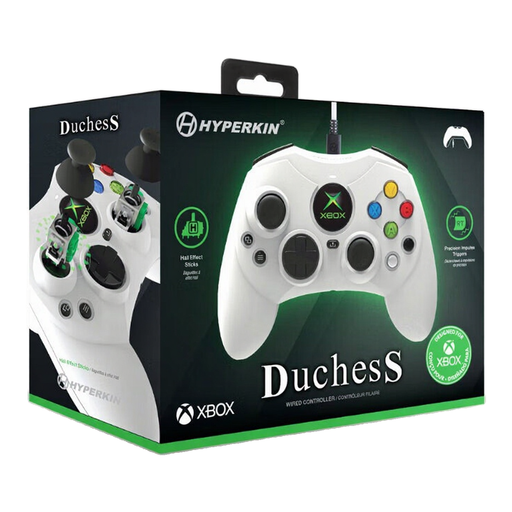
Hyperkin Duchess wired controller, white
A wired option for Xbox Series X|S, Xbox One and Windows 10/11 if a cable suits your playing space.
The product description lists Hall Effect sticks, impulse triggers, a 3.5mm headset socket and a detachable 3-metre USB-C cable.
View at Joybuy
 No image available
Nintendo Switch Pro Controller, black
An option for Nintendo Switch. Nintendo says the original Switch Pro Controller can also be paired with Switch 2.
The product description lists thumbsticks, shoulder buttons, motion controls, HD Rumble and amiibo functionality. It also says the controller has a built-in lithium-polymer battery.
View at Joybuy
 No image available
BEITONG KP70 Haptic Feedback Elite Wireless Controller
The product title lists PC, Nintendo Switch and Switch 2. Check that the controller and connection are right for your exact device and game.
The product title lists six programmable buttons and adjustable joystick damping. The description mentions wired, wireless and Bluetooth connections, and a 1500 mAh battery capacity.
View at Joybuy
 No image available
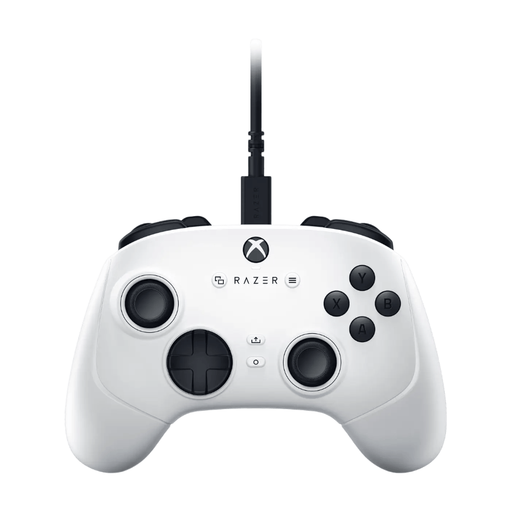
Razer Wolverine V3 Tournament Edition, white
A wired option for Xbox and PC if running a cable from your seat to your device is practical.
The product description lists Hall Effect sticks, four paddles and six assignable buttons. The detachable USB-C cable is 3 metres long.
View at Joybuy
Frequently asked questions
Can I play every detective game on Steam entirely with a controller?
No. Steam Support says that not every game supports controller use; with partial support, you may sometimes need a mouse or keyboard. Check your game’s support label before choosing a controller.
Does the DualSense headset socket work on PC over Bluetooth?
According to PlayStation, the controller must be connected by cable to use the headset socket on PC. So don’t choose this listening option based on a Bluetooth connection alone.
How can I reduce controller vibration if someone else in the room is asleep?
Nintendo explains how to turn off controller vibration on Switch and Switch 2. On the original Switch, the option is under Controllers and Sensors; on Switch 2, you’ll find it under Controllers/Accessories. This won’t necessarily reduce the sound made by the physical buttons.
Does the Switch 2 Pro Controller work with the original Switch?
No. Nintendo says the Switch 2 Pro Controller can only be used with Nintendo Switch 2. Check the full model name and your console generation before buying.
What are my rights when buying a controller online in the Netherlands?
According to the Dutch government, online purchases from a business generally come with a 14-day cooling-off period. You’re also entitled to a product that works as it should; if it’s faulty, the seller must provide a solution. There’s no fixed statutory two-year warranty period in the Netherlands. What applies depends on the purchase and the problem.


