
Swing in front of the TV
You’re looking for tennis where arm movements control your shots, and want to make room to play together in front of the TV. Nintendo describes this way of playing for Nintendo Switch Sports.


First, decide whether you want to swing using motion controls or play with standard buttons. Nintendo describes tennis with Joy-Con motion controls for Nintendo Switch Sports and compatible Switch models; you’ll need a Switch 2 for Mario Tennis Fever. If you’re looking for TopSpin 2K25 with professional players and a career mode, consider PS5 or Xbox Series X|S. Also check the local game modes and any online subscription requirements with the publisher.
You’re looking for tennis where arm movements control your shots, and want to make room to play together in front of the TV. Nintendo describes this way of playing for Nintendo Switch Sports.
You want an accessible, colourful tennis game and are mainly interested in the game modes, the number of local players and which Switch generation the game requires. Nintendo says Mario Tennis Fever is exclusive to Switch 2.
You’re looking for professional players, a career mode or local doubles with standard console controls, and are comparing PlayStation and Xbox. Publishers list different game modes and online requirements for each platform.
First choose the tennis game and controls you want; then check that the console connects to your TV and that the controllers and any online access suit the way you want to play.
| What to consider | What should you check? | Who is this important for? |
|---|---|---|
| Tennis with motion controls | Check the specific game and mode, the compatible Joy-Con controllers and whether you have enough room. Nintendo describes motion controls for tennis in Nintendo Switch Sports. | If I want to swing a Joy-Con, I want to know whether the game really supports those controls and whether I have enough room to move. Around 31% of consumers say motion controls are their top priority. |
| Mario Tennis and local play | Check the Switch generation, the Mario Tennis game you want and how many controllers you’ll need. Nintendo says Mario Tennis Fever is exclusive to Switch 2; Mario Tennis Aces is a Switch game. | If you mainly want to play Mario Tennis with others, it’s worth comparing the game version and local game mode in advance. Around 25% of consumers prioritise this. |
| TopSpin and career mode | Check whether you’re choosing the PS5 or Xbox Series X|S version of TopSpin 2K25 and which local game mode you want. Xbox lists offline Exhibition for up to four players in doubles; PlayStation lists local play for one to four players. | If professional players, a career mode or local doubles matter to me, I want to choose the right version of TopSpin and the right game mode. Around 25% of consumers prioritise this kind of tennis game. |
| Complete gaming setup | Check the console version, game and controllers; for online play, review Nintendo, PlayStation or Xbox’s requirements. The PS5 Digital Edition and Xbox Series S don’t have a disc drive. | If you want to work out the cost of your complete setup first, compare the console, game and controllers, and include an online subscription only if you need one. Around 19% of consumers say the overall cost of playing is their main consideration. |
The Switch Lite doesn’t support TV mode, so it won’t meet your needs if you want to play on a large external screen.
Before you buy, check whether the exact Switch model supports TV output.
If you already have a Switch Lite, you may still need a TV-compatible console system to play on your TV.
The console alone doesn’t tell you which controls a specific tennis game or mode supports. The Joy-Con motion-control modes described differ from the game modes listed for TopSpin.
Check that motion controls are supported for the specific game and mode, not just the console.
The PS5 Digital Edition and Xbox Series S don’t have a disc drive, so a disc-based game won’t work with these console versions.
Check the full console model first, then choose the corresponding game version.
For a digital console, you’ll need to buy the game you want in a compatible digital version.
Your chosen game mode may require a separate game, extra controllers or an online subscription. Requirements vary by platform and game.
Before you buy, make a list of the console, game, local controllers and any online requirements.
Your final setup may therefore include more than just the console and game.
A way to play tennis with Joy-Con motion controls, Mario Tennis games and Nintendo Switch Sports. Check which Switch generation each game requires.
A PS5 option if you’re looking to play TopSpin 2K25 with professional players, a career mode or local multiplayer.
An Xbox Series X|S option for TopSpin 2K25, with offline Exhibition game modes.
These product picks focus on playing on a TV with Nintendo Switch and Switch 2 consoles, and a PS5 console. Check each product card and game to make sure the tennis game, controllers and game mode suit your needs.
 No image available
A bundle for anyone who wants to play Nintendo Switch Sports Resort on a TV-compatible Switch 2.
The product name lists Nintendo Switch Sports Resort and 3 months of Nintendo Switch Online. The bundle description mentions Joy-Con 2 controllers and a dock with an HDMI connection for TV mode.
 No image available
A console option for anyone who wants to pair a Switch 2 with a compatible tennis game for TV play.
The product name mentions a replaceable battery and the 2026 edition. The product description lists Joy-Con 2 controllers and a dock for TV mode; check which game you want to play separately.
 No image available
A TV-compatible Nintendo Switch option to compare if you’re looking for a console for Switch tennis games.
The product name lists 32 GB and Mario Kart 8 Deluxe on a physical game card. The description mentions Joy-Con controllers, a dock and an HDMI cable. Check separately which tennis game you want to play.
 No image available
A Switch 2 console for playing on a TV. Before you buy, check that the tennis game you want suits your needs.
The product name lists a Mario Kart World download and 3 months of Nintendo Switch Online. The description mentions 256 GB of internal storage and a dock that connects to the TV with an HDMI cable.
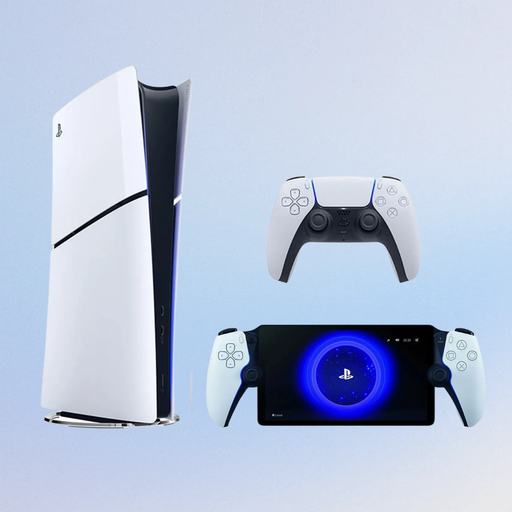 No image available
A PS5 option if you want to play TopSpin 2K25 on PlayStation. Check which local or online game mode you want.
The product name lists the Digital Edition with 825 GB and a PlayStation Portal Remote Player. PlayStation describes the Digital Edition as a console without a disc drive; the product description mentions connecting to a TV via HDMI.
No, the Switch Lite doesn’t support TV mode. For Nintendo Switch Sports, Nintendo lists TV mode on Switch, Switch – OLED Model or Switch 2, and says that Switch and Switch 2 Pro Controllers aren’t compatible.
For a TV-compatible Switch model, use the dock, a TV or monitor and an HDMI connection; detach the Joy-Cons. Nintendo recommends using wrist straps with Joy-Cons when playing wirelessly. Make sure you also leave plenty of space around you when swinging.
It depends on the game and whether you’re playing locally or online. Nintendo requires an active Nintendo Switch Online membership for online play in Nintendo Switch Sports; PlayStation lists PS Plus as a requirement for online TopSpin, and Xbox requires a separate subscription for online multiplayer on console. Check the requirements for the specific game mode.
According to the Dutch government, you’re entitled to a product that works properly and can contact the seller if there’s a problem. The Netherlands has no fixed statutory warranty period; a manufacturer’s warranty and any additional warranty don’t replace your statutory rights.