Start by checking the exact superhero game you want and which systems that specific version is available for. Then choose between a handheld, such as a Switch or Steam Deck, and a fixed setup: a PS5 or Xbox Series S also needs room for a monitor, cables and ventilation. For older Switch games and PC games on Steam Deck, check compatibility for the specific title too.
Who is this guide for?
Player with one favourite hero
If you mainly want to play a specific Spider-Man or LEGO Marvel game, first check which systems the version you want is available for. PlayStation lists a PS5 version of Marvel’s Spider-Man 2; Nintendo UK lists LEGO Marvel Super Heroes 2 for Nintendo Switch.
Handheld player with limited desk space
If you don’t want to keep a console and monitor set up side by side, compare handheld options and check compatibility for each game. Nintendo Switch 2 has a built-in screen, while Steam gives PC games individual compatibility ratings for Steam Deck.
Family playing superhero games together
Check how many players and controllers are needed for each game mode. Nintendo UK notes that extra accessories are needed for multiplayer in LEGO Marvel Super Heroes 2.
What should you consider when choosing?
PlayStation 5
Choose this if: you want to play the PS5 version of Marvel’s Spider-Man 2 and have a monitor and space for the console.
Bear in mind: the digital edition doesn’t have a built-in disc drive. Sony recommends leaving at least 10 cm of clear space around the PS5.
Nintendo Switch 2 or Switch OLED
Choose this if: you want to play handheld or at a table, and are looking for a LEGO Marvel game for Nintendo Switch, for example.
Bear in mind: some Switch games may not be fully compatible with Switch 2, or may not work at all; check each individual title.
Xbox Series S
Choose this if: you want to use a dedicated console with a monitor and the LEGO Marvel game you want is available in the Xbox catalogue.
Bear in mind: the Series S doesn’t have a disc drive, so it won’t play physical game discs.
Steam Deck OLED
Choose this if: you’re looking for a handheld that plays PC games and will check compatibility for each title you want in advance.
Bear in mind: Steam lists Marvel’s Spider-Man 2 as ‘Playable’, not ‘Verified’; these ratings don’t mean the same thing.
| What to consider |
What should you check? |
Who is this important for? |
| Game availability |
Look up the full game title and edition with the publisher or in the platform’s store. |
If one specific superhero game is the deciding factor, I want to be sure that exact version works on my system. Around 36% of consumers give their preferred game top priority. |
| Desk space |
Measure the space for the complete setup, including the monitor and cables. Sony recommends leaving at least 10 cm of clear space around the PS5. |
With a small desk, I want to know whether a handheld will fit or whether there’s also room for a monitor and console. Around 29% of consumers prioritise the space available for gaming. |
| Playing together |
Check the local game mode, player count and required controllers or accessories for each game. |
If we want to play together, I want to know in advance whether the chosen game mode and controls will work for everyone. Around 21% of consumers give playing together top priority. |
| Discs and other requirements |
Check whether the console has a disc drive and what’s included in the bundle, such as games, controllers and accessories. |
If you want to use existing game discs or find out what else you need first, check the edition and what’s included in the bundle. Around 14% of consumers prioritise these purchases and requirements. |
Common buying pitfalls
-
Assuming an old exclusivity listing is still current
The fact that Marvel’s Spider-Man 2 has a PS5 version doesn’t mean it’s only available on PS5. Steam also lists a PC version, with a separate Steam Deck rating.
Check the platform version and, if you’re using a handheld PC, the compatibility rating for the exact game you want to play.
-
Looking only at the console’s dimensions
A fixed PS5 or Xbox setup also takes up space for a monitor, cables and ventilation. Sony recommends leaving at least 10 cm of clear space around the PS5.
Measure the space needed for the complete setup before choosing a fixed console.
-
Buying a digital console when you own game discs
The Xbox Series S and digital PS5 edition won’t play game discs without the appropriate hardware.
Check the exact edition and compare it with the games you already own or want to use.
-
Assuming every Switch game works on Switch 2
Nintendo warns that some Switch games may not be fully compatible with Switch 2, or may not work at all. You’ll need a microSD Express card to expand game storage on Switch 2.
Check whether the game you want is compatible and confirm the card standard before relying on being able to reuse your existing card.
Brands to compare
Sony PlayStation
Worth considering if you want to play a PS5 version of a superhero game and have a permanent spot for a monitor.
- PlayStation lists Marvel’s Spider-Man 2 for PS5 and offers editions with and without a disc drive.
- The digital CFI-2100 edition doesn’t have a built-in disc drive. Sony recommends leaving at least 10 cm of clear space around the PS5.
Nintendo
Worth considering for handheld or tabletop play, and for LEGO Marvel games listed for Nintendo Switch.
- Nintendo UK lists LEGO Marvel Super Heroes 2 for Nintendo Switch; Switch 2 has a built-in screen.
- Some Switch games may not work on Switch 2, or may not be fully compatible. Check compatibility for the specific game.
Microsoft Xbox
Worth considering for a fixed, digital console setup with a monitor and a game from the Xbox catalogue.
- Microsoft lists LEGO Marvel games for Xbox. For the 512 GB Xbox Series S edition compared here, Microsoft gives dimensions of 6,5 × 15,1 × 27,5 cm.
- This edition doesn’t have a disc drive. Remember to allow room for cables and ventilation when deciding where to put it.
Valve Steam Deck
Worth considering if you’re looking for a handheld that plays Steam games and will check compatibility for each title.
- Valve gives the Steam Deck OLED dimensions of 298 × 117 × 49 mm. Steam rates Marvel’s Spider-Man: Miles Morales as ‘Verified’.
- Steam rates Marvel’s Spider-Man 2 as ‘Playable’, not ‘Verified’. Check the rating for each PC game you want individually.
Joybuy products for gaming at a small desk
This selection focuses on handhelds and Nintendo Switch consoles for gaming at a small desk without a permanent monitor.
 No image available
Lenovo Legion Go 8ASP2
Its handheld design is ideal for gaming at a small desk without a permanent monitor.
View at Joybuy
 No image available
Lenovo Legion Go S 8APU1 83N6001TMH
Its handheld design is ideal for gaming at a small desk without a permanent monitor.
View at Joybuy
 No image available
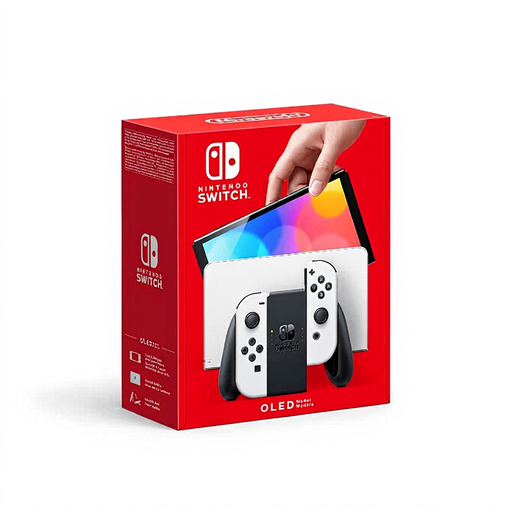
Nintendo Switch OLED White
This Switch edition is suited to handheld or tabletop play; Nintendo lists LEGO Marvel Super Heroes 2 for Nintendo Switch.
View at Joybuy
 No image available
Nintendo Switch 2 Console (EU)
The built-in screen makes it suitable for gaming without a permanent monitor. If you’re buying Switch games, check whether each specific title is compatible with Switch 2.
View at Joybuy
 No image available
MSI Claw A8 BZ2EM-047NL, 8 inches, 1 TB
Its portable design is ideal for gaming without a permanent monitor. The product information states that the charger must be purchased separately.
View at Joybuy
Frequently asked questions
Can I play any Switch game on Switch 2?
No, not every Switch game is fully compatible with Switch 2. Nintendo warns that some games may not be supported at all or may not be fully supported, so check the specific title with Nintendo before making your choice.
How should I position a PS5 on a small desk?
Keep the vents clear and, according to Sony, leave at least 10 cm of space around the PS5. Don’t put the console in a cramped space; this advice applies to the PS5 and isn’t a general measurement for other consoles.
What are my rights if an online console purchase isn’t suitable or doesn’t work properly?
For online purchases, you generally have a 14-day cooling-off period from delivery; exceptions may apply. If a product doesn’t perform as you could reasonably expect under normal use, ACM ConsuWijzer says the seller is responsible for providing an appropriate solution under the statutory guarantee.
Does a PEGI age rating tell you how difficult a game is?
No. PEGI describes age ratings as an indication of whether a game’s content is suitable for a particular age, not how difficult it is. The Dutch Government refers to age recommendations for computer games; if you’re a parent, check the rating for the specific game.


