
Story and puzzle fan
Start with the mysteries and brain-teasers you want to play. Then check the console version, edition and language for each title. For example, Nintendo lists The Case of the Golden Idol: Complete Edition for Nintendo Switch.


Start with the story-driven puzzle games you want to play, then check the console version, language and age rating for each title before choosing a console. Nintendo Switch 2 lets you play on your TV or in handheld mode, while a PS5 with a disc drive or an Xbox model may suit you if you want to use compatible physical games. A stated 4K output does not automatically mean every game will display in 4K.
Start with the mysteries and brain-teasers you want to play. Then check the console version, edition and language for each title. For example, Nintendo lists The Case of the Golden Idol: Complete Edition for Nintendo Switch.
You mainly play from the sofa and want to check the TV connection, supported display settings and whether the interface is easy to read from where you sit. A console’s maximum output alone doesn’t tell you the picture quality of an individual game.
You may want to switch between playing on a TV and in handheld mode. Nintendo Switch 2 supports both, but check compatibility for existing Switch games individually: Nintendo warns that some titles may not work, or may not work fully.
First, check that your preferred puzzle games are available on the console. Then make sure the TV display and play modes suit you, and finally compare disc support and storage.
| What to consider | What should you check? | Who is this important for? |
|---|---|---|
| Games you want to play | Look up each title individually and check the console version, edition and on-screen language. | If I want to play particular mysteries or brain-teasers, I want to know in advance whether that specific version is available. Around 30% of consumers prioritise their preferred story and puzzle games. |
| TV display | Check TV mode or HDMI output, game and display support, and how easy the interface is to read. | If you mainly play from the sofa, you’ll want to check how settings and text look on your own TV. Around 30% of consumers prioritise TV display and readability. |
| TV and handheld play | Check whether the console offers both play modes and whether your existing games are compatible. | If I want to carry on playing without a TV, the console needs to suit both ways of playing. Around 20% of consumers prioritise the option to play on both a TV and in handheld mode. |
| Discs and costs | Check whether the model has a disc drive, and compare storage and any accessories you’ll need. | If you own or want to buy physical games, you’ll need to make sure the console you choose can play discs. Around 20% of consumers base their choice mainly on game format and overall costs. |
The Nintendo Switch Lite can’t connect to a TV, so it won’t meet your needs if you want to play on a big screen.
Check the full model name and make sure the console specifically supports TV mode.
Nintendo says that 4K on Switch 2 depends on the game and a compatible display supporting it. So the console’s maximum output doesn’t prove that a particular puzzle game runs in 4K.
Check the game you want to play and your TV’s capabilities separately.
The Xbox Series S model reviewed has no disc drive, while the Xbox Series X and PS5 models reviewed do. A console without a disc drive can’t play your compatible physical games.
Decide in advance whether you want to use downloads, existing discs or physical games you buy in future.
Nintendo lists 10 December 2026 as the release date for Professor Layton and the New World of Steam. That means the game won’t be playable on 25 October 2026.
Base your choice on games you can play at the time, and check the latest release date again when you buy.
Nintendo Switch 2 is an option if you want to use the same console on your TV and in handheld mode. The Nintendo catalogue includes story-driven puzzle and detective games.
A PS5 with a disc drive suits anyone who wants to play PS5 games on a TV and use compatible physical games too.
Xbox Series S and Series X are TV console options. Your choice will depend in part on whether you want to play digitally or use compatible physical games.
This selection includes TV-focused consoles and bundles, as well as a handheld PC. For the latter, check what connection you’ll need to play on your TV before buying.
 No image available
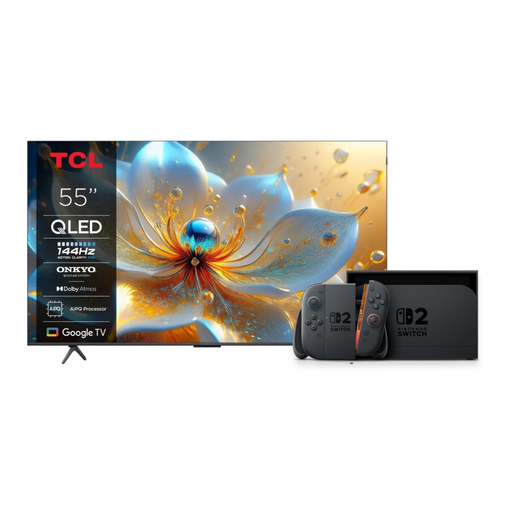
This bundle combines a TV and Nintendo Switch 2 for anyone who wants to play on a TV and in handheld mode.
The product name specifies a 55-inch 4K QLED TV with 144 Hz. Nintendo says that 4K output on Switch 2 depends on the game and display.
Games aren’t included unless listed separately.
 No image available
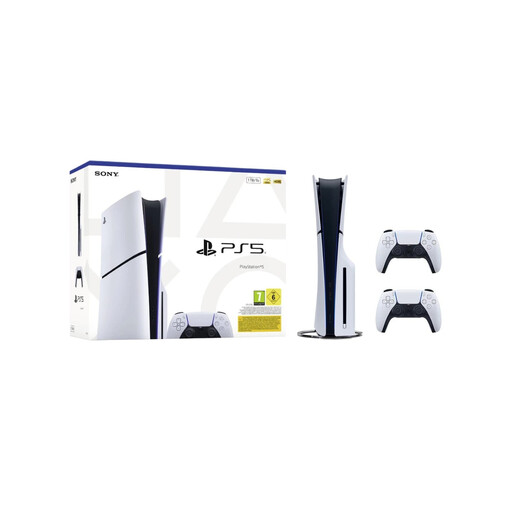
This bundle suits anyone looking for a PS5 with a disc drive and two controllers included.
The product name specifies 1 TB, a disc drive and two white DualSense wireless controllers. Check which games you’ll need to buy separately.
 No image available
This model is described as a handheld for PC games. Check the connection you’ll need and compatibility before choosing it for TV gaming.
The product information lists Windows 11 Home, a 1 TB SSD, detachable controllers and USB4 ports with DisplayPort 2.1.
 No image available
This console is designed for TV, tabletop and handheld play.
Nintendo says 4K output depends on the game and a compatible display supporting it. Check compatibility for each existing Switch game you want to play.
 No image available
The bundle is described as offering TV, tabletop and handheld modes, and the product name states that it includes a physical Mario Kart 8 Deluxe game card.
The listed bundle contents don’t include a story-driven puzzle game. Check which of your preferred Switch titles you’ll need to buy separately.
No. Nintendo says that some Switch games may not work, or may not work fully, on Switch 2. Check the compatibility status of the specific puzzle game before choosing a Switch 2 for it.
You’ll need a console with TV output and a suitable connection on your TV. Switch 2 uses its dock for TV mode; Nintendo Switch Lite does not support TV mode. For 4K or HDR on Switch 2, the game and TV must also support these features.
Not for the offline single-player mode in The Talos Principle 2 on PS5. For other games, check individually whether you want to use online features and whether any additional requirements apply.
According to the Dutch government, the seller must provide a solution if a product is faulty. The Netherlands has no fixed statutory warranty period for all products; a manufacturer’s or extended warranty does not replace your statutory rights.
No. PEGI indicates whether the content is suitable for a particular age, not how difficult the puzzles are. The Dutch government describes computer game classifications as age guidance; check the rating for the game you want to play.