First, decide whether you want to play sports games with motion controls or standard controllers. For motion-controlled Nintendo Switch Sports, the Switch, Switch OLED or Switch 2 in TV mode are options; for sports games with traditional controllers, the PS5 and Xbox Series X|S are also worth considering. Check the local player count and controllers required for each game, and assess reflections on your TV separately: a higher console resolution won’t eliminate glare.
Which console is right for you?
Players who want to get moving
You want to make movements during quick sports matches, so you’ll want to consider the game, the Joy-Con controllers and the way you play. Nintendo Netherlands explains which play styles and controllers work with Nintendo Switch Sports.
Players who like gaming together on the sofa
You want to play against friends or family at home using standard controllers. Check the game’s local player count and whether you’ll need extra controllers. For example, the Dutch PlayStation Store lists EA SPORTS FC 27 as supporting 1–4 local players.
Players in a bright living room
You play in daylight or with plenty of lights on, and want to see the action clearly on your TV. So, consider the TV’s position and any reflections too; these are separate factors to bear in mind when choosing a console.
What should you consider when choosing?
Start with the sports game and controls you want to use. Then consider playing together, visibility on your TV, and the games and accessories you’ll need.
| What to consider |
What should you check? |
Who is this important for? |
| Motion controls and sports games |
Check the specific game, console, controller and play style. Support varies by sport in Nintendo Switch Sports; Joy-Con 2 doesn’t work with the leg strap. |
If I want to play using motion controls, I’ll first check whether my chosen sport and controller combination are supported. Around 36% of consumers prioritise motion controls. |
| Local multiplayer |
Check the game’s local player count and work out how many compatible controllers you’ll need. Online multiplayer doesn’t automatically mean you can play together locally. |
If I want to play with others on one screen, the game must support that local play mode. Around 29% of consumers give local multiplayer top priority. |
| TV visibility in daylight |
Consider the position of windows and lights, as well as reflections on your existing TV. For 4K or HDR, also check whether your TV and the specific game support these features. |
If light falls on the screen, I want to be able to see the match clearly; console output alone won’t eliminate reflections. Around 21% of consumers prioritise visibility in a bright room. |
| Games, accessories and game format |
Check what’s included in a bundle, whether the console can play discs, and whether an online play mode requires a subscription. Check local play requirements for each game. |
If I want to use games I already own or limit extra spending on games and controllers, I’ll first compare what my chosen way of playing requires. Around 14% of consumers give running costs and game format top priority. |
Common buying mistakes
-
Assuming a higher console resolution will solve reflections
Reflections also depend on your TV and the light in the room. Nintendo says 4K and HDR are only available with supported games and a compatible display.
First, check your TV and the light sources in the room. Then check whether the console, game and screen support the picture features you want.
-
Assuming every Switch controller works with every motion-controlled sport
Controller requirements vary by sport in Nintendo Switch Sports. Nintendo says, among other things, that a Pro Controller doesn’t work with this game and that Joy-Con 2 isn’t compatible with the leg strap.
Before buying, check the requirements for the sport you want to play. Depending on your chosen sport, you may need compatible Joy-Con controllers or a separate accessory.
-
Confusing online multiplayer with local multiplayer
Player numbers and requirements can vary by game and play mode. An online option doesn’t, by itself, tell you how many people can play at home on one console.
Look up the local player count for the specific game and check how many controllers you’ll need. Check the game’s requirements for online play separately.
-
Assuming an announced game is ready to play
Nintendo lists 22 October 2026 as the release date for Nintendo Switch Sports Resort. This means the game had not yet been released as of 15 October 2026.
If you want to play straight away, base your purchase on games that are already available. Treat announced titles as future options until their release date.
Brands to compare
Nintendo
Worth considering if you’re looking for sports games with Joy-Con motion controls and want to connect the console to a TV. Nintendo lists the Switch, Switch OLED and Switch 2 as systems for playing Nintendo Switch Sports in TV mode.
- Nintendo says the Switch 2 is compatible with compatible Switch games.
- Controller support varies by sport; Joy-Con 2 doesn’t work with the leg strap for Nintendo Switch Sports. The OLED screen is the console’s built-in screen, not your TV screen.
Sony PlayStation
A good option for sports games with standard controllers and local multiplayer, provided the specific game supports that play mode.
- The Dutch PlayStation Store lists EA SPORTS FC 27 as supporting 1–4 local players.
- Check how many controllers you’ll need for each game. According to Sony, the PS5 Digital Edition has no disc drive.
Microsoft Xbox
An option for sports games with traditional controllers. When choosing a console, consider the games you want and whether you’ll be using physical games.
- Microsoft says the Xbox Series S is disc-free and the Xbox Series X is also available as a digital edition.
- Console specifications alone don’t confirm how many players can join locally; check this for each game.
Joybuy console picks
These Joybuy picks focus on Nintendo consoles for sports games on TV, including motion-controlled Nintendo Switch Sports.
 No image available
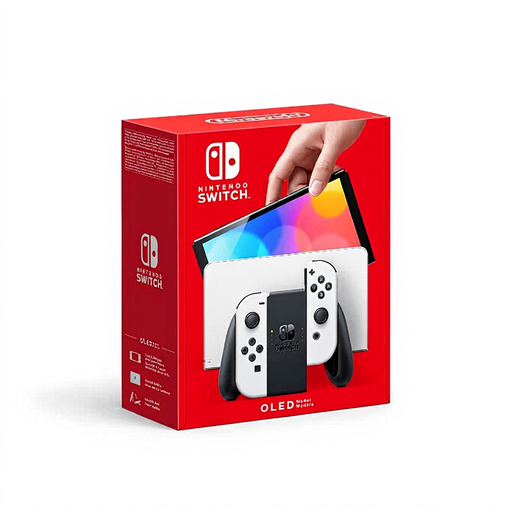
Nintendo Switch OLED White
An option if you want to play Nintendo Switch Sports on a TV using motion controls; Nintendo says the OLED model is suitable for TV mode.
The OLED screen is the console’s built-in screen and doesn’t change the features of your TV. Check which controllers you’ll need for your chosen sport.
Joybuy
 No image available
Nintendo Switch 2 Console (EU)
An option for playing Nintendo Switch Sports on a TV and for compatible Switch games; Nintendo says the Switch 2 is suitable for playing this game in TV mode.
Joy-Con 2 doesn’t work with the leg strap in Nintendo Switch Sports, and controller requirements vary by sport. According to Nintendo, 4K output is only available with supported games and a compatible display.
Joybuy
Frequently asked questions
Can I play Nintendo Switch Sports in handheld mode?
No. Nintendo says Nintendo Switch Sports doesn’t support handheld mode and recommends TV mode on a Switch, Switch OLED or Switch 2. Check the controller requirements for each sport too: a Pro Controller doesn’t work with this game, and Joy-Con 2 isn’t compatible with the leg strap.
How do I connect a Switch to play sports games on my TV?
Use the appropriate dock and connect it to your TV. Detach the Joy-Con controllers and use the wrist straps as instructed by Nintendo. The Switch Lite doesn’t support TV mode.
Do I need an online subscription to play sports games at home?
It depends on the game and play mode. Nintendo says an active Nintendo Switch Online membership is required to play Nintendo Switch Sports online; playing together on the same system is a separate option. The Dutch PlayStation Store lists EA SPORTS FC 27 as supporting 1–4 local players and says PS Plus is required for online play.
What protection do I have in the Netherlands if a console or game doesn’t work properly?
According to ACM ConsuWijzer, you’re covered by the statutory guarantee if a product doesn’t do what you could reasonably expect it to when used normally; the seller must then provide an appropriate solution at no cost. ACM ConsuWijzer says this guarantee also applies to digital game files and services. Online purchases generally come with a 14-day cooling-off period, with some exceptions, including certain unsealed games.
What should I consider if children are playing too?
Check the PEGI age rating for the specific game. PEGI describes this as a guide to the suitability of the content and also highlights parental controls for things such as purchases and online contact. The rating doesn’t mean every sports game is suitable for every child.


