Start with the party games and modes you actually want to play. Check whether they support local play on one screen and which controllers or phones you’ll need. A Switch is a good fit for playing Nintendo games on your TV, and compatible models also offer handheld and tabletop play. A PS5 or Xbox is an alternative if your preferred local games are available on those platforms. Then decide whether you want physical or digital games, and check the player limit and display information for each game.
Who is this choice relevant to?
Groups playing together on the sofa
You’ll want to know in advance how many people can join the same game mode and what controls each person needs. The number of controllers connected doesn’t automatically tell you how many players a particular game supports.
Buyers with a party game in mind
Your choice depends on the game, the platform and sometimes the edition. For example, Nintendo distinguishes between Super Mario Party Jamboree for Switch and the Switch 2 Edition, which includes the Jamboree TV modes.
Buyers who also want to play away from the TV
You want to play party games on a big screen, but sometimes use the console in handheld or tabletop mode too. Check which play modes the exact model supports; not every Switch model supports TV mode.
What should you look for in a party console?
| What to consider |
What should you check? |
Who should pay particular attention? |
| Local multiplayer |
Check the number of local players for each game and mode, and whether you need controllers or phones to play. |
If I want to play on one screen with the whole group, I need to know whether everyone can join the same game mode. Around 33% of consumers prioritise getting the whole group involved. |
| Game and edition |
Look up the exact game title, console version, game language and local game mode. |
If I already have a particular party game in mind, I want to make sure the right version and game mode are available on the console. Around 27% of consumers prioritise their preferred game or edition. |
| TV display and flexible use |
Check whether the model can connect to your screen, and look up the game’s own display information. |
If I also want to use the console away from the TV, I weigh up TV play against handheld or tabletop use. Around 20% of consumers prioritise screen use and flexibility. |
| Game format and requirements |
Check whether the model supports discs and which controllers or accessories your chosen games require. |
If I want to use existing game discs or need extra controls, I want to factor that in before buying. Around 20% of consumers focus mainly on game format and the extra items they’ll need to buy. |
Things to watch out for when buying
-
Assuming the console’s maximum output is the resolution of every game
Nintendo states that Switch 2 supports output of up to 4K through the dock, while the TV mode for Super Mario Party Jamboree – Nintendo Switch 2 Edition is listed at 1440p.
Check the display information for the specific game before using a resolution figure to compare consoles.
-
Assuming a digital-only console can play your existing game discs
The Xbox Series S model reviewed and the PS5 Digital Edition don’t have a disc drive.
Check which games you already own, and choose a model with a disc drive if you want to use compatible discs.
-
Counting only the console, not the controls or game edition
Some local PS5 games may require an extra DualSense controller. Certain Jamboree TV features require the Switch 2 Edition and a compatible USB-C camera, sold separately.
Check how many players can join each game mode, and which controllers or accessories are needed.
-
Mistaking the OLED screen for an improvement to the TV picture
The OLED screen is the console’s built-in display; the HDMI port is on the dock.
Choose an OLED model for features that matter to you in handheld or tabletop mode too, not just because of its name when playing on a TV.
Brands to consider
Nintendo
A good fit if TV play, portable use and Nintendo party games all matter to you.
- Nintendo lists TV mode for the standard Switch and OLED model; Switch 2 supports TV output of up to 4K through the dock.
- The Jamboree TV modes are part of the Switch 2 Edition. Switch Lite doesn’t support TV mode. These are details from Nintendo about the models and games, not the results of an independent performance test.
PlayStation
An option if your preferred local multiplayer games are available on PS5; also decide whether you need a disc drive.
- PlayStation describes local multiplayer games for PS5 and notes that an extra DualSense controller may be useful.
- According to PlayStation, the PS5 Digital Edition doesn’t have a disc drive. Check the player limit and required controls for each game.
Xbox
The Series S and Series X are worth considering if your preferred local games are available on Xbox.
- According to Xbox, the Series S model compared here has 512 GB of storage, is fully digital and lists 1440p as its gaming resolution. The Series X model compared here has 1 TB of storage, a disc drive and lists 4K.
- These details apply to the models mentioned and don’t indicate the picture quality of any particular party game.
Console options at Joybuy
These console options are suited to party games on TV and to situations where local multiplayer or playing away from the TV matters.
 No image available
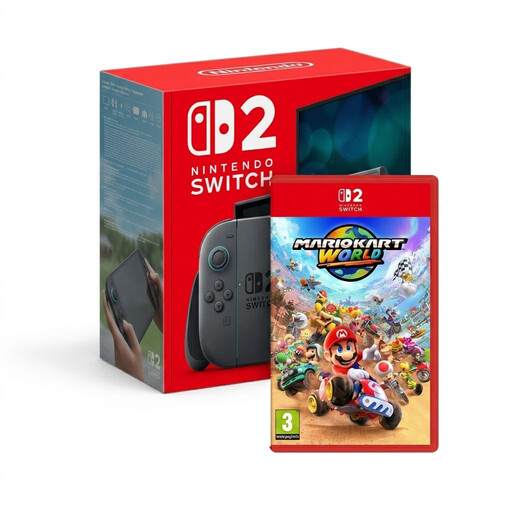
Nintendo Switch 2 + Mario Kart World
An option if you want to play Mario Kart World on a big screen and enjoy local multiplayer too.
The bundle includes a Nintendo Switch 2 console and Mario Kart World.
View at Joybuy
 No image available
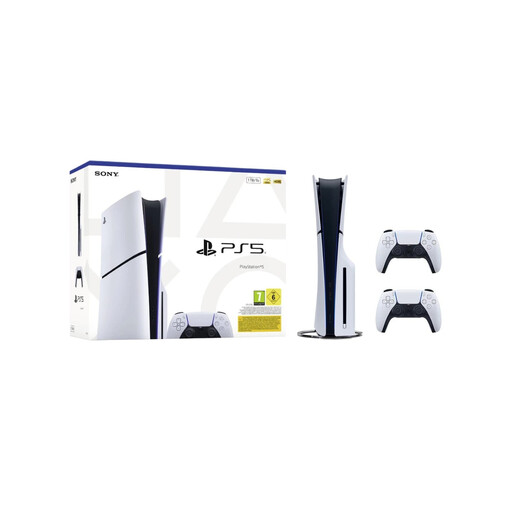
Sony PlayStation 5 Slim Disc Edition 1 TB bundle with 2 white DualSense controllers, EU version
A good fit if you want to play local PS5 games and having two controllers included in the bundle matters to you.
The product name lists a disc drive, 1 TB of storage and two white DualSense controllers.
View at Joybuy
 No image available
Nintendo Switch Game Console Bundle 32GB with Mario Kart 8 Deluxe game card
An option if you want to play the Switch game mentioned on a TV; check that the game mode suits the number of players.
The bundle name lists 32GB and Mario Kart 8 Deluxe on a physical game card.
View at Joybuy
 No image available
Sony PlayStation 5 Slim 825GB Digital Edition
A good fit if you want to play PS5 games digitally and your preferred local multiplayer games are available on PS5.
According to the product information, this Digital Edition doesn’t have a disc drive. The product name lists 825GB.
View at Joybuy
 No image available
Nintendo Switch OLED Neon-Red/Blue
An option if you want to use the console in handheld or tabletop mode as well as playing on a TV.
The product description lists TV, handheld and tabletop modes, and a dock with a LAN port.
View at Joybuy
Frequently asked questions
Is a Nintendo Switch Lite suitable for party games on TV?
No. Nintendo states that the Switch Lite doesn’t support TV mode. The standard Switch and OLED model can connect to a TV through their dock.
Does everyone need an extra controller to play a party game?
It depends on the game and mode. PlayStation recommends an extra DualSense controller for local PS5 multiplayer. For The Jackbox Party Pack 7, the PlayStation Store lists phones, tablets or computers as ways to play without extra controllers. This doesn’t automatically apply to other games.
How do I connect a Switch or Switch OLED to my TV?
Use the dock and power supply, then connect the dock’s HDMI output to an HDMI input on your TV. Select the correct HDMI input on your TV and follow Nintendo’s instructions for the exact model.
Can a digital console play my game discs?
No, a model without a disc drive can’t play game discs. The Xbox Series S and PS5 Digital Edition reviewed here don’t have disc drives; choose a model with one if you want to use compatible physical games.
What should I do if a console I bought in the Netherlands is faulty?
If a product is faulty, contact the seller to resolve the issue. The Dutch government states that the legal guarantee doesn’t have a fixed term of exactly two years; normal wear and tear or damage caused by you won’t necessarily qualify for a free repair.


