
Quest-focused player
You already have a particular world or series in mind, so you first choose the platform that plays the game edition you want.


Start with the open-world quest you want to play: Horizon Forbidden West is available on PS5, while The Legend of Zelda: Tears of the Kingdom has its own edition for Nintendo Switch 2. Then choose based on your screen setup, whether you want to use discs, and how you feel about storage and any subscription costs.
You already have a particular world or series in mind, so you first choose the platform that plays the game edition you want.
You mostly play on a monitor you already own and want to know whether your screen, console edition and preferred game features are compatible.
You want to continue a quest at your desk sometimes and away from an external screen at other times, so screen and game compatibility matter.
A good fit if: you want to play the PlayStation games you’ve chosen and use compatible discs.
Bear in mind: Sony lists 1 TB of storage and a disc drive for the PS5 edition described here; check the exact game edition and your screen.
A good fit if: you buy games digitally, or want to make the most of a Pro enhancement in a game you play.
Bear in mind: Sony’s Pro visual enhancements depend on supported games and a suitable screen; the Digital Edition described here has 825 GB of storage.
A good fit if: your chosen quests are available on Xbox; the Series X edition with a disc drive suits you if you use physical Xbox games.
Bear in mind: Microsoft describes the Series S as disc-free. The Game Pass catalogue changes, so check the title you want and the subscription terms.
A good fit if: a Nintendo quest, such as the Switch 2 edition of Zelda: Tears of the Kingdom, is your priority, or you want to switch between play modes.
Bear in mind: Nintendo lists 256 GB of internal storage and compatible microSD Express cards for expansion; not all older Switch games are fully compatible.
| Buying consideration | What should you check? | Which consumers does this matter more to? |
|---|---|---|
| Quests you want to play | Check the platform and exact game edition, including any expansions you want. | If I already know which quest I want to play, I first check that the specific edition is available. Around 33% of consumers put their preferred quests first. |
| Compatibility with your screen | Check your monitor’s inputs and the display modes supported by your monitor and game. | If I play on the desk screen I already own, I want to know whether it supports the display mode I want. Around 27% of consumers prioritise compatibility with their own screen. |
| Discs, storage and ongoing costs | Check whether the console has a disc drive, which type of storage it supports and what subscription terms apply. | If I want to use my physical games collection or weigh up the costs of downloads, storage and services, I look at the exact edition. Around 20% of consumers put purchase format and ongoing costs first. |
| Changing where you play | Check the play modes and compatibility of the games you want to take with you. | If I don’t want to be tied to a monitor, I look for the option to keep playing without an external screen. Around 20% of consumers prioritise being able to change where they play. |
A disc-free edition can’t play physical games; PlayStation and Microsoft both offer disc-free models.
Check the full model name and compare it with the games you already own. You may need a compatible digital edition of the game for a disc-free console.
Nintendo warns that some older Switch games are not compatible, or may not be fully compatible. A Switch 2 edition may also include extra features that don’t work on a standard Switch.
Check compatibility for the games you already own, and make sure you choose the exact edition of the quest you want.
The right type of storage varies by console and affects how you can use your games.
Check the requirements for your exact model before buying extra storage; Nintendo specifies compatible microSD Express cards for Switch 2.
A relevant choice if you’ve picked a particular PlayStation quest and want to compare editions with and without a disc drive.
Series X and Series S offer different options for discs, storage and digital services in a fixed-screen setup.
Switch 2 is worth considering if you want to play a Nintendo quest and choose between playing with or without an external screen.
Below are Joybuy picks to suit console and handheld gaming for desk-based open-world quests.
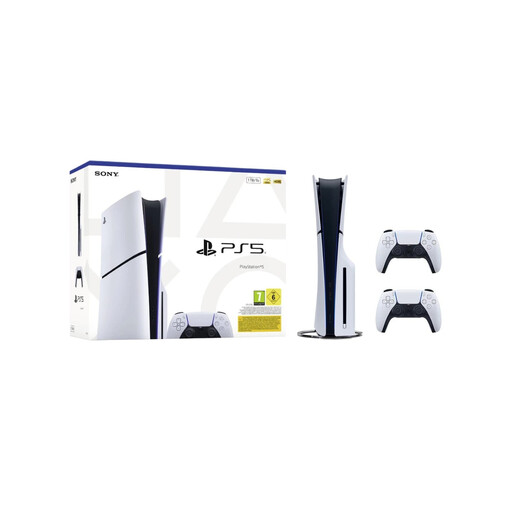 No image available
A good fit if you want to play a PS5 quest and are looking for an edition with a disc drive.
Disc Edition; 1 TB; bundle with 2 white DualSense Wireless Controllers.
 No image available
The handheld design suits anyone who doesn’t want to play exclusively at a fixed desk monitor.
 No image available
A good fit if you want to play a Switch 2 quest; Nintendo lists a dedicated Switch 2 edition of The Legend of Zelda: Tears of the Kingdom.
The product name specifies a replaceable battery and the 2026 variant.
 No image available
A good fit if you’re looking for a Switch 2 console bundled with a digital game and a stated subscription period.
256 GB; Mario Kart World download; 3 months of Nintendo Switch Online.
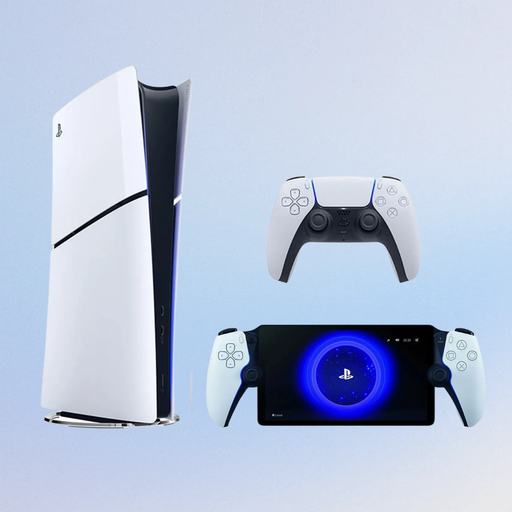 No image available
A good fit if you’re looking for a digital PS5 edition; Sony lists Horizon Forbidden West as available on PS5.
825 GB; Digital Edition without a disc drive; bundle with PlayStation Portal Remote Player.
No, not when choosing a console in general: start by comparing the games you want to play. For a specific 4K mode, check the requirements for both the game and the screen; Nintendo lists requirements for both when using Switch 2 in TV mode.
Nintendo specifies a dock, power supply and HDMI cable for TV mode; the system also has a built-in screen and tabletop mode. Check that your external screen and connection support the display mode you want.
It depends on the model: Sony specifies a compatible M.2 SSD for PS5 games, Microsoft an expansion card for Xbox Series X|S, and Nintendo compatible microSD Express cards for Switch 2. Check the type specified for your exact console before buying.
Not necessarily. Sony lists offline play for Horizon Forbidden West and specifies a paid PlayStation Plus subscription for online multiplayer. Microsoft’s Game Pass catalogue changes, so check what type of access you need for a particular Xbox game.
According to the Dutch government, there is no fixed statutory warranty period in the Netherlands: what you can reasonably expect from a product is what matters. EU consumer information states that goods bought online generally come with a 14-day right to cancel from the date of delivery; exceptions apply to digital content. Check which terms apply to the console and any game download.